Click here to show all 3 Set Items
This download has Requirements!Description
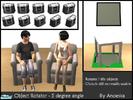
These object rotators will allow you to place objects with steps of 5 degree. Rotated objects are still normally usable! Place the object on the object rotator and use M to rotate. Keep M pressed down for quick rotating. Only works for 1-tile objects. 3 Versions: for large floorobjects, small floorobjects and objects that can be placed on endtables. Stacking-enabled: you can still place objects on rotated tables and even rotate through slots.
Creator Notes
Needs OFB or later. It will show up pre-OFB, but doesn't work. Diningtables and some coffeetables can't be rotated (they are programmed as 2-tile objects). You can find these objects in General/Miscellaneous. Invisible recolors included in the packages..
This Mesh has Recolors on TSR:
Click here to show all recolors available on TSR
Report this Download:
If you find a problem with this download or wish to report inappropriate/copyrighted material, click here


Add a Comment
Note: Please report any offensive comments so we can remove them. Use of bad language, unsuitable links or flaming will result in deletion of your account - regardless of your membership status.
68 Comment(s) posted so far
On Dec 9, 2008 maxi king wrote:
On Dec 9, 2008 JakkieSim wrote:
This is so great! Thank you for awesome working ideas
On Dec 9, 2008 musicalcompanion wrote:
WOW, this is a very useful thing! Thank you so much, I bet I'm gonna use this all the time!
On Dec 9, 2008 ulker wrote:
This is just amazing, such a great idea
Thank you!
On Dec 9, 2008 openhousejack wrote:
thanks, it's great.
On Dec 9, 2008 Mimi52861 wrote:
What a clever & very useful idea!
I know I will get much use of these in my game. Thank you very much for sharing!
On Dec 9, 2008 JCIssette wrote:
Thanks so much.
I can't wait to try this. I hate doing that cheat thing.
On Dec 9, 2008 *n-a-n-u* wrote:
Wow Anoeska ---I am so impressed by that...how do you made that?...never thought something like that would be possible...I love this idea...Great job!...I am still a bit speechless and do not know what to say...^^
On Dec 9, 2008 squeakers wrote:
On Dec 9, 2008 Eletro_DJ wrote:
So great!
Are trying to do that to rotate "large objects"?
On Dec 9, 2008 MoonlitMaiden wrote:
I never heard of such a thing! This is going to be FUN to play around with. What an inventive notion -- you are amazing!
Gina
On Dec 9, 2008 elkeda wrote:
Ingeniously. Thank you
On Dec 9, 2008 LD202 wrote:
great idea thank you
On Dec 9, 2008 rhondashidee wrote:
I know you don't know me but, darn it, I love ya!
This is a stroke of genius. Just yesterday (and this is no joke) I was complaining to my husband about only being able to rotate 45 degrees. I said, "Who has their furniture either perfectly straight or at a 45 degree angle? No one! That's who!!"
Thanks for all of your awesome stuff (I especially love the more functional sets). This is really going to add to my game!
Thanks so much!
On Dec 9, 2008 Pinecat wrote:
You're a genius, m'lady! Can't wait to try these for a couple of things that normally don't rotate correctly!
On Dec 9, 2008 Raven98590 wrote:
I am so excited about this, so many times I have wanted to be able to move furniture and objects in my game into a more life-like manner and have been constricted by the games placement system.
I know I am going to have fun with this, I'll probably be playing around with this DL for awhile instead of playing the game(lol).
Thank you so much for thinking of this and making it happen, also for sharing this with us.
On Dec 9, 2008 Nannie wrote:
Thank you for this great idea!
On Dec 9, 2008 BrooksHalten wrote:
Amazing! I will use this to excess. Now, all someone needs to do is make a multi-tiled version....
On Dec 9, 2008 matomibotaki wrote:
On Dec 9, 2008 Saoz wrote:
This is going to be *so* useful! I could have used this yesterday while doing the photoshoot for my latest story update. I needed to rotate one of the characters slightly, but 45 degrees was too much.
On Dec 9, 2008 deagh wrote:
I'll just echo one of the above poster - who puts their furniture on perfect 45-degree angle? No one! and now my sims don't have to, either.
And OMG I can use this to rotate SIMS! I also could have used this in a photoshoot yesterday, but you can bet I'll be using it in the future!
I think I officially love you!
On Dec 9, 2008 lirunchik wrote:
Anoeska, I'm so amazed by your talent and your excellent skills so I'm speachless right now!!! You're really a kind of a genius here and it's so great you've made such a useful thing for all of us!!! Thank you so much, you're the Master!!!
~Marina
On Dec 9, 2008 Lorry wrote:
This is brilliant
Thankyou very much
On Dec 9, 2008 spicylove wrote:
On Dec 10, 2008 kdb wrote:
Wow! Just what I have wanted for a long time, I can't wait to try it out. Thank you, Anoeska!!!!
On Dec 10, 2008 luckylove72 wrote:
On Dec 10, 2008 MoMama wrote:
Just when I think you can't come up with anything to top the last great thing, you do it anyway!
On Dec 10, 2008 Anida wrote:
Fabulous idea!! Thank you so much!
On Dec 10, 2008 lpvinyl21 wrote:
I am not sure if I am doing something wrong but this does not work for me using the M key
On Dec 10, 2008 JakkieSim wrote:
I am having the same issue, it doesn't seem to work for me using the m key either
On Dec 11, 2008 AnoeskaB wrote:
Please keep in mind that you need to have OFB or later, and that it only works for 1-tile objects (diningtables and some of the coffeetables excluded). You also need to press M before you actually place the object on the object rotator, so you actually hover the object above it, press M untill you reach the desired angle and then really place the object.
Let me know if you still have problems, I'll try to help in that case.
On Dec 11, 2008 AnoeskaB wrote:
As for placing rotated objects on top of an endtable: If you used an objectrotator to rotate the table also, then you can place the red objectrotator on the table, and place an object on top of that to rotate it. If the endtable is not rotated, then you need to place the red objectrotator on the floor, place/rotate an object on it, and then place the red objectrotator on the (end)table. The reason for that, is that the lowest object (the one standing on the floor) needs to be stacking-enabled. The object rotators are stacking enabled, but the (end)tables are not. That's why there's a little difference in placing the items.
I hope this is not to much confusing. If it is, then I'm sorry
Just play a bit with it, and you'll find out how it works. Have fun with it!
On Dec 11, 2008 BBKZ wrote:
Gorgeous idea! Now sims' life will be more varied
You did wonderful set. Thank you
On Dec 11, 2008 JakkieSim wrote:
Ah, I thought it was something silly on my side....It is working perfect and looks great in-game.
On Dec 11, 2008 lichtje wrote:
AnoeskaB, you found a brilliant solution for this everlasting angle problem. Thank you so much for this... played with them yesterday and what you can achieve with them is really astonishing! Great, fantastic, extraordinary - thank you!
On Dec 11, 2008 hiedibear75 wrote:
I've OFTEN wished "gosh I wish I could just turn it a LITTLE BIT"! THANK YOU!!! It's a decorator's dream come true!
On Dec 12, 2008 Dreamsims wrote:
wow
I was looking for a long time afterwards sims objects to rotate a lot of thanks sorry for my bad english
On Dec 13, 2008 NataliS wrote:
On Dec 20, 2008 Medora wrote:
Awesome,,,,amazing...did I mention awesome????
Thank you, I have had the most fun using this!
Merry Xmas
On Dec 21, 2008 Pinecat wrote:
It's official - I can't live without these!
Wonderful Wonderful Wonderful!!!
On Dec 31, 2008 jjab73 wrote:
This is Very cool! Thank you.
On Jan 2, 2009 cadiva wrote:
Fabulous, just absolutely fabulous, thank you so much for this!
On Jan 3, 2009 MissMokie wrote:
Oh gosh, thank you! Just last night I was wishing I could position something other than the 45' because of how it fit with something else there.
On Jan 23, 2009 mamooshka wrote:
These have bought such a wonderfull new dimension to the game thanks so much.
On Feb 9, 2009 shiv. wrote:
Wow, that's awesome idea!
On Mar 28, 2009 Simpetuous1 wrote:
I read about this little goodie in the forums so I just had to have it. Incredible idea. How do you come up with these ideas? Thank you!! :)
On Apr 22, 2009 pfaff wrote:
What a fantastic idea. You are amazing!!!
On Apr 30, 2009 DT456 wrote:
WoW
On May 20, 2009 cvscorpio28 wrote:
thanks this is a great idea
On May 24, 2009 wocu2 wrote:
Thanks, this is great.
On May 24, 2009 Dani0524 wrote:
Thank you. This looks great.
On May 26, 2009 oscaredh wrote:
'SHARING?! WTF this cheap dude put this mod only for subscribers. It not fuckong sharing, you have to fucking pay to get it.
On Jul 24, 2009 silverleaf56 wrote:
Thank you so much for this creation. I searched a long time looking for a cheat to place furnishings at an angle and couldn't find one. This will be perfect. Thanks again.
On Aug 19, 2009 carolinebaby wrote:
Thank AnoeskaB I love te object rotator !!!
On Sep 12, 2009 Reh.aes wrote:
On Oct 4, 2009 klemen krevs wrote:
Hvala. Thank you
On Dec 13, 2009 Natti wrote:
I'm totally in love with it! What's a pity it's subscriber...
On Jan 13, 2010 lily c94 wrote:
Thnkz soo much!!! Yhoo really gd at creating thiss stuf!!! Thnkz soo much for sharingg!!!! =D
On Jul 17, 2010 energeticmouse wrote:
subscribe? no! everyone who needs this should be able to get it for free! it's essensial! (sorry for crappy spelling)
On Aug 18, 2010 misja056 wrote:
Thanks so much. I'm sure that this packet would help for me
On Nov 24, 2010 Yoedda wrote:
Very nice thanks
On Dec 7, 2010 oldmember_membears wrote:
This has to one of the most useful items I have ever added to my game. Thanks so much.
On Apr 4, 2011 MoonAngel wrote:
On Apr 22, 2011 oldmember_membears wrote:
This item is great. I use it all the time. Thanks
On Dec 31, 2011 Rowansims wrote:
OMFG <3
On Jan 29, 2012 ShineSims wrote:
This is soo amazing!! Thank you! I really missed that. How did you do that?
I would absolutely die of excitement if this were a global mode. Only you know if that would be possible. Is it?
On Feb 2, 2012 floydthatcrazylass wrote:
I LOVE YOU!! Thank you so much