
 Sign In
 Support


This item has 0 required items.
Please make sure to go back to the
required items tab on this detail page to download
all required items.
Download All with One Click
VIP Members can download this item and all
required items in just One
Click. Start your VIP membership for as low as
$3/Month.


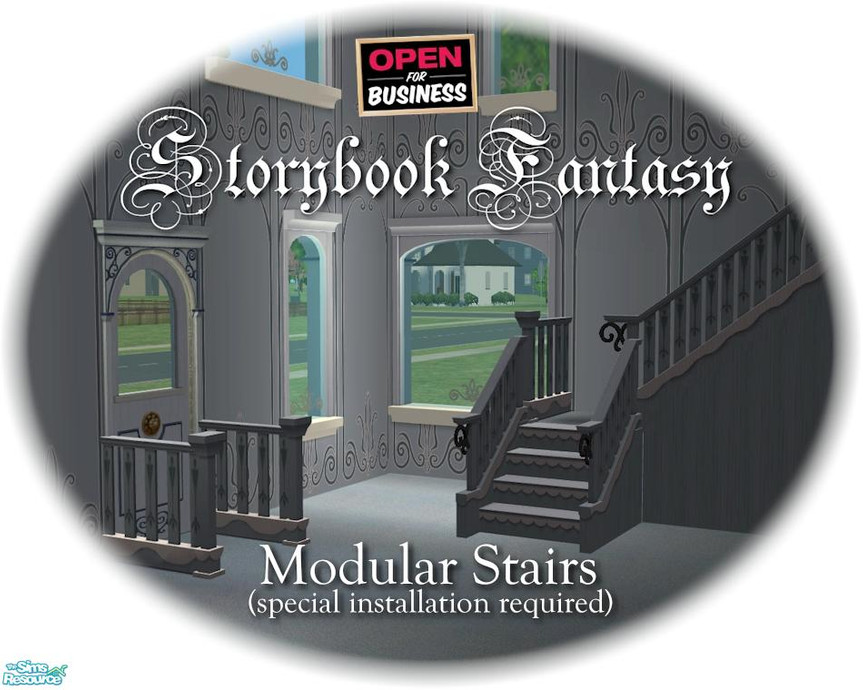
Created for: The Sims 2
This Creation belongs to a Set - Click here to show the whole Set
This Creation has Requirements - Click here to show them
REQUIRES OPEN FOR BUSINESS! Modular stairs require special installation. Please see INSTALLATION INSTRUCTIONS (see link).
Short URL: https://www.thesimsresource.com/downloads/273253
ItemID: 273253
- TSRAA: Yes - What's this?
This Creation requires what's listed below in order to work properly.
Required Expansion/Stuff Packs:
- Open For Business
Installation Instructions:
<font face="Arial" style="font-size:10pt"><strong>TO INSTALL THE <font color="#FF0000">FANTASY</font> MODULAR STAIRS...</strong>
<strong>(1) Place the stairs file in your 'Downloads' folder </strong>as usual.
<strong>(2) Find where you originally installed The Sims 2 game </strong>(not the expansion packs) and look for the folder <strong>TSDataResCatalogScripts</strong> (<a href="http://forums.thesimsresource.com/attachment.php?attachmentid=126944" target="_blank">see picture</a>). It is usually in THIS location:
<font color="#008080"><strong> C:Program FilesEA GAMESThe Sims 2TSDataResCatalogScripts</strong></font>
<strong>(3) Take a BACKUP COPY of the 'modularstairs.txt' file</strong> and keep it somewhere safe in case you make any mistakes.
<strong>(4) Now open the file 'modularStairs.txt'</strong> and find an empty space at the bottom of the page. <u>DO NOT</u> change or erase any text already on this page!
<strong>(5) Copy and paste the block of text below</strong> into an EMPTY SPACE at the <u>bottom</u> of the file <a href="http://forums.thesimsresource.com/attachment.php?attachmentid=126945" target="_blank">(see picture)</a>:
<font face="Courier" style="font-size:10pt">
# cyclonesue_stairs_Fantasy_Blue
modularStairs 577
objectID landing 0x00189480
objectID placeholder 0x0018947F
objectID step 0x00189481
objectID topStep 0x0018947E
objectID bottomStep 0x0018947C
catalogTextIndex 13
</font>
<strong>(6) Save and close</strong> the text file.
______________________________________
And that's it! The fantasy stairs should now show in your stairs catalog. More details about installing modular stairs can be found here at <a href="http://forums.thesimsresource.com/showthread.php?t=303192" target="_blank">this forum</a>. Have fun!</font>
CEP Required!














 Limited Time Offer
 For a limited time only, we’re giving away a free


