

 Sign In


TS2: Pets Preview
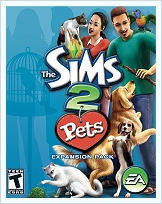 On Friday 21st July 2006, I was invited along to Electronic Arts in Redwood Shores for a Community Event to have a preview of the upcoming Sims 2 Expansion pack, 'Pets'. The development team started off by showing us Pets in action, highlighting some of the main features of the pack. After that we were given some play time to get hands on with Pets, during which time I tried to gather as much information as I could to pass on to our active community, eagerly awaiting the release of this latest addition to our favourite game!
Hopefully it will bring some snippets of new (or confirmed) info to help you decide whether The Sims 2: Pets will be on your shopping list this Fall/Autumn. The shipping dates by the way, will be October 17th for pretty much everywhere except Europe. We have to wait (as usual) until October 20th. Booo!
Please note that the version of the game we were playing was 'Pre Alpha', meaning that final decisions have not yet been made regarding gameplay and content. Features which I talk about here may not make the cut into the final release of the game. Likewise, other changes might make this info contradict the final shipped version of the game. Unfortunately, the screenshots had to be taken with a digital camera rather than "Print Screens", so the quality is a little lacking.
NB. This article ended up being almost 4,200 words! It's all too easy to get carried away when writing about something you really enjoy ;-)
The Fourth Expansion Pack
 Many people cannot help but ask about comparisons between Sims 2: Pets and Sims 1: Unleashed. A fair point, as on face value, they pretty much add the same content to both games. As Tim LeTourneau once said of Nightlife, "If we don't cover basic stuff from TS1 expansion packs then we won't represent real life".
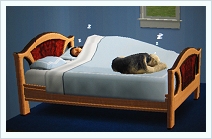
Well, yes, Pets adds animals to our game, but it does it in a far more advanced way than Unleashed did. After all, Sims 2 is way more advanced and has the power not only to make the animals look more cute and cuddly, but to make them more dynamic. In Pets, you do not have any direct control over the animals, you control them through commands given by your Sims (a true representation of life), but they do play a much bigger part in the game than they did in Sims 1. Far more interactions make the dogs and cats in particular, feel like they really are a part of the family (just look at these two sharing a bed). They have big characters and a mind of their own, which although can be tamed, often result is anything from destruction to WooHoo!
So what's new?
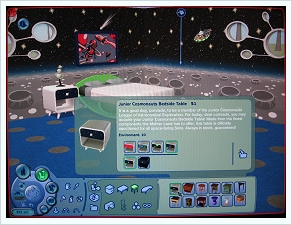 Before we go into the detailed features, here's a rundown of the latest and greatest additions to the game... Unlike other EP's which add whole new areas of gameplay to The Sims 2, Pets concentrates on the animals. That's not to say there are no new challenges in the game because there are. Raising a family is one thing, but trying to do it with cats, dogs, birds and the odd pest in your face makes it all the more demanding! However, don't expect to see new body meshes, a new "downtown" area or indeed, any new clothing. There are some new decorative items including furniture, walls and floors, such as this Space Theme shown in the picture. Some new build mode tools are included, but we will cover those in detail later. Unlockable content makes its debut to the game too. More on that later. Oh, and a new radio station providing music on a 'Country' theme.
In Unleashed (the Pets pack for Sims 1) we saw the introduction of gardening and produce sales. Nothing like that here, as we already have Businesses, and I have a sneaky suspicion that gardening and harvesting could have a place in a future pack, so don't expect any of that in Pets. So, it's all about the animals!
Canines and Felines
 Dogs and Cats bring the vast majority of the content to Pets. They are fully interactive and bring a large amount of humour with them (as in real life). You could leave your four legged friend to manage their own life if you wish, as long as you look after them by filling the food bowls and providing some light entertainment, you shouldn't go far wrong.
But the real idea is to nurture your animals: Play with them, train them, make them feel part of the family! If you don't, you could find yourself trying to manage an unruly hound or tom cat!
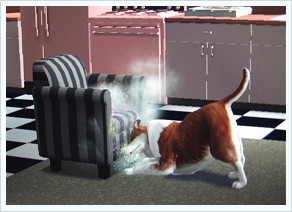
As with real animals, there is a natural instinct to destroy your prized possessions. An unchecked mutt will think nothing of clawing and chewing at your furniture until all that is left is a pile of ugly rubbish, fit for the bin. This is where the 'scold' interactions and training really come to play. In this picture a chair is getting a hammering from a Lassie wannabe that needs a finger waving in its face!
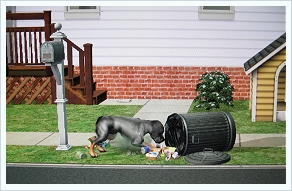 Trash cans are also attractive to dogs, who just love to tip them over and roll in the trash. Of course, once trained, dogs loose the desire to carry on with such behaviour, so you are almost certainly going to want to spend some time with your new Pet to get him to a standard of behaviour which suits your Sim family.
Of course, some of this unruly behaviour needs not to be discouraged, just given new direction! Dogs can be trained to bark at the mail and newspaper delivery staff.
Fights are inevitable among the animal world. Dog on dog, cat on cat, and of course the always fun to watch, cat and dog fight. In this scrap which took place next to the trash, the cat won after much fur flying, hissing and spitting.
When the dust cleared a rather sheepish looking dog got up and crept away, while the cat washed itself looking totally satisfied!
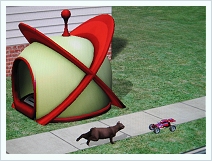 Animals, like Sims, have wants and needs, memories, learned behaviours and even special interests which include: Playtime, Scary Things, Weather, Food, Toys, Outside and Sleeping.
They will also interact with items on the Lot, such as the Remote Control toy, which can be seen here being pursued by a playful cat. Later in my game it was tearing away from an angry pack of 5 dogs! It got away ;-)
Get a job (Sha na na na, sha na na na na)
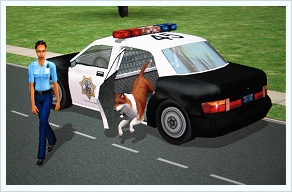
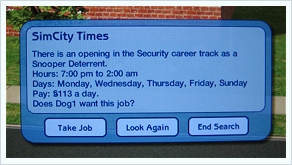 A pleasant surprise from the game, came when we learned that animals can actually go out to work! Yep, a pool car turns up and takes your mutt away to work. It's a shame we cant do that in real life! Career tracks are Security, Showbiz and Service and include jobs like Acting Extra, Vermin Chaser and Snooper Deterrant. Jobs can be found in newspapers and can be viewed on the same popup as job offers for Sims, as seen in this picture. Days and hours of work, and of course salary, reflect the job level (up to level 5 in each career track) just as they do for Sims, and require training to improve them.
As well as Sims being able to train their pets through interactions, there is also an option to use the phone to hire an Obedience Trainer. This a more expensive option but gets faster results. We don't yet know the value of a highly trained, top level dog, but the developers did point out that it's quite possible to raise a few well trained 'dogs with jobs' and have the Sim family live off the animals careers!
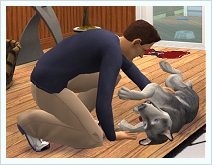 Pets can also be taught fun tricks and games. One of the funniest interactions I saw was a Sim trying to teach a dog the 'play dead' interaction. The Sim starts out putting his hands around his throat, staggering around choking before collapsing to the ground and laying still. The dog's first reaction is to sniff the Sim, looking genuinely concerned that they might be dead, only to jump back and wag its tail when the Sims stands up. The dog's turn now, as it stands up on its back legs and mimics the Sim in pretending to die. This is the funniest thing, as the dog way over acts the roll and staggers around like a drunk before hitting the floor, opening one eye to see if people are still watching. Hilarious!
Of course, animals have a vicious streak too. We saw a Sim have his 'Hug' interaction rejected by a cat. To add insult to injury, the cat leapt up on the sofa and curled up to sleep in the spot the Sim just stood up from!
What is feathered, wet and furry?
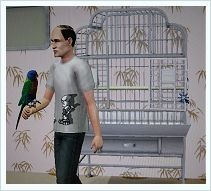 Well, pretty much all the other Pets in the game actually, though not all at once! Other than cats and dogs, Sim families can also be blessed with Birds (parrots), Fish (a new saltwater aquarium) and Womrats ("Is Hamster Mr Faulty"). Actually, a Womrat is a Sim Guinea Pig, and you will be pleased to know that unlike Unleashed, Sims 2 Guinea Pigs have been vaccinated against the virus that saw off so many pixelated families of old.
For these animals, a cage or tank must first be purchased in Buy Mode. You then have the option to "restock" which of course costs more money (Womrats are currently §45, while Parrots cost §75). Womrats can be removed from their cages and played with, and also need to be fed and cleaned regularly.
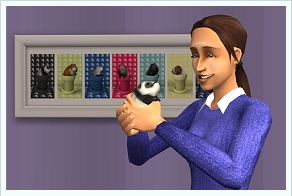 Parrots live in a huge cage and can also be taken out by a Sim. In the version of the game we played, the Parrot sat on a Sims arm, but the developers are working to try and have them sit on shoulders, Pirate style. We'll wait and see on that one! Parrots can also be taught to talk, as you can imagine, with hilarious results.
I made the mistake of leaving my Parrot's cage door open when my Sim wandered off. The Parrot escaped and flew around the Lot for a while before eventually flying back to his cage .
The only other animal Sims are likely to come in contact with are Skunks. Needless to say this can be a pretty nasty experience if they get to close to a surly Skunk that chooses to spray the Sim with a head shot! Keep an eye out for that one.
Daddy, where do babies come from?
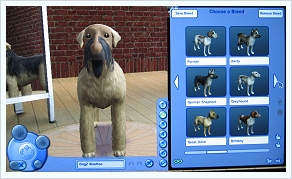 We already know that caged animals appear on demand. You should also know that they have no breeding capabilities, but how about Cats and Dogs? Well, there are actually four ways to acquire them in game. Lets look at each option:
Create A Family.
The impressive 'Create-A-Pet' uses the same technique as 'Create-A-Sim' and is every bit as powerful. The game will ship with many predefined breeds (around 30 dogs and 20 cats) but each of these can be modified at will. Of course, some pretty hideous alternatives can be made with the dozens of sliders and adjustments that can be made: short or long snout, pointy or floppy ears, long or short legs etc. In fact, you start out with some basic principles of animal size and shape.
Dogs and Cats can be created as either Adult or Elder (with baby, these are the only 3 stages of the dog and cat lifecycle). Babies cannot be made in Create-A-Pet. For Dogs you get to choose Large or Small breeds, as you could have anything from the Daschund to the German Shepherd, but Cats are strictly 'one size fits all' (although with the size and shape sliders you can make anything from an agile sprinter to an obese lap cat).
Clothing for animals for the PC Expansion (Sims 2:Pets Consoles are covered later) are restricted to the color and style of a collar, but the coat color and markings are something else! Like Ogres, our Cats and Dogs have 'layers'. We found while playing the game that the layers functionality was a little tricky to handle, but the developers took this on board and will look at improving this feature, but handling aside, these layers are a very powerful tool to enable us to create really unique and interesting looking Pets. Remember earlier I mentioned 'unlockable content'? Well, this is where you might have the ability to unlock the Zebra fur layer for example, or Leopard Spots for your animal. Layer them together for something spotty and stripy maybe, the possibilities are endless!
After you have created the look of your new family Pet its time to give them a personality! As you can see in the 'Adopt-A-Pet' screen below, animals somewhere between each of 5 personality traits: Genius & Dufus, Hyper & Lazy, Independent & Friendly, Aggressive & Cowardly, Pigpen & Finicky. My test dog, Nobby, was a wild combination: A hyper, friendly, cowardly, pigpen dufus! A recipe for disaster (which, incidentally, categorised him as a Sagittarius), resulting in much demolished furniture in the house!
Pet Adoption Service.
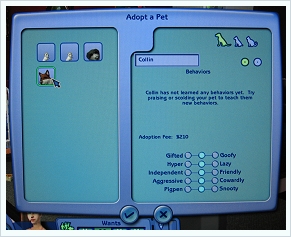 Your Sims can use the phone to call up the Pet Adoption Service at any time. On doing so you will be presented with a screen showing all of the animals looking for a new home at the time. This screen shot here does not show the finished screen as it will include all of the animals personality types, training record and abilities etc. Here, you do not have the ability to change anything about the animal. Your Sims will need to craft its personality through training once the little tyke is delivered to your door.
Adopting a Pet is not free, and just like trying to adopt a Child Sim, you need to meet a financial requirement before being allowed to look after an animal (around §1000+). Prices vary. You could in fact adopt a fully trained career successful animal, but this will cost much more than a basic grade mutt. The picture below shows our adopted Pet being delivered to the door!
Breeding (WooHoo).
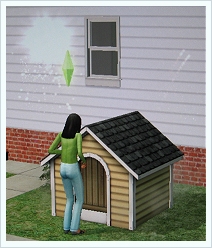
 I couldn't resist, I had to see it! I love the comedy elements that working with animals brings! As you would expect, animals can breed, given the right conditions and circumstances. One of the developers explained to me what this mix was, so I quickly put it into action! I set the scene, got the animals in the right mood and then went for it, selecting the 'Try for baby with..' interaction on a trustworthy animal (er, before your imaginations runs away with you, its an instruction for the dog, right?).
Sure enough, two dogs were seen disappearing into their kennel, soon followed by much shaking and rattling followed by fireworks and clouds of smoke as all the Sims on the Lot gathered around the clattering kennel cheering and whooping! Once it had all calmed down, two dogs crept out low on their bellies looking sheepish and somewhat embarrassed in front of the crows! Another hilarious moment! Try it, how can you resist?
 Of course, the result, 2.5 days later, would have been a littler or little puppies which, as is the case for Sims, will look like a combination of their parents, and adopt many of their personalities. Where are the pictures of the puppies? Well, I had a little accident!
While being so concerned about making Doggy WooHoo, my neglected Sim died. With nobody to feed my two excited doggy parents-to-be, the Animal Welfare Officer came and took them away :-(
Adopt a Stray.
Finally, your Sims will see Pets wandering past their home just as they see neighbours. Sims can interact with these animals in much the same way they can their own. If they like what they see they might like to offer a stray pet the opportunity to move in with the family and take them on as one of their own!
Doggy Heaven?
 Animals have a lifecycle, and although it has less stages than a Sim, there has to be an inevitable end! I have already mentioned one way in which we can loose our family friends (I learnt the hard way so you don't have to!).
You can also put your animal up for adoption if you no longer want the burden of filling and cleaning food bowls, or have had all of your furniture destroyed. Adoption is just a phone call away, but remember kids.. a Pet is for life, not just for Christmas!
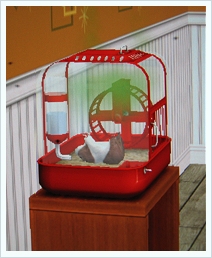
It should also be noted that Womrats are delicate little creatures when around aggressive Dogs! They will die if neglected, yes, but too much attention from the hound can result in Wommie being scared to death! This poor chap went unnoticed while I tried out some game tools, only to be found later with a green cloud and flies above his upturned lifeless body. Oh well... §45 later, the cage was restocked with a fit and healthy replacement :-)
Quick build, quick sell!
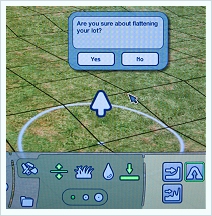 A couple of new tools and features are added to Pets that will make building in the game a little bit easier and slightly more interesting. One of these features I've kind of let you down a bit because time run out before I could play with it in detail and get some pictures for you :-(
First up lets take a look at the new 'Flatten Land' tool, identified as you can see on this picture under Build Mode/Terrain by a flat line with an arrow pointing down. This is simply a quick and easy way of flattening any Lot which is not built on. If like me, the first thing you do when buying most plots of land is get the terrain tool out and level all the land to give you maximum build space, then this new tool is for you. Nothing groundbreaking, but could save some time and frustration.
The next new tool isn't so much for creation, but high speed destruction! Currently in the game, if you wanted to remove a fence you would need to go to Build Mode, select Fencing, and then use the undo tool to get rid. Likewise, if you wanted to sell a table and anything on it, you first needed to remove the items on the table piece by piece first. Not any more!
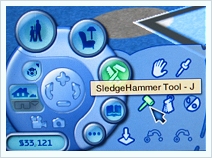 Bring on the Sledgehammer Tool (seen in action in this picture). With this baby selected, you can demolish anything, from Build Mode creations to Buy Mode objects. Click to sell back a table and each of the items sat on it will also be sold back. Its a quick and easy way to clear a space in a house and knock down those walls and decks in preparation for extending. If you think it doesn't sound much, wait until you try it. You'll wonder how you ever managed before!
Of course there are also some new objects in the catalogue that are Pets related. The version of the game I played had four Kennels for Dogs, ranging from slum to palatial, there are food bowls and toys, animal cages and a new Saltwater Aquarium.
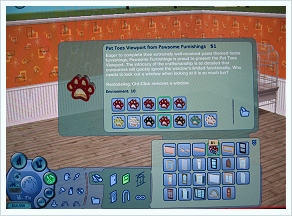 I already showed you the Space Theme Set and there are also some Pet themed Doors and Windows too. Here is a picture of the Paw Print Door, the "Paws-Way Passage from Pawsome Furnishings". There are windows to match. I can already hear people thinking these would look great as a frontage for their new Pet Store! Lots of pet related art work appear in the catalogue too.
Diagonal Roofs were touted by the developers, but alas, I ran out of time before I could finish a building to investigate. I was too busy with the animals to worry about what was going on above my little Simmies heads, sorry :-(
Still, it leaves you something to investigate when you get your game this October. I'm sure there are plenty of other things too that we missed, and the Developers kept under their hats for some last minute surprises and Easter Eggs for the players to discover!
Tools, Tips AND Tooltips!
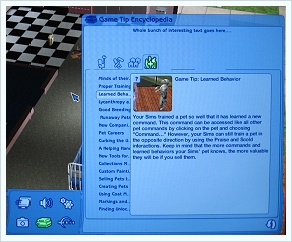 If, like me, the first thing you do when you load up a game or new piece of software is turn off those annoying tooltips, you are probably missing out on some useful information. The Sims 2 has, especially if you install all of the Expansion packs, tried to tell you about loads of useful snippets of information in the past but where are they all now?
Well, who cares, because Pets brings us the Tool Tip Encyclopaedia! This screen shot is of a 'work in progress' so dose not look as polished as the final release will be. Identified by the stack of books icon, the Encyclopaedia can be found at any time under the game settings tab and includes all of the tips from all the packs you have installed, so a great resource to come back to now and then when you feel you don't quite understand something.
Challenge Everything
If you are a PC player, reading this article because you are hungry for information about what your next EP purchase will bring you, you might not be overly excited about what I'm about to touch upon, but hold on there one minute before you scroll off to the summary!
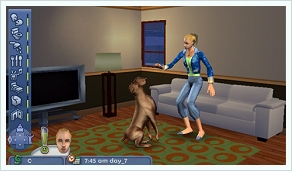 'Sims 2: Pets' is just an EP to us PC players, but it's a whole new standalone game coming to lots of other platforms too! The console and handheld games will ship around the same time as our EP and will appear on the PS2, Gamecube, PSP, DS and GBA (the PSP version ships a month after the rest).
The handheld versions were particularly interesting, as although you cant actually take your PC Simmies away with you on walkabout, you can play with other Sims and Animals in different ways to the PC game. You can still adopt pets but you can take them to the town of Barkersville and teach your Pets tricks, enter then in shows etc. There a loads of mini games included for you and your four legged friend to work your way up a career ladder, learn new tricks and cook all kinds of weird and wonderful food.
 Definitely check out the reviews that are about to flood the Internet and take a closer look for any console or handled machine you own, you might be pleasantly surprised by the dept of gameplay and sense of challenge and achievement that you might not be getting from the PC.
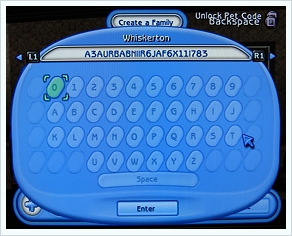
Interestingly, the Console versions of the game allow for the very first sign of Custom Content sharing! After creating an animal you can take the Pet Creation Code and pass it to other players to type in to their Unlock Pet Code screen, giving them a replica of your Pet. Alas, clothing is not included (on the console versions you can dress your animals up in all manner of hideous clothing items), but it's a start, and something the developers are keep to progress with, especially with the next-gen hardrive based consoles.
Enough already!
OK, 3,890 words later you're bored of my ramblings, I can tell... So lets summarise!
When I previewed Nightlife I concluded that even if you were not interested in the dating aspect of the EP you would still find lots in the pack to expand your game. Alas, with Pets, if you are not interested in bringing animals to your Sims lives then there will be very little of interest to you here.
There is no doubt that I have not included all of the great new addition that Pets brings to our game, so expect to have more to find when you play your game this October. I do hope that I have helped you to understand what Pets brings to The Sims 2, and to help make an informed decision as to whether or not Pets will be on your shopping list!
One think I haven't talked much about (because the developers didn't) was the ability to "Unlock & Share" content across platforms. For example, if you are planning your game on PSP and achieve something special you will be given an unlock code to open up some new content, like the Zebra Stripes I mentioned earlier. These codes could be shared with your friends on any other platform to unlock something special in their game too. How far this extends to PC we don't yet know, but it's something to look out for. Maybe you'd like to ask about it on one of the upcoming Developer Chats at the Official Site?
That's it. I'm done!
My thanks to the team at EA for the opportunity and information, and to my Sims Community colleagues who attended, making the day informative and enjoyable.
Keep an eye open for an article about the EA trips in our upcoming newsletter ;-)
/Steve












 Limited Time Offer
 For a limited time only, we’re giving away a free


