

 Sign In


Member Blogs
Do you know a TSR artist that converts Sims 2 to 3 Hairstyles/Clothing?
ok, still waiting for responses, for like, hairstyles and stuff, i am really upaet, that no-one has replied to my requests..... it makes me really upset, atually. so if any of you's know who converts them, let me know, coz i am waiting for replies, now i am going around, asking all the fabolous creators, to do so! kk, and BTW can YOU convert that child curly hairstyle, it is in the TSR hairstyles catagory, BTW, to adult? PLEASE! if we could have a custom content TSR workshop...... PLEASE , OH, PLEASE help me out! can you, yes YOU go around asking people for them!? if you copy my PREVIOUS blog, then you will understand me..... so, PLEASE! leave a comment, and go ask people! xxx Demi xxx
Hi everyone
Hi everyone, sorry I have been gone so long, as some of you know, I have been really sick, lots of pain, no sleep and bucket days, I've lost over 50 pounds the past couple of months, and though I still hurt, I'm hanging in there, and doing a bit better healthwise, it's one day at a time. I've had a virus that the Drs aren't sure what it is, my diabetes has been acting up, and I've been in the hospital, but like I've said, I'm doing better, with help from my dear hubby, and my dear freind Hiedibear, we have been talking on the phone, and she has been such a huge help, and a real freind freind, who I consider my sis!
On a more serious note, we lost our little kitty Shadow last week, he died in my arms, someone had poisoned him, and he went fast. He was only around 10 months old, and my little angel. When I was sick, he was there for me, he stayed with me on bucket days, and would follow me around the house, keeping me company. He always seem to know when I was ok, and he would leave for the day, and bu God, he was home every night at 6:30, you could have set your watch by him. I shall miss him terribly, I still cry when I think of him, I keep expecting to hear his miaow, and feel his head butting up against my leg when he was hungry. For more about Shadow, read my other blog, we rescued him, and it took us a few months, before he would stay in the house overnight with the door closed.
Thank you for reading this, and thank you from the bottom of my heart for thinking of me, especially my favorite people here, your comments are so nice, and so welcome right now, I'll write soon, I'm just starting to sim again, and will hopefully have screenies soon for you to check out! Hugs, Squeakers
update
ugh well my primary computer crashed and is unusable so i will have to repurchase all my sims 3 stuff and i will have to get a new computer so i will not be making anything in the near future
The Hathaway Mansion - Teaser Trailer
I'm on a roll with these video editing tools, so don't make fun of me. And don't ask where I got the male voice, I'd have to shoot you later. On a more serious note, this was a fun project to execute. It all started with a shell I did for the cover of an article for Simspiration. From there I made a residential mansion and then decided to go a bit further and create an alternate tomb version. Both lots are available for download at my minisite, I hope you enjoy them :)
p.s. I haven't been updating this blog very much, you may want to check my other blog: http://startersims.blogspot.com/
REJECRED, BABY!!
SO one of my newest homes was just rejected because I have no photo of the interior of the house. Now they rejected it because I didn't bother to. What a crock. Oh well, it was uploaded and will probably be up by tomorrow so, look for it then!
Amin (Sims) & Heart Happiness; life with Dustin
household;
Dustin Broke = elder
Heart Happiness = adult
Amin (Sims) Happiness = adult
Love Happiness = child/ teen
The news of Cassandra Goth’s passing spread quickly through the neighborhood. Heart hadn’t known Cassandra well, but she knew her step-father Dustin Broke was very fond of the pretty pinked hair woman. It didn’t bother Heart that her step-father had begun warming the bed of his step-sister, Cassandra. She knew he was also warming the bed of Dina Caliente. Heart was for anything that kept the bitter old man happy and out of her hair.
As a teen, Dustin was the first sim Heart met when she moved to Pleasantview with her mom, Hope. Dustin had came home with Heart after school, but any attempt at friendship turn sour fast and the two had a fight in her living room.
Like so many others, Heart went off to college. Dustin, having been left behind by all his friends moved out of the Goth house and next door to Hope. They’re shared love of cats drew Hope and Dustin close. Soon Hope and Dustin married. Heart had been happy for her mom. She had worried about her mother being alone with only her cat, Honey, to keep her company. At the wedding, Heart and Dustin had gotten along great for the first time.
Despite Dustin’s cat Bonkers and Hope’s cat, Honey, discord, it was no reflection of the their owners marriage. Dustin and Hope had a happy life. They weren’t a lovey dovey couple, but they were very much in love. They had only had one child together, Brian, despite having tried many times for more.
Heart had visited often, attending all her brother’s birthdays, having lunch with her mom and she had even been there when Dustin became an elder.
After college Heart bought the house next door, where she had once lived with her mom. Being a popularity sim Heart often had a house full of other sims. She’d dated Justin Kim a few times at college and now on her own things got serious. Things had been more serious for Heart then for Justin and soon Heart found herself a single mom.
Hope and Dustin started visiting Heart daily. Dustin stepped up to role of grandfather quickly and often cared for the infant while Hope cleaned up. Finally, worried about her raising a child on her own, they insisted Heart move in with them.
Heart tried to care for Bobbie on her own as much as she could so as not to be a burden on the elder couple, but Dustin dotted on the child. Heart started dating townie named Amin Sims and fell madly in love. Dustin didn’t approve, not for anything about Amin other then he was a townie. Dustin hated townies.
For Hope’s sake, Dustin kept quite about how Heart was living her life but all that changed after Hope passed away. Only a few days after her mother’s death, Heart married Amin. Dustin couldn’t keep his true feelings to himself any more. The moment the couple finished their ceremony Dustin marched up to the alter. He slapped Amin first before turning on Heart. He slapped her several times and through out the reception he followed her around poking her and starting arguments with her. Life with Dustin wasn’t bare able after that.
Heart had asked Brian to take him in but his wife found it to awkward given her history with him. Having promised her mother to make sure Dustin was well tended to, Heart sucked it up. She threw herself into her work, rising quickly in the slacker career. Amin pluged away in law enforcement while Dustin continued on as a All Star sports talent. The household income tripled quickly. Shortly after Love was born, Heart found a large estate for the family. Hopping the bigger house would make Dustin happier the family moved.
Heart fixed a room up for Dustin on the second floor of the three story house. There was a large open room on the second floor she fixed up as a game room complete with a pool table. She put a big screen TV in a small sitting room next to Dustin’s room. She fixed up a part of the yard for him to have his green house and added lots of fruit trees.
Amin was slowly winning Dustin over by repairing sprinkler heads in the green house, hour long games of chess and now rounds of pool.
Shortly after moving into the house, Bobbie left for Sim State and Love was close to becoming a teenager. Heart pushed her memories from her mind as she hurried about the house cleaning for the surprise party for Love.
Heart tried not to think about her two recent affairs. Her night with Justin Kim was just one more in a line of many. She just didn’t even want to contemplate her night with Mel Fancey. She’d known Mel since college, he’d lived in the same dorm as her, but he had not been as good looking then as he was now.
Heart pulled off a great party for Love who grew up well and very beautiful. She had her father’s soft brown complection and her mother’s big green eyes. She had soft red hair like both her father and her grandmother.
As fall progressed, the men continued to become friends. They also started spending money. First Amin bought a flashy sports car as a token of his affection for Heart. Dustin bought a tent and stuck it out back, which Heart didn’t understand as he never went in it. Then Amin took Love cloths shopping in the middle of the night. Dustin decided to add to his garden by putting in more plots next to the green house. Amin hired both a maid and a gardner, which Heart had to admit would make her life easier. Taking care of a 5 bedroom / 4 bath house was a bit much to care for along with all the yard work that needed to be done. The gardener turned out to be a bad investment, as she spent the whole day complaining about the placement of some shrubs on top of a hill and she still charged them for the time despite doing nothing.
As the days grew short and the nights longer the chilly air made Dustin feel his age more and more. Working in the cold weather left him little desire to spend time with his plants. He finally gave it to Heart’s and Brian’s pressure to retire.
Heart had mixed feelings about Dustin being home with her all day. She dreaded that her stepfather would spend his time annoying her but she also felt he’d worked so hard to get so far he deserved to sit back and enjoy his life more.
The first day home with him she busied herself raking leaves. He worked in his garden and tended his fruit trees. He gathered her leaf piles for composting. The second day was more of the same. Both working quitly. Both giving each other space. The third day was a repeat of the other days. Heart knew fall would end soon. All she could do was hope that the green house would be able to keep him busy all winter.
Custom Content
Soon a new home will be uploaded to TSR for the community to download into their game. I've noticed I usually use a lot of custom content. Which I am sorry for but, I need to use it. I like to use it. If needed just go and download the item used in the house or on the exterior of the house. I tihnk that the custom content helps to improve the house. I mean think about it. You all have the content already in the game so it really does make you want to download it even more, doesn't it? Well it does me. Just seeing all of the things I do not have in my game helps me want to want the house even more. But, also I don't want it because I know I will have to download all the custom content in the house before I can download the home, which just aggrivates me. It takes forever! So I am debating this one. But don't worry, the homes whether or not they have custom content,(which they probably will)will keep on coming!
Who makes Sims 2 to 3 conversions?
ok, well, who on here converts sims 2 hairstyles and clothing to sims 3, c'mon! i need that curly hair, or that Bella Goth hair, well, more like AND the Juliette Capp hair.... actually, i rly dont mind if it is non-recolourabled, as long as it's in brunette/brown! i need that kool girl kinda outfit..... the on with a on sleeve top, and that plaid skirt.... no-one i know will make them.... THEY NEED TO BE ON TSR THO becoz i cant download zips.... :( AND i need that corset top and jeans outfit.... WAAAAA! the one that Juliette Capps sister wore... Harmnia? was that her name? I hope people read this, PLEASE! sims 2 has WAY better features in clothing/hair than Sims 3..... :D :D :D the images are on google, type in JULIETTE CAPP and BELLA GOTH and type in SIMS 2 BASE GAME CURLY HAIR and the blonde child hairstyle is the one i'm talking about... kk's, bye byes, and please, if you can respond, and well, MAKE THESE ITEEMS! please, please i have'nt got any responses from any creators, that i ADMIRE A TON... ok, byes xxx BTW: this is a page that has the hairstyles that, I and WE ALL want..... http://forum.thesims3.com/jforum/posts/list/108958.page
request for Aaliyah hair or sim
Hey people!!!! i want to make a request for Sims 3.. i wanted an Aaliyah sims or the hairstyle.. if someone can do it for me i would love that... thank you.. the hair looks like this.... PLEASE!!!

Editing Riverview
Atm I'm redoing River view up with extra lots, more space, a beach and waterfall. I really can't be bothered starting from scratch but I'm saving the community places. I don't think I'll be doing them from the begging not to last anyway. After I finished doing up Riverview I'm going to do all the town up starting with customised houses. I just need to find a name for the area :( Oh oh!
HELP Please!
Does anyone know how to change the N00X to the neighbourhood number on sims2??
(On Neighbourhoods That You've Created, Not On Exsiting Ones!)
- Katie (Golden97) x
Poems, well, my attempt
ok, so this is my FAIL attempt of a poem
if we could share a week together, it would feel like forever, whilst i'm with you time passes slow, i love you, and that you know. i love our short little laughs, and the place you take me, woodland park, this is where the journey shall end, i want you to know, you were my true friend. Now i wait, at that place, waiting for you to return, it's empty space. but i know we can't be together no more, but always, i will be yours, forever, more.
ok, so that FAILED but wateva! kk, sign my guestbook!
The allmenus cheat
This is an except from the discussion topic about the allmenus command. It has a link to the tutorial in The Sims 2 at SimsHost.
It works! And apparently it works with any version of the game. The
trick is to make sure that you edit the GlobalProps.xml file in the
folder that goes with the latest expansion pack that you have installed.
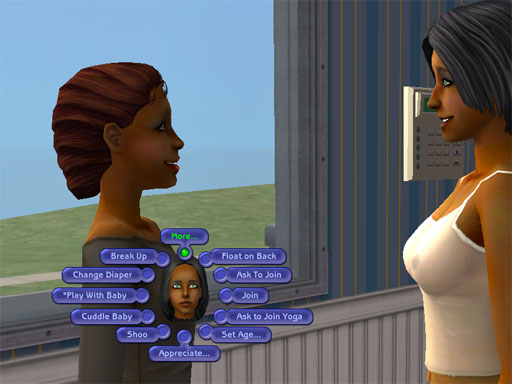
Andrea and Sophie try out the "allmenus on" command.
Click on the image for all ten of the screen shots showing all the menu options.
This would be useful when you want a specific animation for a screen
shot or perhaps if you want some special interaction between characters
that's not available, but mostly it's a pain in the neck to have to
click through all those menus.
Click on the image to see the web page I hastily cobbled together about
this. There are images showing all 10 pages of possible options for
things that Andrea can do to Sophie here.
Zodiacal Atraction
This is pilfered from a message that ZirconiaWolf posted in the thread
about "Necessary Hacks" in the Discussions and Help section:
All I can gather from the Prima guide is that attraction is based on
some (apparently very) complicated combinations of turn ons/offs,
personality traits, aspiration type & of corse (the Maxis interpitaion of) their zodiac signs.
This- obviously- would "count" for more than 3 Bolts (which isn't even
possible in the game) if the "counting method" made any sort of logical
sense, so Lord only knows quite how Maxis programed the "attraction factor" in the game! (I still swear some of it's random! )
Also- aside from the "zodiac"
signs- there is no real info (in the guide) as to exactly which trait
conflicts with which! Turn ons/offs is pretty strait forword but just how "lazy" does a Sim need to be to be rendered un-attractive to a more
"active" Sim (for example) isn't explained. (This is pretty wiered too,
as those of you who are familuar with Prima guides will be VERY
knowlegable about their almost cumpulsive use of
charts/graphs/mathamatical calculations/etc for darn near everything
else in the game! NOTE TO PRIMA: Yo guys, next time how about ditching
the discriptions of EVERY piece of furniture in the game & tossing
in an "Attraction Calculation Graph" or something???? )
Oh, just in case some of the folks out there don't have/want the Prima guide, here is how SIMS (1 & 2) determin the whole "ziodiac" attraction thing.........
| THIS SIGN | IS ATTRACTED TO | IS REPELLED BY |
| Aries | Gemini
Taurus |
Cancer Libra |
| Taurus | Aries Libra |
Virgo Cancer |
| Gemini | Pisces Virgo |
Aries Capricorn |
| Cancer | Taurus Scorpio |
Gemini
Aries |
| Leo | Sagittarius
Cancer |
Capricorn Gemini |
| Virgo | Aquarius Sagittarius |
Taurus Leo |
| Libra | Cancer
Virgo |
Pisces
Scorpio |
| Scorpio | Pisces Leo |
Libra Aquarius |
| Sagittarius | Capricorn
Pisces |
Scorpio
Libra |
| Capricorn | Aquarius Taurus |
Leo Gemini |
| Aquarius | Sagittarius
Capricorn |
Scorpio Virgo |
| Pisces | Gemini Scorpio |
Aries
Leo |
-ZW
----------
Edit: Added color indicators
Mutual Attraction
Mutual Repulsion
Repulsed by someone who is attracted to me
Attracted to someone who is repulsed by me
Other person is neither attracted to nor repulsed by me.
No more ugly Townies/Dormies!
I used to nuke my new hoods with deleteallcharacters then cleaning up
the stray crap in the neighborhood file with SimPE. However, I started a
new 'hood for experiments in growing up Dormies, and discovered it is
actually kind of nice to have a good supply of preexisting Townies and
Dormies to interact with, instead of waiting for them to slowly
generate.
To prevent ugly NPCs with stupid names from ever getting created:
1) Before starting your game:
a) Get Nailati's replacement face templates. She's only got three of them done, but they are wonderful!
http://www.moreawesomethanyou.com/smf/index.php/topic,3804.0/topicseen.html
b) Get Jordi's names hack.
http://www.modthesims2.com/showthread.php?t=207539
c) Prevent the ugly Townies: Open up Program Files\EA GAMES\The Sims 2\TSData\Res\UserData\Neighborhoods\N001. Zip up the Characters folder (just in case you ever need them), then open it and delete its contents.
d) Prevent the Pets families from appearing in the SimBin: Open up Program Files\EA GAMES\The Sims 2 Pets\TSData\Res\NeighborhoodTemplate. Zip up the P001 folder, then open it and delete its contents.
e) Depopulate the Pets populated lots: Open up Program Files\EA GAMES\The Sims 2 Pets\TSData\Res\UserData\LotCatalog. Zip together all files starting with cx_Character_, then delete them.
2) Create a new neighborhood.
3) When adding sub-hoods (Uni, Downtown, OFB), don't use the Maxis
subhoods; add a custom one and populate it with lots you packed up from
the Maxis subhoods in a dummy neighborhood.
Best looking bunch of Townies and Dormies I've ever had! Haven't checked out the Downtownies yet...
How To Create Custom Colleges for The Sims 2 University
Here's How:
- Click the College Chooser icon in the neighborhood screen (located in the top left corner).
- Click Create College icon.
- Click Create Custom College icon at the bottom of the template college list.
- Choose a terrain type. The terrains are in "SimCity 4" format, and show the ones you get when you create a new neighborhood. The game comes with a selection, but you can create your own in the same way you create them for regular neighborhoods.
- You will be prompted for a neighborhood name and description. When done click the Done button.
- The new college will be loaded. You can then add a neighborhood story, or add one later. Click the Done button.
- The college is now yours to customize. Under the Lots and Houses bin you will find Dorms under Speciality lots. You can create libraries, gyms, etc. by playing emplty lots and making them community lots.
- Houses from the bin can be used to make private residences. Your favorite neighborhood homes, can be placed in the college.
- Choose one Secret Society building from the Speciality Lots. The building will disappear as soon as it is placed. There are three lots to build. You can place other buildings over the spot the Secret Society was placed.
- Further customize your college with decorations, such as a rainbow, street lights, trees, boulders, etc.
Tips:
- You do not have to perfect the neighborhood in one sitting. You can continue to build and decorate long after students have started attending the college.
- To save time, you can package community lots (like the Campus Gym) to be used in your custom college. To package a lot, find the community lot you want, click the Package Lot icon. Close the game and find the packaged file (location is given when you package it). Double-click the file and it will be installed and ready to use the next time you start "The Sims 2 University."
What You Need:
- "The Sims 2"
- "The Sims 2 Univeristy"
- Neigborhood that needs a college
How To Share Your The Sims 2 Houses
Here's How:
- Start "The Sims 2."
- Open the neighborhood that has the home you want to share or upload to a website.
- Click on the house.
- Click on the info icon.
- Click on the icon on the top, looks like a star with an arrow.
- Choose whether you want to package the house and upload to exchange, or package so you can upload to a website.
- If you choose upload to a website, the house will be packaged and be found at: my documents\ea games\the sims 2\packagedlots\.
Tips:
- Once the house is in the packaged format (.sims2pack), gamers who download your house only have to double click the file to install it. The house will appear in the lots bin in the Neighborhood screen.
What You Need:
- "The Sims 2"
- House you want to share
How To Create Custom Eye Color in The Sims 2 Body Shop
Here's How:
- Start The Sims 2 Body Shop. Choose Create Parts at the top of the screen. After this click Start New Project. From the next menu, you have the choice of which part you are going to make. Select Create Genetics. Next choose Eye Color.
- In the eye color screen, you will see the colors already available to you. Pick one of the colors to modify. I choose brown.
- With the eye color selected (there will be a green line around choice), click the Export Selected button near the bottom of the screen.
- Enter a project name. Name this one, FirstTryEyeColor or the new color you are going to make. Click the Accept Project Name button.
- The next screen will show where the eye textures were saved. Open Windows Exploreer or My Documents, and browse to the folder.
- With the eye color folder open, you will see three bmp files and a package file. You need to open stdMatBaseTextureName.bmp with your favorite graphics program (Photoshop, Paint Shop Pro, etc.)
- Within your graphics program, use the hue/saturation adjustment to create the eye color you desire.
- Once you have a color you want, save the file. Switch back to The Sims 2 Body Shop. Click the Refresh Preview Sim. You may continue to save your work and refresh the preview Sim until you are satisfied.
- Next we need to create a swatch that will appear in The Sims 2 Body Shop. Open the swatch.bmp in your graphics program. You can create the swatch in a variety of ways. I copy the eye from the original, and paste it into the swatch. Save the file after you done.
- Refresh the Preview Sim. Once you are happy with the results, Click the Import to Game button.
- The eye color will be available to you when you create a new Sim.
What You Need:
- The Sims 2 Body Shop
- Graphics Software
Basic Object Recolor for Sims 2
Download SimPE
After the download is complete, install SimPe. Read the warnings on using Simpe. It is possible to corrupt your game files if you change the wrong values. Remember to back up your files if you plan on exploring SimPE.
During the installation process you will also be given a list of software that you may want to download and install.
- Micrsoft .Net 1.1 is required for SimPE to work.
- For better compression results download and install Nvidia DDS Ultilities.
- Color Options Enabler Package is available at the SimPe homepage.
You will need Graphics software to recolor the exported graphics file. I use Photoshop, but Paint Shop Pro and other software also works just as well. With many graphics programs, there is a free trial. Or you could try free software if you do not already have another program to use.
Start SimPE

Wizards of SimPE
After the required software is downloaded and installed, start Wizards of SimPE. The shortcut is located in the SimPE folder under your list of programs in Windows. Click on Recolors, this allows you to recolor Maxis objects. It will take some time to move to the next screen.
Choose Object to Recolor

Select an Object
For this tutorial, we will choose an object that very few colors. In the future, when you decide to recolor objects with multiple colors, you will need to you use the magic wand or select tool to change parts of the objects. This time we will keep it simple possible. Click the 'Sofa by Club Distress' then, Click Next.
Select Fabric to Recolor

Select Fabric
Scroll down the possible fabrics to recolor and click the ivory one. Make sure Autoselect matching textures is checked. Click Next.
Export Files to Recolor

Export Sofa File
Select the displayed file, it should be the ivory sofa file. Click the Export Button. You will be prompted to save the file. Create a folder just for your recolors, in 'My Documents' or another place you feel comfortable with. Name the file 'sofa_distress' since that is the object's name in the game.
Open Favorite Graphics Program & Modify

Making the Selection
Since is the time you will need a graphic editing program. For this tutorial, I am using Photoshop. The tools we will be using can be found in other graphics software.
Start your favorite editing program and open the sofa distress file.
Zoom in wood that is top, center of the file. Using the Rectangle Marquee Tool (or another selection tool), select the brown wood.
After the selection is made, choose Select from the file menu - then Inverse (or Invert). The fabric of the sofa will now be selected and ready to be edited.
Changing the Object's Color

Adjust Hue and Saturation
Next, create an Adjustment layer by going to the Layer Menu - New Adjustment Layer - Hue/Saturation. A screen will appear with sliders for Hue, Saturation, and Lightness. Experiment with the sliders until you get the color you desire.
If you cannot create an adjustment layer, you can also check under Image for Adjustments and change the background layer directly. In some software, you may have to duplicate the original layer first. This can usually be done by right clicking the layer in the layer palette.
Merge layers before saving: Layer - Merge Visible.
Save your work. Make sure it is in png format. In Photoshop I used Save for the Web, and choose png under settings.
Import Recolored Object File
Import Recolored File
Go back to SimPe and click the Import button. Select the edited file and click Open. Once it is imported click Next.
Give Object a Name and Finish

Choose a Filename
Enter a filename for your newly recolored sofa. Give it a name that is something you will remember as yours. I named mine green_distress_sofa_courtney. This way I know the color and the base object.
Click Finish. The object will be saved and be appear in "The Sims 2."
Congratulations! You have recolored your first object for "The Sims 2."
How To Edit a Sim's Characteristics with SimPE
Note: SimPE can cause damage to your game if the wrong files are edited. Please backup your files before making changes. Backups can be done when you select your neighborhood within SimPe.
Here's How:
- Download SimPE
Download SimPE if you haven't yet done so. Make sure to download and install the required software to run SimPE - Microsoft .NET Framework and Direct X 9c. - Install and Start SimPE
Install SimPE and the required software. Once installation of SimPE is complete, start SimPE. You will find a link to SimPE on your desktop, programs list, or on the quick launch bar. - Open Neighborhood
With SimPE open, from the toolbar go to Tools - Neighborhood - Neighborhood Browser. This will open up the Neighborhood screen. Choose which neighborhood the Sim is in you would like to edit. After selecting the neighborhood, you can create a backup. Once the backup is complete, click Open. - Finding the Sim
In the top left part of the screen, there is a list of Resources under the Resource Tree. Scroll down to find and select the Sim Description icon. A list of Sims in the neighborhood will appear on the right. - Edit the Sim with SimPE
Scroll through the list of Sims and select the Sim you wish to edit. The Sim Description Editor will show a picture of your Sim and information about that Sim. This is where you will make your changes. You will see areas for career, relations, interests, character, skills, "University," "Nightlife," and other. - Make Changes & Save the Sim
After you have made the desired changes, click the commit button to save the Sim. You can now close the game and play "The Sims 2" to see your changes.
Tips:
- To edit the family tree, select Family Ties under the list of resources.
- Make backups of your neighborhood whenever you make changes. This will ensure you have a working copy just in case "The Sims 2" becomes corrupted after using SimPE.
What You Need:
- "The Sims 2"
- SimPE
- Microsoft .NET Framework Version 1.1
- Managed Direct X 9c
Rosesims items
News:
New pay hair and new gift:


There
are now three Taobao packages available. We should have most sets of
package 1 and 2 already. Package can be purchased for nearly 10$. Too
many pictures to post.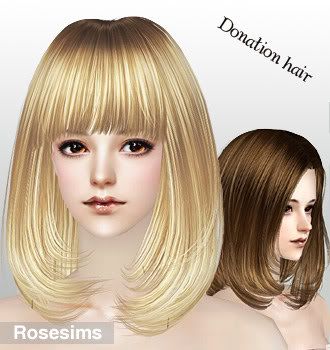
Gifts:
Gift 58 
Gift 72 (Also done by Portakal at GOS)
Gift 74 (Yuxi at GOS already made a f2m-conversion)
Gift 76 (Again already converted by Yuxi)
Gift 78
F2M-conversion of hair 94
Also done by Yuxi at GOS
Gift 79
F2M-conversion of hair 99
Gift 80
F2M-conversion of hair 103
Gift 82
Gift 84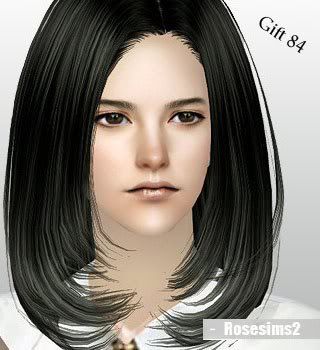
Gift 74, 78, 79, 80, 82, 84 and the Special Gifts can be bought separately now without the need of buying other files first.
A little Combination :P
Hair:Peggy http://www.simscave.com/index.php?topic=18143.0
Skintone:Subaxi MCV? http://lessims3desubaxi.blogspot.com/2010/08/male-non-default-replacement-skintone.html
Lips:?
Eyeliner:TSR http://www.thesimsresource.com/downloads/details/category/sims3-makeup-eyeliner/title/two-lashes--eyeliner/id/992907/
Dress:TSR http://www.thesimsresource.com/downloads/details/category/sims3-clothing-female/title/britney-spears-cosmo-dress/id/998410/


Pink Bubbles Bathroom...
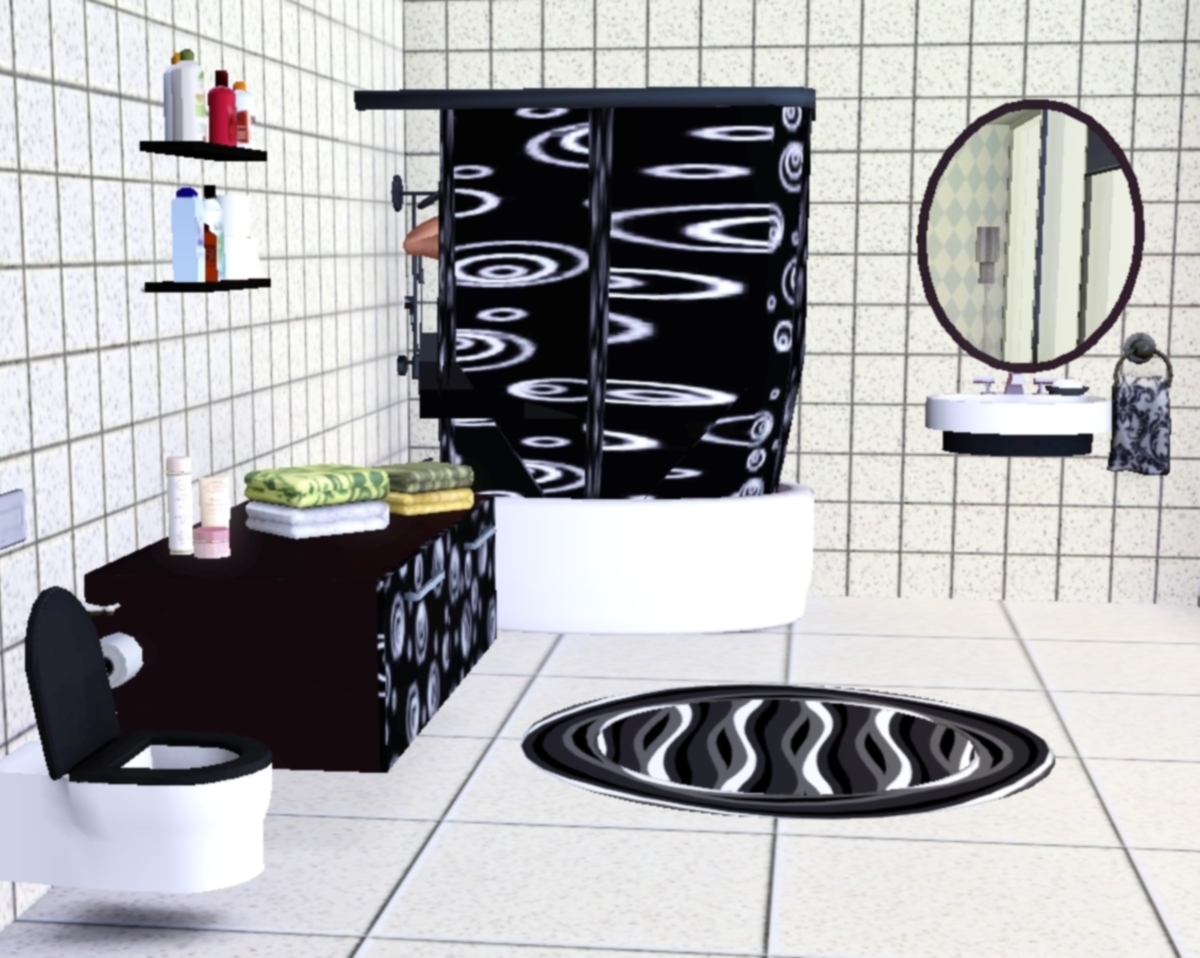
Some shots from my latest work. I hope you'll like it. :)

It took a lot of time working on the shower. While shower curtain closes, the pattern is broken. Sorry, this is the best I can do. :(
Compressed Rock and Super Compressed Rock
I noticed that when I had compiled these packages for uploading, I must've done it wrong. The single files have no description, and therefore, we all have to refer to the set page to find out what it does. Nice of me, no? Well, I'm mildly frustrated, so I just figured I'd give everyone a heads up on a couple things about the purpose and use of these terrain paints.
As the set description dictates, this is just meant to keep the same rock graphic, but compress it a little on some of the steeper hills and cliffsides so that there's more detail in the rock, and it doesn't look so goofily stretched. In some instances, it looks rather linear, if I can use that word, like the rock is compressed too much. So here's a couple ways to work with these...
1. The super compressed rock vertical and horizontal are a little weird to work with, and they will seem a little pixilated. If you pull up a hill roughly a wall and a half high, it looks great. Anything higher than that will kinda look goofy.
2. The compressed rock is a little easier, the detail looks good on higher slopes, or it'll give smaller slopes a better, fuller rocky look. I was going to come up with a vertical version of that, but I'm still playing around with it.
3. When you go to paint the hillsides, mountainsides, or the cliffsides, it will seem as if nothing's working, like nothing is there. You may have to paint one section of the hill, et. al., for a while, meaning putting the cursor over the terrain and holding the mouse button down for a while, like a good 10-20 seconds. Now, I've noticed that when that's done, it looks sorta pixilated. If you erase the mountainside down to green grass, the paint will show up more clearly, more detailed, and very quickly.
Please, if you have any questions or concerns, feel free to drop me a line. Again, I'm sorry I didn't put descriptions in the individual files, I hope this clarifies anything.
Thanks for downloading, everyone, I aim to please. ;)
Salome...
Pieces of Me Chapter 11 Veiwers Choice...
Don't forget to post your ideas for what you want to happen after Dani watches Ari disappear into the night!
Post your ideas either in my guest book or send me a private message with what you want to see happen.
I will choose one and use it for the starting point to
Chapter 11!!!
Im hoping to start chapter 11 with in the next day or two so get those ideas in!!!
Angelina Jolie Sim (Preview)
I promised long ago a new sim of Angelina Jolie. Well it will be out this september and i decided to show you guys the sim has her latest movie role, Evelyn Salt. The sim will be her regular self but for fun i decided to show you guys this look.

Why its ALWAYS like that?!
Hello everyone,I've got both good and bad news..Lets start with good..Ive made a posebox and it works fine in game..yay!
Here's pic:

BUT submission area gone mad (for me at least)-there's no message items updated meaning that they get uploaded to "uploads" without any information or without preview image ot without being part of the set,sometimes all those glitches happen....
I have no idea why it happens...I think I should write to online support right? 
clown cathers
I have been playing sims hot date and keep getting a message that the clown cathers are here and then the game crashes and I loose the entire game. why does this happen! and is there anything I can do to stop this? when I have been playing I am not connected ti the internet. help me please!
Taking a break :)
Hi everyone. This is just to say that I have to take a break from TSR and everything because I'm swamped with school work and whatnot now. And although I hate to say it, I may not pick up Uncharted Territory where I left of. It's become like a chore to keep uploaded chapters of it - and I think it shows. Whereas with Shadows, I couldn't wait to add a new chapter each time. So I'm taking a break and seeing where that takes me. So look out for me in a while's time when I'll be back (mwa ha ha), hopefully with a brand new story. :)
me: update and a question
sorry the stories are getting kinda spread out. I didn't play for a little while cause I was actully trying to build some houses in the game. managed to get one done for the monthly compation in the forums. It's not the best looking house ever but for me, it's actully really nice. Maybe some day I'll get my zip file software to work right and I could up load it.
also had back to school, my younger two kids are in high school and school started back up. shopping, getting scheduals, and band practice for them. which means a lot of running around for me.
had a job interview the other day. still waiting to hear. I really really want the job. I think it would be great for me. but we shall see what happens. hopefully will find out soon. :)
I asked about screen shots with CC in it, and so long as I don't take credit for the work (Which I would never do, since I would be the first to say I can't create) it's ok for me to show what my sims look like. so, those of you who read my stories. I will leave the decision up to you. would you rather read my stories as I've been doing, leaving it to your imaginations? would you like me to add one or two screenshots to my blog to give you an idea what everyone looks like? or would you like to see it worked out in story mode? figure I'd put it to you all and go with what you all would prefer.
I haven't done a lot of screen shots, and have two more households that would still need to be written out here; Heart Happiness' and Meagan (pleasant) Dreamer. I took some screen shots of Nina, and her daughter Niela. so I could start with them on the screen shots.
I try not to let my story up dates here be more then two pages in word. keep them light and short for easy reading. just post me a comment on what direction you want me to go. and thank you for reading!!
Pieces of Me Chapter 10
Pieces of Me Chapter 10 is almost done and ready for upload to be approved!!!
And now a comment from the peanut gallery
It seems like everyones patience with Dani is wearing thin, but i want to reiterate that Dani is still a teen who has never had to deal with boys and love and with wanting to keep some reality to the story we all know and can identify with Dani's thoughts and feelings when we have done something or given someone a second chance we didn't feel were deserving of! So have a little faith in Dani that she can do whats best for her!
And with that said off to finish up my 10th chapter!


POXEBOXES
Yeah,I know I love hard tasks...but I want to also create poseboxes and submit them to TSR ;)
Preview on one of the poses of my first posebox:

What do you think of it?;)
Thank you....
To everyone that has downloaded one of my creations... I can't believe I have over 150,000 downloads!! :D WOW... I realize that it's not a great big amount... but it is to me! I hope those that downloaded something from me are enjoying them! And, if there are any problems.. let me know!!
Again,,, a HUGE thank you to all the folks that have helped me reach 150,000 downloads! I'm just so happy! :)
End of August update
Hey fellow simmers! I got a lot of love for my Liberty of London and Cath Kidston pattern sets. I want to say thank you to everyone for supporting me so far, I really appreciate everything. I know earlier in the month I said I was working on some new pattern sets, and I am. I've just been really busy between work, daily chores, and preparing for school to start. So, I apologize for the delays but I hope that you'll still keep your eyes out for those releases.
I also want to announce my upcoming American Heritage house collection. It will be based on real federal/colonial era houses from the East Coast. As you know I'm a huge history and architecture nerd, so I'm really enjoying this. However, I'm finding a hard time mixing it up with the furnishings and decor. If anyone has any suggestions for me please post them down in the comment box.
Much Love,
Michele
Now on Facebook!
Well, I have had my private Facebook profile for quite a while, but today I made a new TSR profile!
Find me here: http://www.facebook.com/profile.php?id=100001524251441 and add me as a friend :D
HI BABESS!
Another sneak-peak
Sometimes creations approved a bit slower,so thats why I guess Alizee's simelf isnt approved..here's sneak-peak on next topmania!

Preparing my firs set
I decided to prepare my first set. Will consist of four lots. I don't know yet whether they will be completely furnished, or leave some space for your imagination. All I have to think carefully. I hope that everything goes my way. Wish me luck ;)












 Limited Time Offer
 For a limited time only, we’re giving away a free


