

 Sign In


Member Blogs
Deleted Homes.
Sorry, but I had to delete my houses because of some stupid doll that attached itself to my uploads. I dont know how because I definitley didnt download that stupid doll to begin with. Its upsetting, but I can always upload them later on in the future. Happy Simming!
Golly Gosh!
I am so so nervous!
I have just submitted my first ever story on here!
I hope you all like it!
x
Coming Back Soon!
I had a lot of problems with my PC, but soon i will come with a new set and some surprises!
Now, I'm using ubuntu because i need it for some works. The next week i'll make a new partition, and I'll begin to work on the Sims 3.
See you soon.
Back With More Goodies!
Firstly, a big thank you to everyone who supported me in my previous blog over the reporting issues - it's greatly appreciated! I'm presuming that since I've had my submissions accepted and published since then (and I haven't changed anything in the process), that I'm not officially considered to be doing anything wrong and it was just a case of sour grapes on the part of the reportee.
Anyway, I just want to put it all behind me and carry on doing what I enjoy - making paintings to (hopefully) brighten up your sims' homes - so here are a few previews of some sets I've been working on.
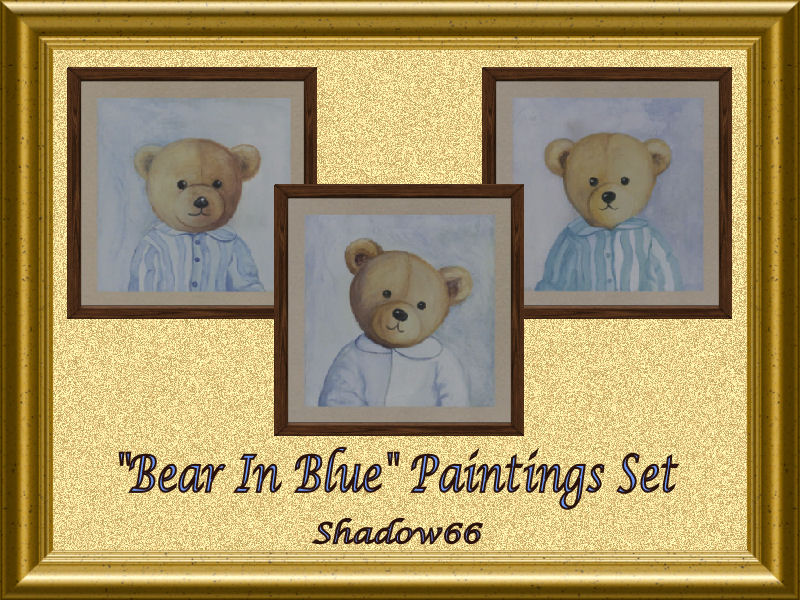
Firstly, three adorable bear paintings - great for nurseries and kids' bedrooms:
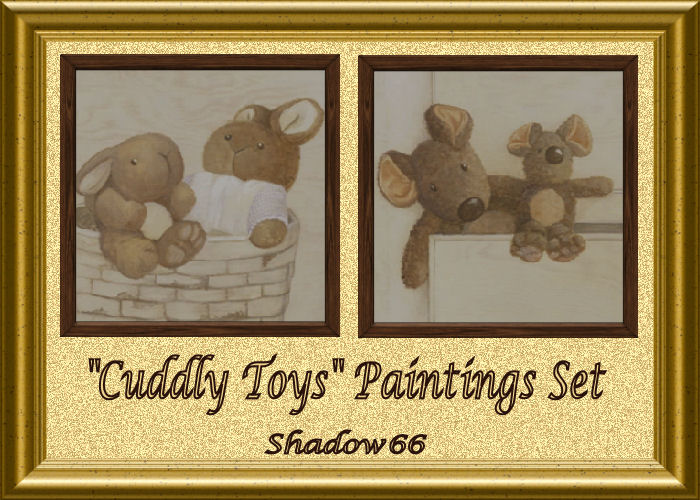
Secondly, staying with the cute theme, two 'Cuddly Toys' paintings:
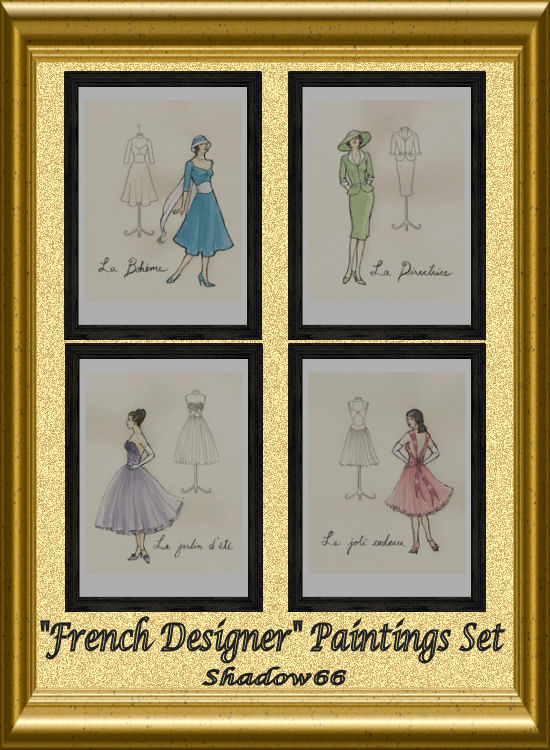
Thirdly, two more sets for your fashion designers:

Followed by a pair of rather nice flowers:

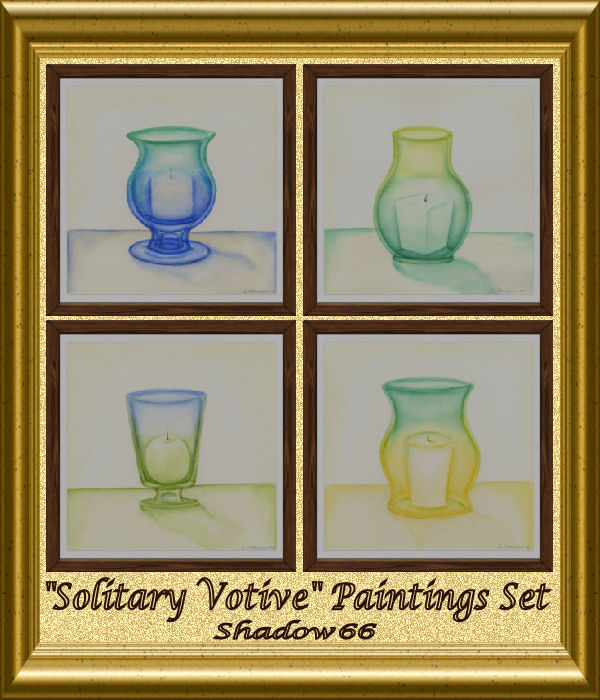
Something a little different - candles:
Some beautiful white tulips:

And finally for now, some booze (Rah!):
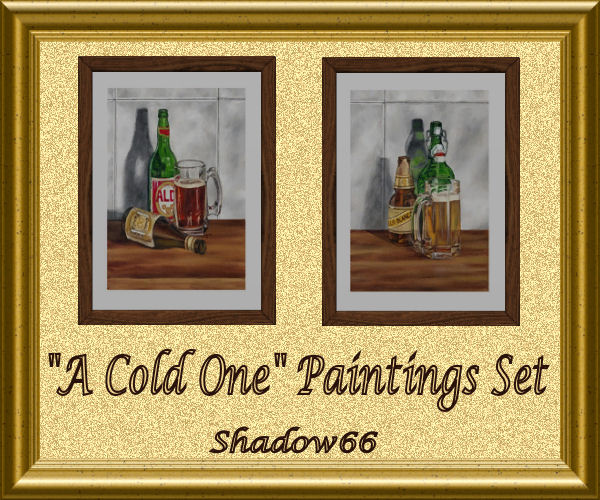
and some more booze (Hic'cup!):

Hope you like them - comments, ideas and feedback always welcome!
Enjoy!
House Clearance
As my collection of Sims 3 lots grows steadily I've decided to add some of my older lots to the free list. So go ahead, check 'em out and happy downloading!
The Hick Family
Mama and Elden Hick woke up one morning to learn they were residents in a newly incorporated community named Old Town. It didn't matter much to them because life pretty much went on for them and their three dogs, Leroy, Duke, and Bobo. Elden was still unemployed, and Mama was still struggling to make ends meet with a minimum wage job as a Dishwasher.
That all changed when Elden met Sally. Like Mama, Sally was a single parent who had struggled to raise her son Brody and put him through school and college. Sally had given birth when she was just fifteen, so she was still a relatively young woman when she met Elden. It was love at first sight...although Elden was aware of Sally's salary as a Security Consultant. Despite that, there was no denying the chemistry between them, and in short order the two were married, and Sally moved in with Elden and Mama and the dogs.
Brody, who had by this time graduated from college (in three years, thanks to summer school, advanced placement classes, and carrying full loads of classes each semester), was living at home and looking for a job. He moved in with the Hicks as well, determined to protect his mother after all she'd done for him. Having never known his father--whom his mother had told him had possesed a "love 'em and leave 'em" mentality--he was suspicious of Elden's intentions, especially after seeing the Hicks' run-down trailer-park home. But, seeing how truly in love Sally and Elden were, he gave the couple his blessing and did what he could to improve the house.
After going on numerous interviews and getting nowhere, Brody asked his acquaintances and friends in Old Town about what he should do. Finally, after all the talking and all the interviews, he finally found a job in a field that suited his skills and his temperment: he became an athlete. The first few days as a Mascot were torture, especially since he was always tired from doing odd jobs around the house before reporting for work. Finally, though, something at home changed that let him get more rest, and he was finally promoted. One opportunity led to another, and he quickly rose to become a Coach. Though he briefly toyed with the idea of trying to become a Hall of Famer, he decided that he was happy where he was helping others to succeed in athletics.
Sally, happy that her son and her new husband were getting along, and that she was getting along with her new mother-in-law, was able to focus on her career and quickly became a Venture Capitalist. The hours were long and hard--for 9 hours work she earned 1,300 Simoleons, the most someone at her level could earn--and the pay-per-hour wasn't the best (she would have needed to be a Theorist for that), but she didn't see how becoming an Information Overlord would have made that great a difference, especially since the risks were so high (one mistake and no one would trust her for information again). So, she settled into her job with something approaching contentment.
The influx of Sally's and Brody's salaries into their finances meant that Mama could relax a bit and reassess her life. She had once been a beauty queen, but the years had taken a toll. She decided instead to continue in the food service industry, but she would definitely get away from the sink and do something more with her career. Now able to study a bit, Mama did just that. Experimenting on the family and taking tips from Brody, who was the best cook in the family, she proved herself and managed to become a Sous Chef. The pay is only double what she was making as a Dishwasher--not much at all--but it was a start.
It took a little while, but Elden and Sally had a son, William. As the individual who truly joins the family together, William found himself very much loved and indulged. He was by no means spoiled, however. Active and playful, he also has a keen sense of responsibility. Although everyone would rather he focus on his studies, William has taken it upon himself to also bathe the dogs on a regular basis. He shares a bedroom and a bed with Brody of necessity--the tight budget couldn't really allow for building a whole separate room for him--but he doesn't mind.
Although Elden knows he should really be contributing to the household finances, his laid-back personality really doesn't allow it. Instead, he has improved his skills as a cook, and now gets up early to prepare breakfast for the family. He also does dinner. He also feeds the dogs, bathes them when William has friends over, and cleans up their messes (the dogs are housebroken, but they do sometimes go in their enclosed yard--outside by the fire hydrant, nature takes care of itself). He does all he can to shoulder the stresses of house management so his family can come home to a clean, comfortable atmosphere where they can all kick back and relax...when they're not juggling relationships, that is.
Leroy, Duke, and Bobo are happy with their expanded family. They all sleep in Mama's room, but their food bowls are in the back yard. William plays with them and also slips them treats at the dinner table. Leroy prefers doing his business out-of-bounds by the fire hydrant, but Duke and Bobo are so obsessed with some wind chimes that Elden gave Mama for her birthday years ago that they often wind up relieving themselves right around it. They also all love teasing the paper girl by barking and threatening to chase her each morning. They also enjoy a good fight with El Bandito, the raccoon--unfortunately, they don't always win.
***Update 20 June 2010***
Mama graduated from being a Sous Chef to Head Chef, then she took time off from the kitchen to study other restaurants by becoming a Restaurant Critic. Then, capitalizing on everything she had learned, she wrote a Cook Book, and finally opened her own restaurant--the Welcome Home Diner, where you'll always be able to enjoy a taste of Mama's cooking. Now, as a Celebrity Chef, she's famous in another way too: she's the first Celebrity Chef to work in hair curlers!
Elden, who previously was satisfied with just taking care of the house while the rest of the family worked and studied, became tired of being dependent on them for everything. Then he discovered that people were willing to pay for what he did for fun--make things! Now he spends several hours each day carving and painting Garden Gnomes or chiseling out Gargoyles for people's gardens and homes. At 100 simoleons a piece, and making between 12 and 18 of these a day, he makes more than even his wife! No longer feeling like a burden, he's happy to share the chores of cooking with his step-son Brody.
***Update 21 June 2010***
Although Sally and Brody reportedly had no ties to anyone in Old Town prior to moving into town and subsequently entering the Hick family, rumors have surfaced that there is at least one individual with a direct blood connection to Sally and/or Brody. The gossip network suggests that the individual is one of Sally's parents (confirmed false), Sally's brother or sister (generally discredited), Sally's cousin (accepted as potentially true) or some other relation (deemed unlikley), Brody's unknown father (greatly favored and hinted at but not yet proven), or Brody's half-brother or half-sister through his unknown father (second most favored but unconfirmed).
***Update 28 June 2010***
Family income: $3060 (Celebrity Chef-$760, Venture Capitalist-$1300, Coach-$1000)
The truth is out! Sally and Brody DO have a connection to Old Town, but it is one that even they didn't know: Grant Steele is Sally's grandfather, and thus Brody's GREAT-grandfather. [Player's note--I did the math. If Grant met Sally's grandmother when he was 17 and she was 15 and got her pregnant, and their daughter had Sally when she was 17, then Grant would only be 35 at the time of her birth. By the time Sally had Brody when she was 15, Grant would only be 50. And when Brody graduated from college at 19--he graduated from high school at 16 because he was so smart and diligent--Grant would only be 69. So it's entirely possible. Highly unlikely, but not impossible. And given the dramas the Silver family is prone to, entirely probable.]
My Sim Families Revamped
It's been a while since I last wrote about my Sims, and a lot has changed since then, so I've decided it's time to re-do the whole thing. So, I'll be talking about the families I've already written about, but I'll try to incorporate as much as I'm able from all the updates and whatnot, as well as whatever new has happened in my families.
I'll try to keep the writing light and entertaining, and creative and imaginitive, of course, so I apologize if a lot of it sounds like it's coming from a soap opera. But, if art represents life, why shouldn't Sim-life imitate art?
But gee, I have so many families in play now that it might take a while to get to all. I originally tried to do one a day, but real life interfered and that idea went up in smoke. So, for the time being, I'll focus on whatever family I happen to be focusing on the most. Then, time (and inclination) permitting, I'll bring in one of the older families.
And so, without further ado, I'll get on with the first of the revamped blog entries, focusing on the family I'm currently working on.
Tyre Fire Burns EA Fire!!!
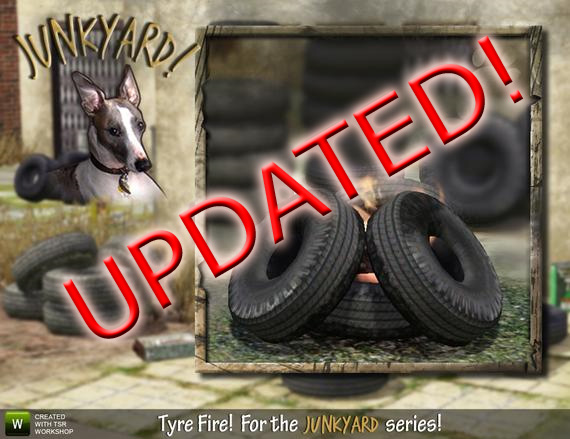
You'll be sick of me by the time I've finished posting about this, but I'm determined you'll see this somehow and in some way...
My latest creation, the Tyre Fire, had a fault. it wasn't a fault I spotted, because the fault actually manifested on the EA fireplace I'd used for my clone, not the fireplace I made. My fire worked fine - succeeded in all manner of tests, and of course the orignal EA fire was still in the catalog. All good then!
Well, no. Baufive wrote to say that the EA fire now carried the name and description of my tyre fire! If you're familiar with the ridiculous descriptions I often add to creations, you'll realise how funny that is. Well, funny for an approx 3 seconds before it becomes extremely infuriating! Therefore I apologise humbly for whatever went wrong with this.
IT IS NOW FIXED - DOWNLOAD UPDATE
Please ensure you UNINSTALL the old version because this version will not replace it automatically.
Themes and projects
Well, as you have notice, i like to build in themes. Now i am building some simple victorians, that i have placed behind halltown in the city. When i have done this, i will take some screenshots and put it up in my gallery.
The next project is modern houses, placed up in the hills, beside the victorian. They are to going to be simple, so no personal items like a guitar or fish bowl, only what they need to be able to live there. And then when the simmers (you) buy the house, you can put in what your simmers need :) And probably upgrade furnisher and other stuff to better stander.
I am thinking about making some farmhouses, and probably going to use houseplans for this. I dont know much of how they should look like. Well, that comes after the modern, so it will take some time before i can start with it.
Well, hope your simmers enjoy my houses so far :)


News!
Hi!
I'll had a good rest and now it's time to create! I've created new dress and tunic top, they'll be uploaded in 2 days:


And I also want to wish new SA winners new gorgeous creations;)
P.S. I'll have a rest this week again;)
First Week at TSR!
I just wanted to write a few words to say thankyou to everyone who has made me feel so welcome here at TSR! I joined the site just six days ago and already I have had two screenshots and a story featured on the front page PLUS I have already had over 1000 page views!
A massive thank you to the creators and administrators of the site for providing such a marvellous place for the simming community to come together and share their ideas and creations with each other. I am sure I will be sticking around for quite some time.
To those who have been commenting on my screenies and stories, I really appreciate it and I love that so many people have such lovely things to say. The support that everyone here gives to each other is fantastic!
I submitted a few sims today as well as my first lot, so they should be available to download very soon and I plan on submitting part three of 'Defection' tomorrow, so keep an eye out for that also.
xoxox - Leni
Thank you!
I just wanted to send out a very big thank you to all the people who have bookmarked me. I have now reached 200 and as I don't know who you are, this is the only way I can thank you :) In addition to this, I have almost reached 50,000 pageviews and seen as I only contribute stories and screenshots to this site, it's always a surprise.
I have been pretty busy in recent weeks but now that I'm settled in my new place, have successfully finished my studies and am close to starting full-time work, I've got a bit more time to work on my new story, A Foreign Romance. The first chapter should be out soon and I hope it's as well received as my previous stories.
Are you on Twitter?
I honestly love chatting on Twitter and I find myself loving it way more than Facebook. It's one of those sites that although you're just suppose to update your status, I actually have full on conversations with my friends on it. I do, however, wish that they would change the 140 characters. What I need to say takes more than that. LOL
Back Again
I've found my way back to the sims community. I've been on again off again for about a year and a half or so. And from the looks of the visit counter many of you have noticed. I feel all warm and fuzzy inside. Truly. Paranoia is a terrible thing to waste. Moving on.
I will answer a question that has been asked over and over and over while I've been away. Yes, I will return to creating. Er, just as soon as I figure it out. Sims 3 is a bit different and I've been mucking with it for less than a month. True. I bought the game back when it first came out but I didn't have a computer that would run it until now. Sad, right? You're tellin' me. Actually, EA really needs to edit their system requirements and supported video cards for Macs. That's all I'll say on that point. Ahem. Anyway, I now game on a PC. Nope, I'm not a traitor. I use my Mac for work and most other things. I game on my PC. Simple enough. My son inherited my original copy of Sims 3 and has been happily rubbing it in my face since (his Mac runs it fine). Until recently. Now I'm on the road to threedom and playing catchup. Back to creating though, I do plan to create for Sims 3. Most likely my forte, lots, and maybe some sims. I've been told I have a knack for making genetically pleasing sims. Possibly patterns. That will require some laptop flipping since Photoshop is on my Mac and the game and TSR Workshop are on my PC. Do I want the hassle? Dunno. It's an awful lot like my real life job and that doesn't really trip my trigger for a hobby, but I am intrigued. Where there is a will there is a way.
I started my first Sims 3 lot last night. That plushie green square adorned in grid lines thought it would get the best of me. I haven't built anything in... too long to remember. There's now a nice modern-type Victorian structure thingy on it. The outside is finished. Now to make the inside purdy. I had almost forgotten how I lose myself when building. Time and space are altered when I'm in that state. Ah, heaven. And I have to admit, with Sims 3 I spend an awful lot of time matching stuff and changing colors and wood grains and then changing them again and back again just because I CAN! Makes me giggle. Crazy? Naw. Just damn happy everything can finally match! And anyone can do it now, but that does not mean everyone should. I've seen some pretty... interesting schemes across the web. No giggle. So perhaps some lots for Sims 3 will show up here if I can figure out how to get them out of the game and uploaded. Should be my usual practical stuff. I know, I know. Boring. But you like it and you know it.
If you've been to my minisite before, you've probably noticed I've redecorated for my comeback. Ah yes... cookies. Mmmmmm... I'd like to throw a hug out to DOT for making a plate of cookies clutter item. I was gonna ask but there it was! Glittering in all its cookieness. All sims must have cookies! Yes, they all learn the recipe and there are cookies in every fridge. No sim goes cookieless on my watch.
Also, I'd like to thank Cyclonesue for her wonderful instructions on roof heights. Thanks to that little ditty I didn't pull all my hair out trying to get 4 different roof heights just so. Roof height sliders. The best thing since sliced bread. But still not as good as homemade bread slathered in peanut butter and jelly. YUM!
That reminds me. My self-sim and my trademark sim, Ryder Drake, are on the Exchange if anyone wants them. I just wanted their portraits for my avatar and then decided to just leave them up there. Sure, I got them up there just fine but I can't find a dang file to stick up here. I feel so inept. *cries* I'll figure it out.
So that's a ditty from me. Lunch hour is over so I better head back to the grind of real life. Maybe I'm back to stay. I won't guarantee anything yet as I never know what tomorrow will destroy but ya never know.
"Have you ever Licked a Lamppost in winter?" Hugs to those of you that get that.
Bad news...
Hey guys, So My "loving" Bro, deleted my game, the day I got the first chapter out of 'Not that bad'. And I didnt realise untill I got my laptop fixed. So if you think I was being lazy, you now know. So from what ever day (I'm not sure) Ive been downloading all day and night, so I've got some cooler downloads and poseboxes :D So please expect my new storie out soon. Its called 'Midnights Moon' It'll be better than my old one :L ~ Jess xox
4 new fence variations out today! More coming all week. Give yourself more choice with your building options :D
Hi all,
This month I will be doing a "fence frenzy", starting from today. I recently learnt how to create fences and to celebrate, I will be creating lots of different fence/mesh options.
I think the more choice we have with our build items, the more unique our builds can be.
Have you ever built a house or a community lot and just needed a fence that was just a bit taller/smaller?
Maybe you like one particular fence, but you cannot co-ordinate with the same style fence around your flower beds?
Maybe you like a small border fence but you would prefer a taller option to co-ordinate?
Well I hope to solve some of those issues by releasing every fence in the game with at least one co-ordinating option.
I love to build and I find it so frustrating that the game does not provide enough options.
Anyway, check out my Profile as 4 fence variations have already been released for download today.
More coming all week! So don't forget to book mark me and check back often.
Please remember to hit the "like" button and leave me a comment on what you think of them. I love to read your comments, they motivate me so much!
Bye for now
Simonetta.x
New Agenda
next agenda:
yay i got hels!
unfortunately its because i lost my game disc.... so yeah i built my first lot and i'm uploading it right now so i hope everybody will like: Lofty Ambitions!
CREATORS...I hope screenshots are a good enough thank you!
I'm uploading a TON of pictures of this house I made. All the stuff is from a bunch of talented artists......this home ended up having too much content (too many MBs) to upload but I hope showing pictures of what I had going are an appropriate way of thank all of you who have helped to make our games soooo much fun to play/decorate/build!
Reported Paintings � Warranted or Not?
I have just discovered that my five latest paintings sets have been reported (all by the same person) for not having in-game preview shots.
No-one else has mentioned this and there is nothing saying it is compulsory to include in-game shots for 'objects' on the submissions page. I have read and followed all of the 'rules' regarding submissions and my creations have been accepted and published, so surely if I was doing something wrong, this would not have happened.
I have not changed my way of submitting items since I started uploading sets, so why have my paintings only now been reported?
Could it be because the person who reported me also creates paintings?!!
I test my paintings in-game before I publish them, so I know they are fine, and I have had no negative feedback regarding any of them.
Everyone has the right to present their creations how they wish and my chosen way of presenting my paintings sets is in a frame, which I think is quite apt.
I always include previews of the actual paintings close-up so people can see what they are downloading - something you can't always see in screenshots, especially of multiple paintings hanging on a wall, with other objects included in the picture. Yes, some look really pretty, but when I’m looking to download something, I’d rather see the actual item itself rather than a screenshot of a room containing the item in the distance, with very little detail visible – that’s just my preference, but I know a few people who feel the same.
I also think that displaying my sets in the same unique fashion every time is helpful to people who are particularly looking for my creations as it makes them stand out amid all the others. Again, that’s how I look at the previews when I’m searching for downloads – you get to know the style the artist uses and if it’s the same, or very similar every time, you are automatically drawn to that picture and item.
Anyway, if anyone would like to pass comment on the way I present my paintings, please feel free to do so – I won’t be offended and would appreciate the feedback.
Thanks!
P.S. – And if the person who reported me would like to reveal the reason why they suddenly decided to do so, that would be appreciated too.
A HUGE THANK YOU
I wanted to express my thanks to all of the lovely and wonderful comments you have left me on my houses. I have been really slacking lately. Sometimes I get busy and sometimes I just forget but either way I want you all to know how much I truely appreciate your comments and that you like my cottages. Your wonderful comments is what drives me to make those homey cottages so you and your sims can have a great living experience. Thank you so much!
Bad news
Yestarday's evening I was reinstalling operating system on my computer and I separated hard disk incorrectly thought I dunno how its happened incorrectly...
So no creations till I'll get stuff fixed,I'm so sorry guys...
But I've got good news aswell-I created a really fab and realistic contact lenses for sims 3,and I'm also going to do sims 2 version of them
Activism
I had a lot of schoolstress but now it's over and soon I'd like to upload my third building. I'm also very happy that my second download had been such a great succes. So to say: Be excited when I upload my new house! ;D
Butterflies, Cakes, Chateaux, Love & Peace - I've got them all!!!
Having had an unexpected afternoon of work, I decided to re-stock my gallery, so here are a few previews of some of the latest paintings I've been working on and will be appearing here shortly.
Firstly, since quite a lot of you seem to like my drinks and chocolat paintings, I thought I'd add some yummy cupcakes to the menu:

Secondly, a set of rather nice French chateaux paintings (ideal for all your homes in Champs Les Sims):

Thirdly, for all you nature lovers, a pair of butterflies:
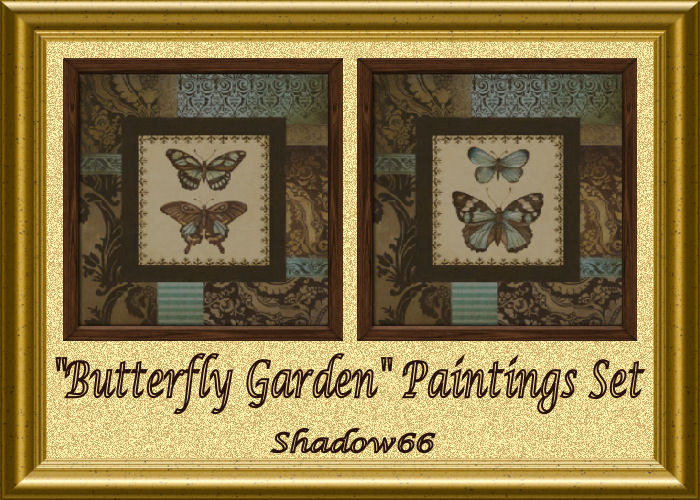
Then there's fashion from around the globe:

A pair of modern abstract tangents:

And finally, lots of 'Love & Peace':



That's it for now - Enjoy!
Meshing Part Three - Porch Column attempt number one :)
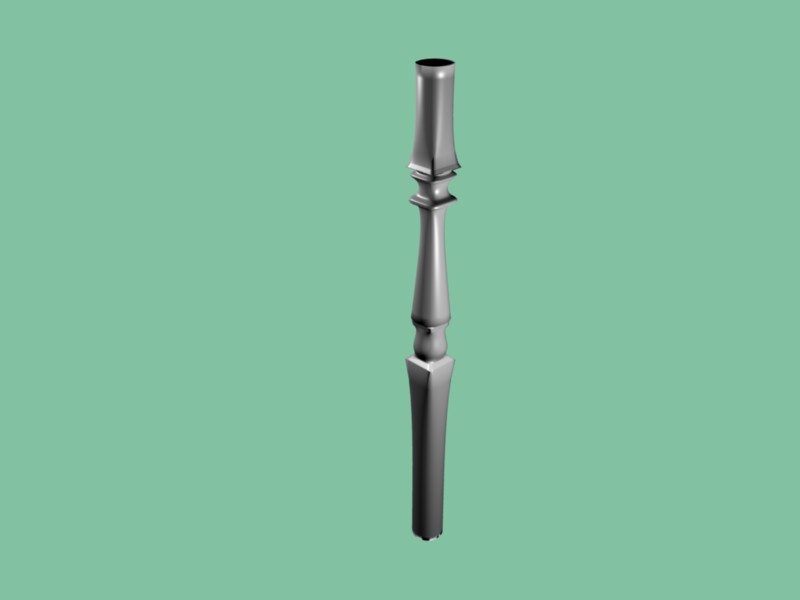
After almost two weeks of solid study and reading fun, I finally made a porch column that is almost perfect. I have a few issues with the bottom (haven't created the base yet) and a couple odd pokey things that didn't disappear when I removed duplicate vertexes. But! At least it is standing straight and not leaning... (remembering that I can lock on the z axis would be really nice to remember, I actually had to put a sticky note on the corner of my monitor)
Once I figure out what I broke with the pokey thing, and can lathe up columns at will, I will start working with the import/export to Milkshape, then see what happens when it's applied to a clone. I am still foggy on what I need to make sure follows the .obj file, so more reading for me!
Here is a picture of the alpha column.
Boardshort long for the summer !
To celebrate the arrival of the summer in a week, here is a boardshort to make surf, or to go to the beach and being fashionable. Available in download this Saturday!

World Cup Fever!!
That pretty much summarizes this post :D I'll try to keep designing and creating but the world cup is every 4 years so Ill be quite busy watching the games!!! LOL don't worry I won't dissapear. The matches are broadcasted in the morning so after work I'll design :D
HAPPY BIRTHDAY BARB!!!!
Today is my sweet American sister Barb's BIG BIRTHDAY! She had a nice round number coming up and today is a day to celebrate!
Go on over to Spitzmagic's guestbook http://www.thesimsresource.com/members/spitzmagic/guestbook/view
and say Happy Birthday!!!

My best friend's Haagje's birthday is today too! YEAY!!! http://www.thesimsresource.com/members/Haagje/guestbook/view
Did I tell you that also my sister in law Chantal and my co-worker Nikolien have their birthdays today? They are not on TSR...so no need to go say Happy Birthday. :D June 14th is a SPECIAL DAY
Sneak-peak on TF Fashion Set 5!


Guys you're killing me but not commenting on my fashion sets..Am I publishing them for myself?
Back, B******s :D
I'm gonna start creating stuff again because I've recently picked up an interest in Sims again. I dunno if I have any subscribers left to care, but it looks like I have over 20k downloads on my stuff...how the hell did that happen?
I also need to refill my TSR subscription...I may not do that for awhile, but it won't stop me from creating stuff. TBH, the fact that I have to pay for downloads to a game is a bit silly to me.
Avaliable Scholarships in Sims 2
Available Scholarships in S2U
=================================================================
Name: Hogan Award for Athletics
Qualification: Level 8 or higher
Body Skill
Award: §750
=================================================================
Name: Bain-Gordon
Communications Fellowship
Qualification: Level 8 or
higher Charisma Skill
Award: §750
=================================================================
Name: Kim Metro Prize for
Hygienics
Qualification: Level 8 or
higher Cleaning Skill
Award: §750
=================================================================
Name: London Culinary Arts
Scholarship
Qualification: Level 8 or higher
Cooking Skill
Award: §750
=================================================================
Name: Will Wright Genius Grant
Qualification: Level 8 or
higher Logic Skill
Award: §750
=================================================================
Name: Bui Engineering Award
Qualification: Level 8 or higher
Mechanical Skill
Award: §750
=================================================================
Name: Quigley Visual Arts Grant
Qualification: Level 8 or higher
Creative Skill
Award: §750
=================================================================
Name: SimCity's Scholar's Grant
Qualification: A- or better in
High School
Award: §1000
=================================================================
Name: Extraterrestrial
Reparations Grant
Qualification: Abducted by
Aliens
Award: §1500
=================================================================
Name: Young Entrepreneurs Award
Qualification: Level 3 in any
teen career
Award: §750
=================================================================
Name: Undead Educational
Scholarship
Qualification: Teen is a Zombie
Award: §1500
=================================================================
Name: Phelps-Wilsonoff Billiards
Prize
Qualification: Level 8 Pool
Skill
Award: §1000
=================================================================
Name: Tsang Footwork Award
Qualification: Level 8 Dancing
Skill
Award: §1000
=================================================================
Name: Orphaned Sims Assistance
Fund
Qualification: Sim has no
living parents
Award: §1500
=================================================================
* Dancing and Pool skills are "invisible" skills. There is no way to
view your sim's skill level in these areas. To build these areas have
your sims spend time dancing or playing pool to accomplish special
moves. Qualifying in these areas for a scholarship is "trial and error".
If you don't qualify when you first check available scholarships, keep
working in these areas and check again. *
This concludes our broadcast day .
. . Have Fun!
Basements Quick and Easy part 2
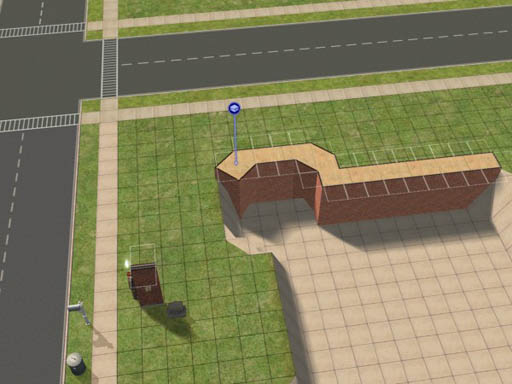
19. I must have had something in mind when I made this detail shot.
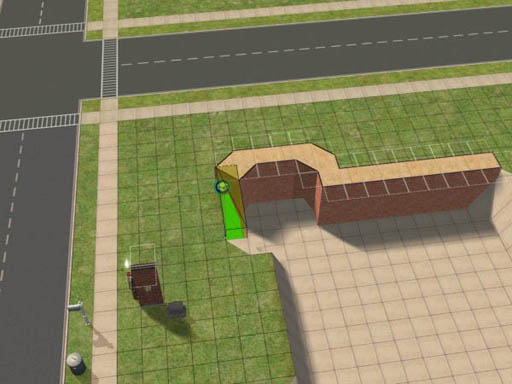
20. And this one.
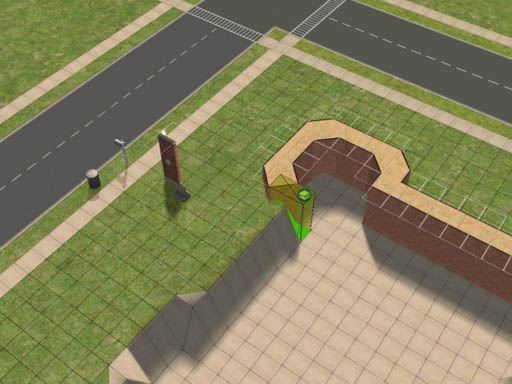
21. This one, too!
Now when it's all done, look at what some of those diagonal walls did to our basement floor. Where the walls are convex, it leaves a sloping floor.
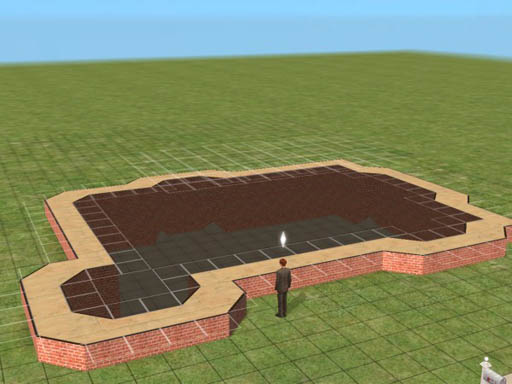
22. Convex diagonals left sloping floors in the basement.
I don't like that effect, so I square off those corners to bury the sloping floor.
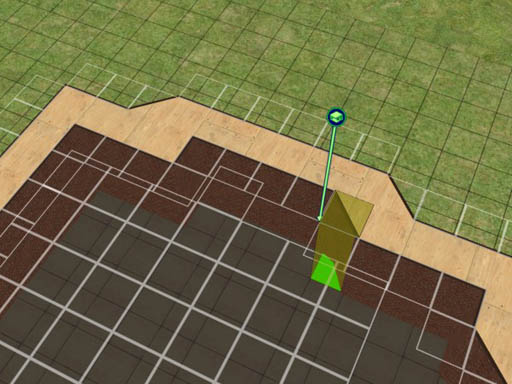
23. One little square of foundation tidies up those corners.
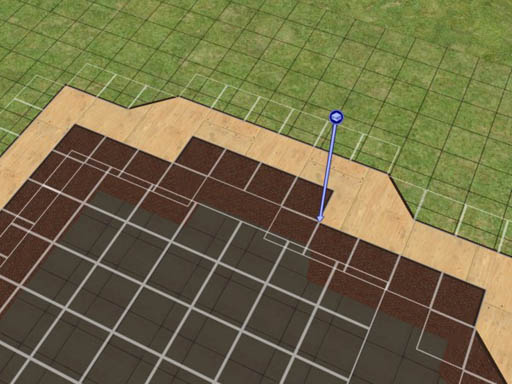
24. Much nicer; no ankle-breaking sloping floor here!
With the whole foundation done, now you're faced with the scary prospect
of having the some of the floor tiles apparently floating above the
level of the first floor. Be not affrighted.
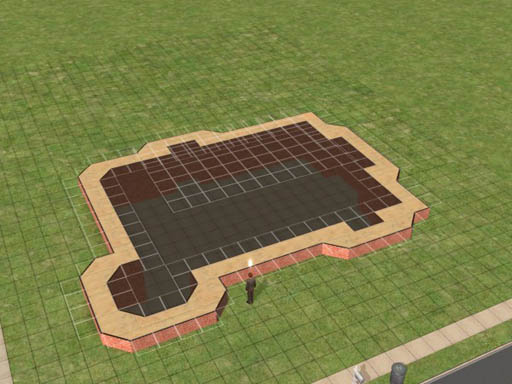
25. The floor above the basement
doesn't seem to line up.
No problem! Just pick a nice floor tile. Select a square on the
foundation at the level you want the floor, and drag across those
floating squares.
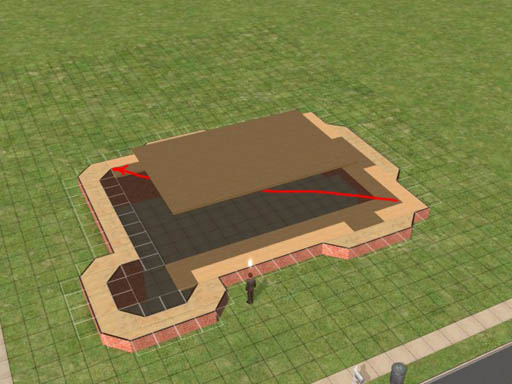
26. Add a floor, starting at the level
of the foundation and sweeping across the mess.
When you release the mouse, voila! The floating floor tiles snap into
place!
(Some tutorials talk about using the 'boolprop constrainfloorelevation
false' command here. I've never needed it.)
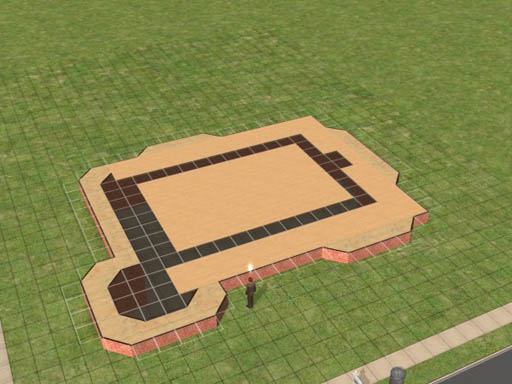
27. The floor levels out when you
release the mouse button.
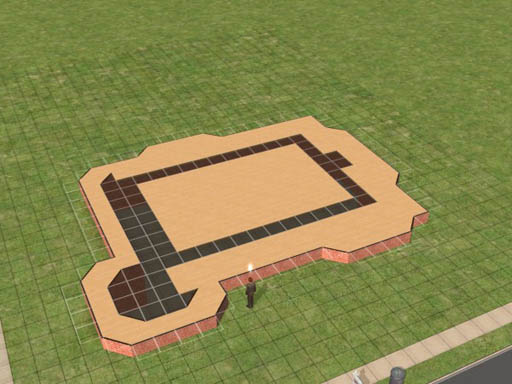
28. You can shift-click to fill in the
floor to the edges of the foundation.
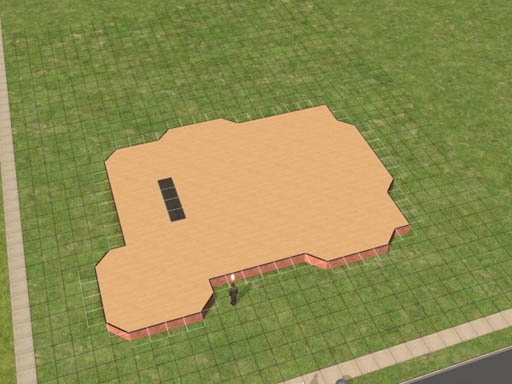
29. Fill in the holes in your floor,
and then cut out a 1x4 slot for the cellar stairs.
An interior stair needs a 1x3 space in the floor above it for clearance.
Exterior stairs need 1x4. I like to use exterior stairs inside
because sims will follow each other up and down exterior stairs. If you
use an interior staircase, they won't mount the stair until it's
completely clear and often forget the commands that made them want to go
up the stairs.
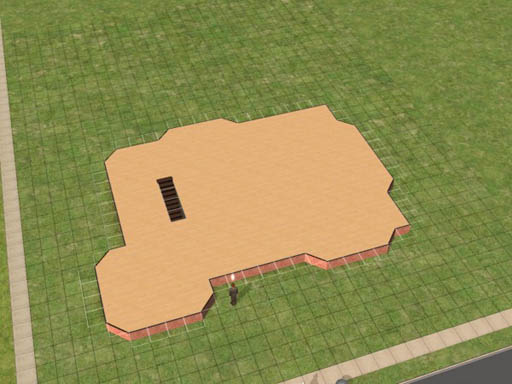
30. I used an exterior staircase to
reach the basement.
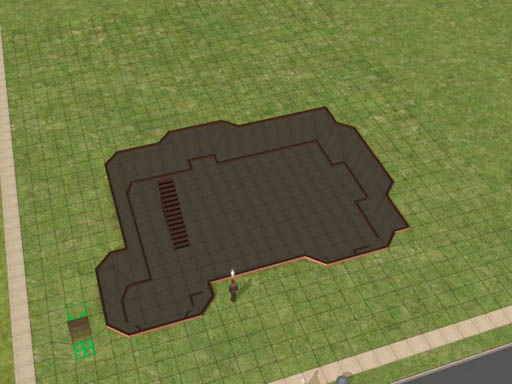
31. Our completed basement, with
staircase.
(Just ignore the little staircase in the left. I just happened to leave
the stair tool resting there when I made the screen shot.)
Well, now that we've built the foundation, let's finish off the house
above it!
Wilhelm wants to build this house to impress his girlfriend. so we'll
make it look nice. If all goes well, he'll only be living here for
about 2 hours; but it's an important two hours!
Part of the front porch will be roofed over so I added some ceiling
lights. To get them to go outdoors, I used the 'move_objects on'
command. Ditto for the burlgar alarm.
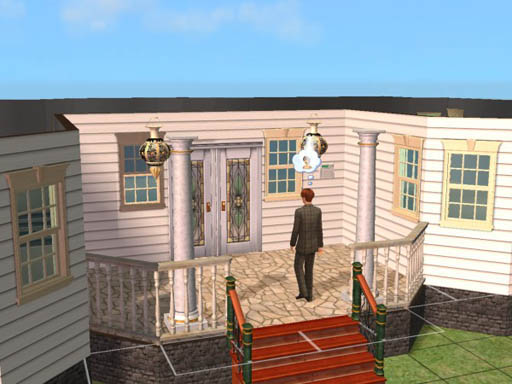
32. I extended the front porch out
another square to add some more architectural interest.
Note that I always paint the interior of the foundation walls. That raw
brick just seems to look funny otherwise.
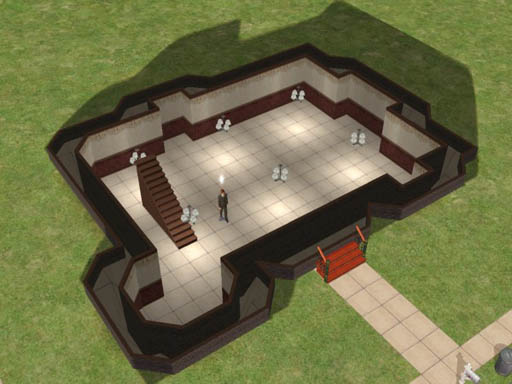
33. Ceiling lights are vital in the
basement. Otherwise it's too dark and the sims will hate it.
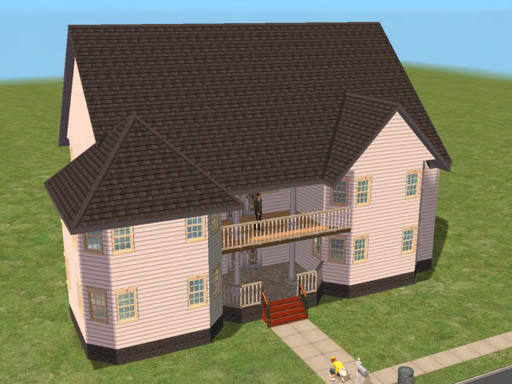
34. The completed house. Wilhelm
enjoys the view from the balcony.
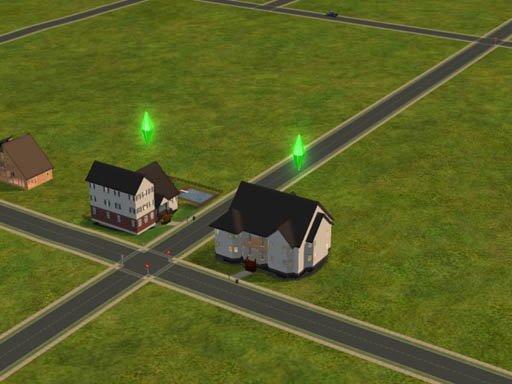
35. Our new construction in the
neighborhood.
Wilhelm's girlfriend lives right across the street. The third floor of
the bedroom wing is the servants' quarters, of course!
Basements Quick and Easy part 1
1. Start out by using the wall tool to lay out the outer perimeter of
your house's foundation.
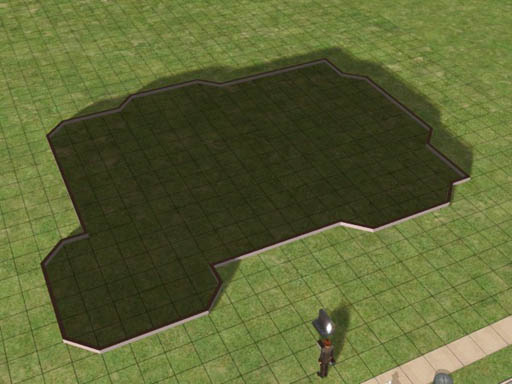
1. Lay out the foundation
You can put a lot of planning into exactly where things will be in your
new home, or you can do what I just did and sort of wing it. At this
point I really don't know what the finished house will look like but I
thought that since this is corner lot, a nice turrety kinda thing will
look nice in the neighborhood.
I figured I wanted a front porch that's six squares wide and the rest is
just sort of intuitive, based on whatever instinct I've developed from
building lots and lots of houses in The Sims 2.
2. Now we need to establish the level of the basement floor.
In The Sims 2, using the shovel tool to move terrain up or down 16
clicks will be exactly the height of a wall. A normal foundation on
level terrain is 4 clicks high, and so is a short staircase. So let's
save ourselves a lot of time and just use the stair tool as our
measuring guide.
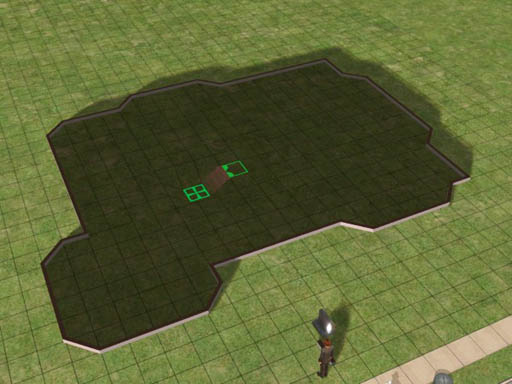
2. The staircase tool takes us down 4
clicks.
If we start at the lower landing of the stair we just built and go down
another level, and then do it once more, we end up exactly 12 clicks
below ground. We want our basement walls to extend 4 clicks above
ground to accommodate a normal foundation height, so now we know just
the right level!
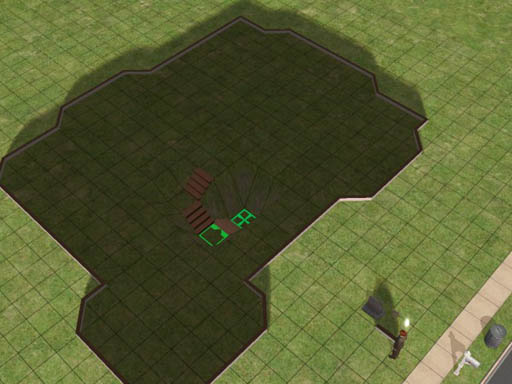
3. Three flights of stairs down takes
us to the depth we need.
Now, while have the stair tool in hand, just hold down the control key
and delete the stairs. They served us well as a measuring device but
now we are done with them. I put a floor tile on the bottom level to
make it easier to see where we are.
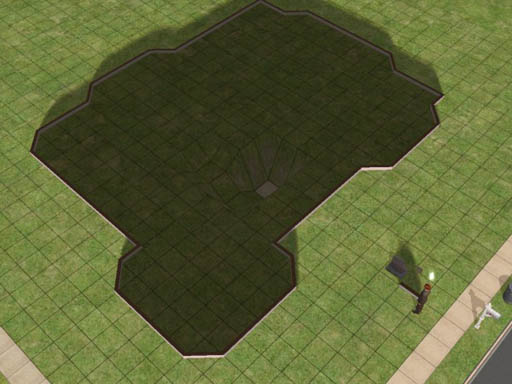
4. Delete the stairs. They were just a
measuring tool.
Now it's time to level out our whole basement floor. With the shovel's
"level terrain" tool selected, we start at the one square and sweep
toward the outer walls, stopping 1 square short of the perimeter.
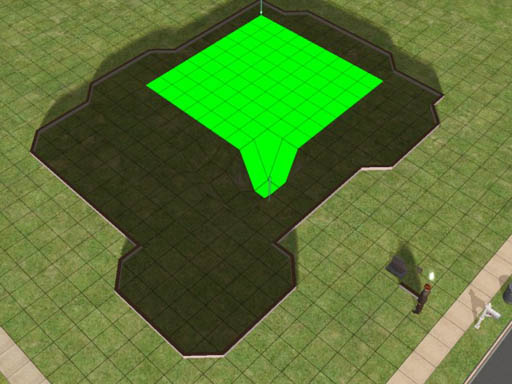
5. Flatten the basement floor out to 1
square short of the perimeter.
Release the shovel tool and the floor flattens out. Now you can see why
we stopped 1 square short. Those outermost squares become the sloping
sides of the basement.
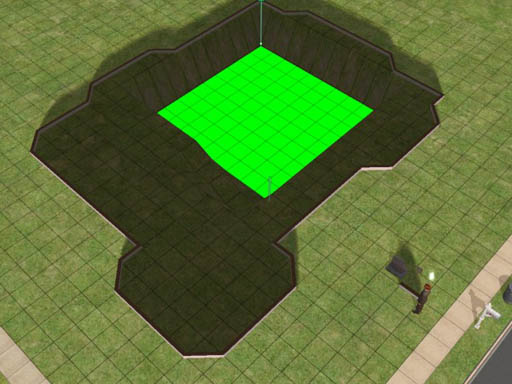
6. The squares nearest the outer
perimeter form the sloping cliff face.
If you go too near the edge, the game will whine at you.
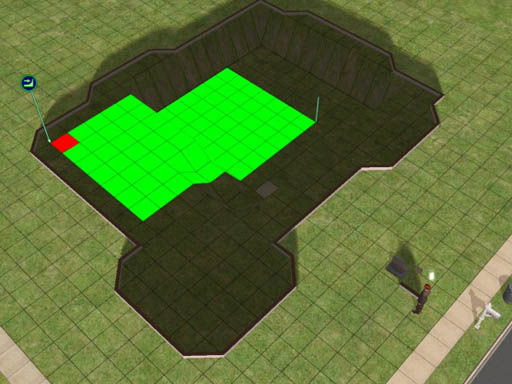
7. You can't select the squares right
at the edge.
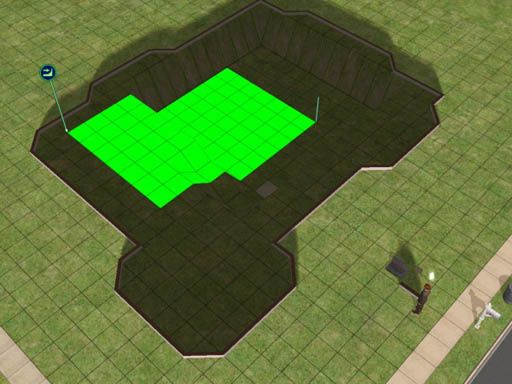
8. When you hit red, back off one
square and let it flatten.
Incidentally, that's Wilhelm Smythe watching the construction in
progress. He's just here to keep me company while I'm digging.
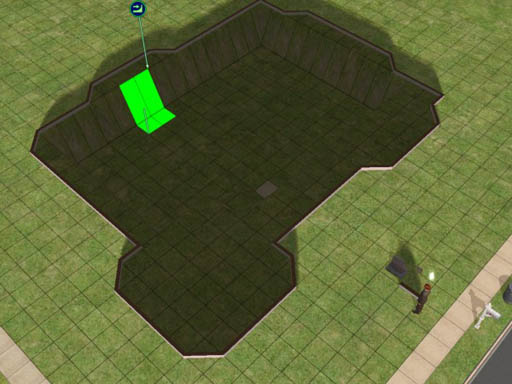
9. You can get a couple of more squares
of flat floor from those bays, giving the basement a more interesting
shape.
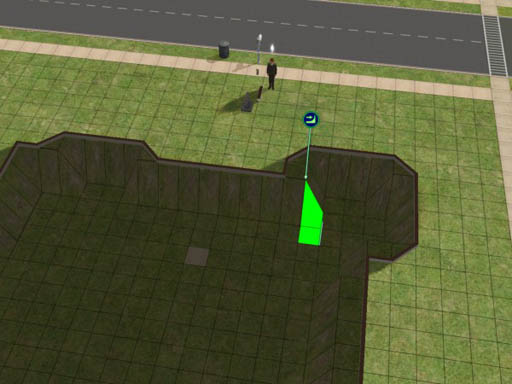
10. Sometimes you can sneak up on a
sloping edge to flatten a little bit more basement floor.
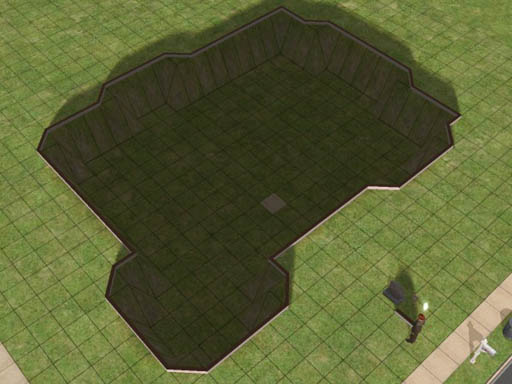
11. Our excavation is done!
I don't like to leave green turf on the sloping walls. In this house I
fixed that by paving over the entire basement in concrete. That was
easy to do because the perimeter walls are still there. I just selected
one tile in the basement and held down the shift key.
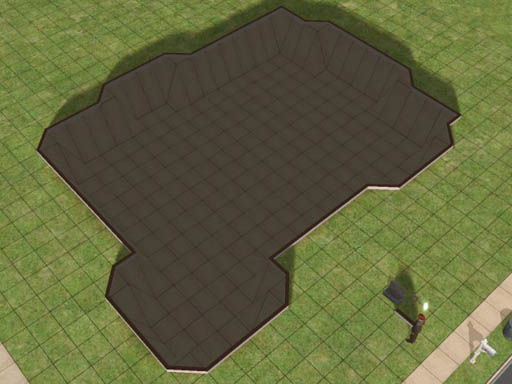
12. Pouring the concrete.
Now we're ready to add the foundation. Start by deleting the perimeter
walls. Then construct a foundation just one square wide all around the
perimeter.
You select where you want the foundation to go by selecting (1) the top
outer corner of the starting square and sweeping to (2) the bottom
corner of the ending square, diagonally opposite where you started.
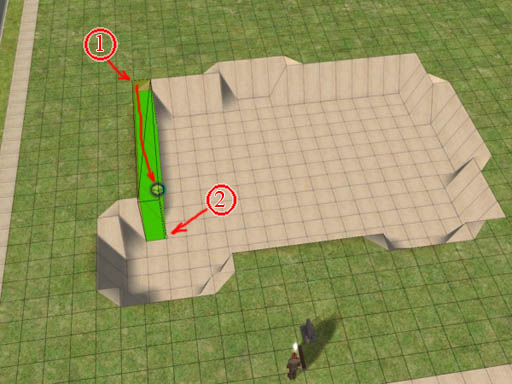
13. Build the foundation with its outer
wall right along the cliff face and its inner wall on the basement
floor.
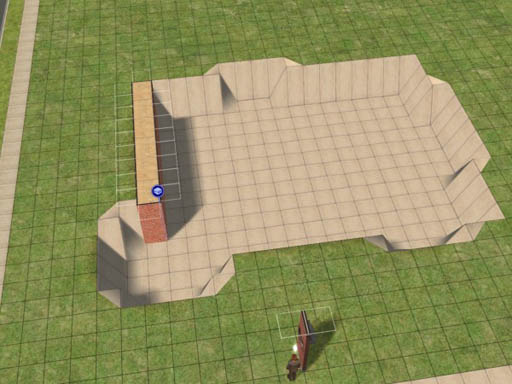
14. See how it works?
Work your way around the perimeter, always starting on the foundation
you've already built. This assures that you have a consistent level for
the whole first floor of your house.
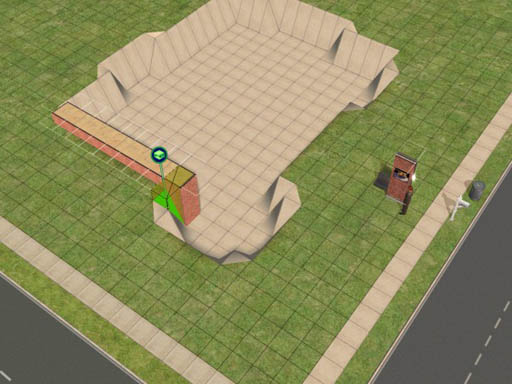
15. Turn the corner and build the next
segment.
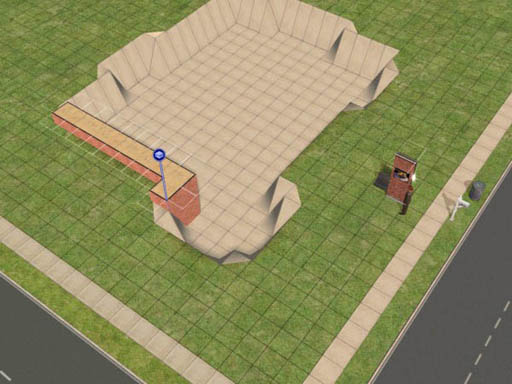
16. Use the diagonal foundation tool to
line up the outer edge where you need it.
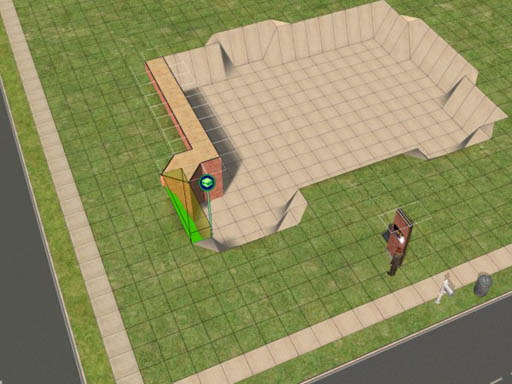
17. Keep working your way around,
building the foundation along the edge of the cliff.
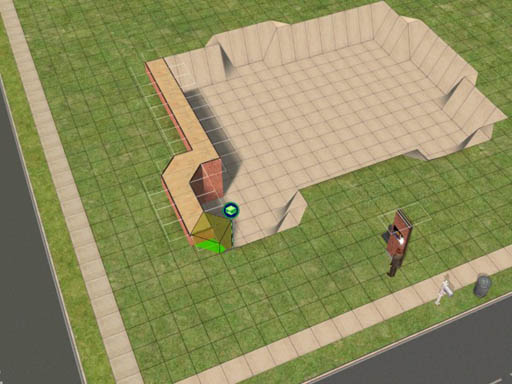
18. The concrete we poured earlier
gives us a nice reference for the diagonal edges.
Installation Order for Expansion Packs
Although there are no specific instructions from EA on how to install or reinstall all the Expansion Packs and Stuff Packs for The Sims 2, conventional wisdom seems to think that it's a good idea to install them in the order that they were published:
- Base Game: The Sims 2*
September 17, 2004
- Patch: The Sims 2
- Expansion Pack: University March 2, 2005
- Patch: University
- Expansion Pack: Nightlife September 13, 2005
- Patch: Nightlife
- Expansion Pack: Open For
Business March 2, 2006
- Patch: Open For
Business
- Stuff Pack: Family Fun Stuff April 13, 2006
- Patch: Family Fun
- Stuff Pack: Glamour Life
Stuff August 13, 2006
- Expansion Pack: Pets October 17, 2006
- Stuff Pack: Happy Holiday
Stuff** November 2006
- Patch: Pets Body Shop December 2006
- Patch: Pets Not published yet.
- Expansion Pack: Seasons Probably coming in March 2007
You can also download this list in a printer-friendly Microsoft Word
file. (That's .doc format.)
IMPORTANT: If you have a working game, back up your entire game before
installing any of the expansion packs!
Yes, it does take a lot of time
and a huge amount of disk space to make a backup copy of your game, and
there's almost half a chance that you won't need the backup.
Nevertheless do it! The fan
boards are filled with sob stories from people who didn't make a backup
first; you don't want to be one of them!
All you need to do is:
- select your The Sims 2 folder,
- control-C to copy,
- navigate to somewhere else on your machine, and
- control-V to paste.
Then take a long break while your machine copies
the files.
If you are installing from scratch, it's going to take you all day to
reinstall this software. You can afford the time it will take for your
computer to make a copy of your The Sims 2 folder. If you have a
separate physical disk drive installed in your computer it's a really
good idea to send the backup copy to that disk so that you will be
protected from a hardware failure.
*The Sims 2 Holiday Edition includes Holiday Party Pack, released November 17, 2005
**The Happy Holiday Stuff Pack includes the original Holiday Party Pack with about 20 new items added.
How to Edit Family Relationships in SimPE
How to Edit Family Relationships in SimPE
Part 1
1. Open SimPE.
2. Select a neighborhood.
3. Make a backup of the neighborhood.
4. Did you make a backup?
- a. Yes: Continue.
b. No: Go to step 3.
5. Open the neighborhood, and make sure you're opening the right one!*
6. Are you sure you want to make the planned changes to this house?
- a.
Yes: Continue.
b. No: Stop. Go back into your game and check out the household before you mess it up.**
How to Edit Family Relationships in SimPE
Part 2
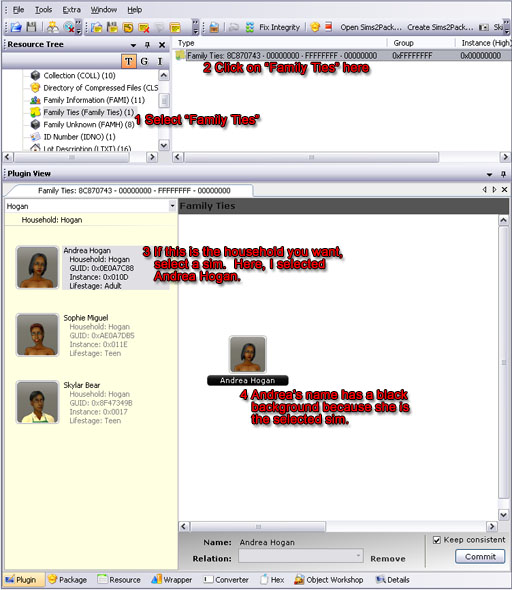
Select a sim whose relationships we
will mangle.
If the family you want isn't the one selected when you first open the
Family Ties tool (which is very likely), look in part 5 of this tutorial
(below) for how to find the right family and how to pick people from
other households.
In this case, our victim is Andrea Hogan in Bonnyview Shores. Andrea is
the target because when I opened the Family Ties tool, the Hogan family
happened to be the one selected. I saw that Andrea was living with two
people and related to neither of them so they had the misfortune of
becoming the victims for this exercise.
How to Edit Family Relationships in SimPE
Part 3
Now let's add Sophie Miguel to Andrea's family.
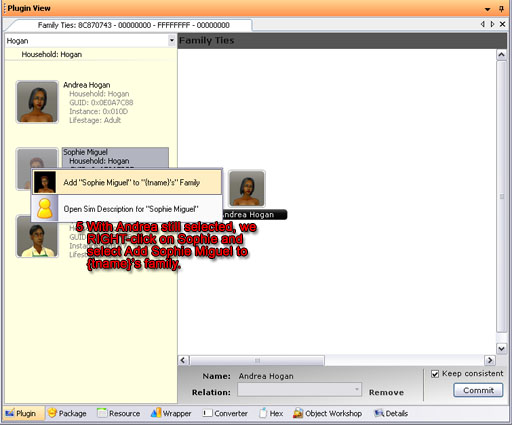
RIGHT-click on the target sim.
Note that Andrea is still selected and we are still in the Hogan
household. I right-click on
Sophie to select her. The menu pops up and I choose to add Sophie to
Andrea's family.
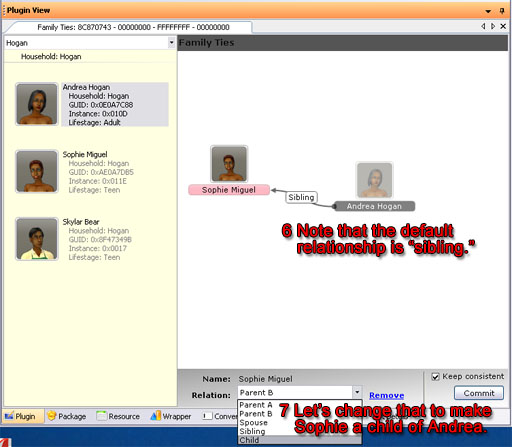
Make Sophie Miguel a child of Andrea
Hogan.
Click on Sophie in the family area to select her. Then use the
pull-down menu at the bottom of the window to make her Andrea's child.
How to Edit Family Relationships in SimPE
Part 4
Now to try something really weird. Let's marry teen Skylar Bear to
adult Andrea Hogan. Right-click on Sklyar, add him to Andrea's family,
and then select "spouse" from the pull-down at the bottom of the window.
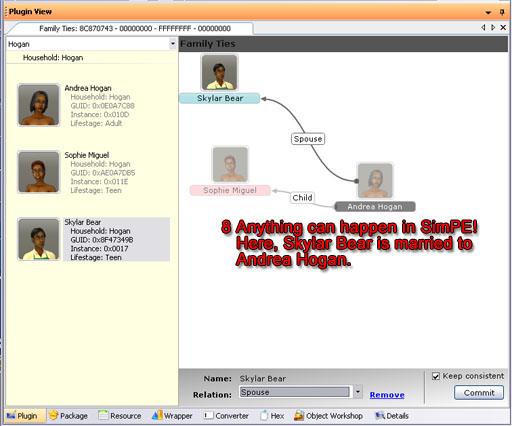
Skylar Bear and Andrea Hogan are
married.
Note that males are
highlighted in blue and females in pink.
In any other neighborhood, they might have thought it odd for Skylar to
get married while he was still in high school, but this is, after all,
Bonnyview Shores, where normalcy is the only weirdness.
Andrea thought it was just a passing fancy, a mere dalliance, but Skylar
takes his responsibilities seriously. Here is the real reason he
married Andrea:
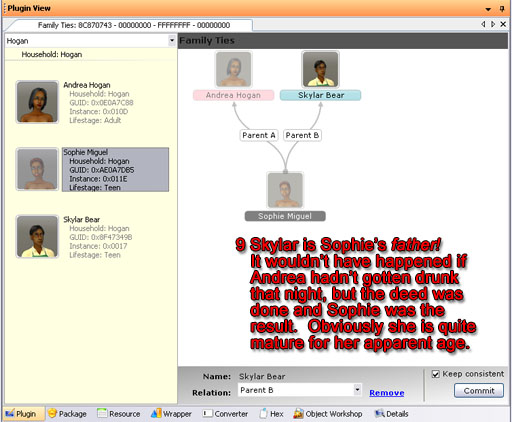
Skylar is Sophie's father!
To complete Sophie's set of parents, I selected her in the left-hand
column. Then I right-clicked on Skyar to add him to her family.
Skylar came in as Sophie's sibling. I changed that to make him Sophie's
father. Sophie is a teenager, so he must be having a terrible time
getting through high school. Maybe it's all the time he spends working
that cash register at the local supermarket; no time for studies. We
all know that Sophie is quite precocious but until tonight I had no idea
just how precocious she is!
How to Edit Family Relationships in SimPE
Part 4
Now to try something really weird. Let's marry teen Skylar Bear to
adult Andrea Hogan. Right-click on Sklyar, add him to Andrea's family,
and then select "spouse" from the pull-down at the bottom of the window.
Skylar Bear and Andrea Hogan are
married.
Note that males are
highlighted in blue and females in pink.
In any other neighborhood, they might have thought it odd for Skylar to
get married while he was still in high school, but this is, after all,
Bonnyview Shores, where normalcy is the only weirdness.
Andrea thought it was just a passing fancy, a mere dalliance, but Skylar
takes his responsibilities seriously. Here is the real reason he
married Andrea:
Skylar is Sophie's father!
To complete Sophie's set of parents, I selected her in the left-hand
column. Then I right-clicked on Skyar to add him to her family.
Skylar came in as Sophie's sibling. I changed that to make him Sophie's
father. Sophie is a teenager, so he must be having a terrible time
getting through high school. Maybe it's all the time he spends working
that cash register at the local supermarket; no time for studies. We
all know that Sophie is quite precocious but until tonight I had no idea
just how precocious she is!
Part 5
You can add sims from all over the neighborhood to your sim's family.
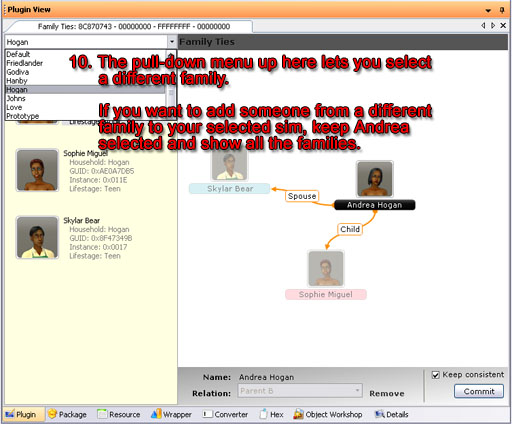
The pull-down in the upper left selects a family.
If you have Andrea selected and choose a family other than "Hogan" she will disappear. However, if you choose "All Households" she'll stick around and you can add anybody to her family.
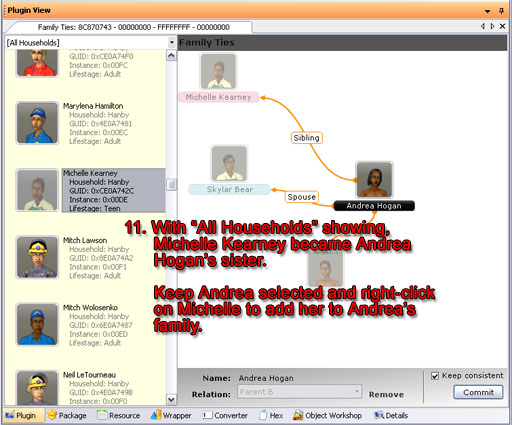
Michelle Kearney and Andrea Hogan are sisters!
Part 6
Skylar finally found out who his real parents are. Now he wishes he didn't know.
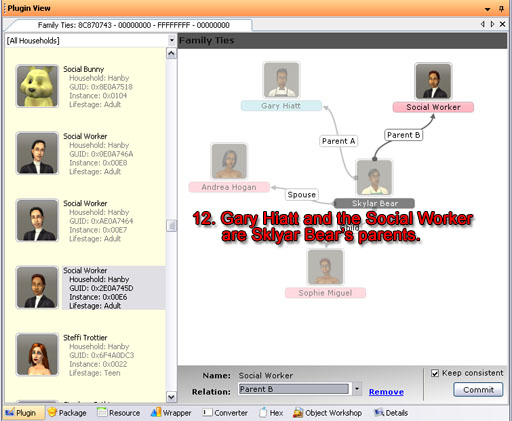
Parents for Skylar
Even NPC's can be parents. Skylar learned that he was Gary Hiatt's woods colt, out of the furshlugginer Social Worker! No wonder she is the way she is! She couldn't keep her own child so now she runs around kidnapping other people's children!
I faithfully backed up Bonnyview Shores before I made that mess. Then when I started my game I went looking among the gazillions of houses in Bonnyview Shores for the Hogan family.
They're not there! I was editing Lake Dorothy!

But oh, it gets worse! Sophie Miguel's family tree turned out fine...

... b'b'b'but...
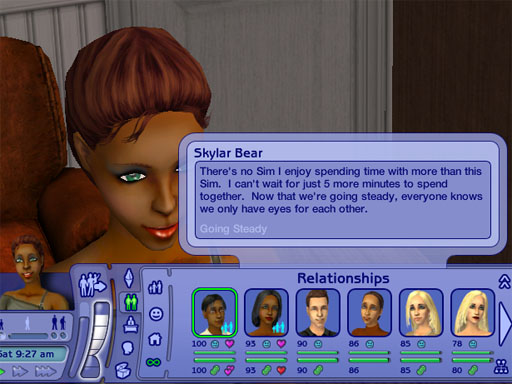
And if it's not bad enough that she's going steady with her father, look at how she feels about her mother!
Aaarrrggghh! So much for the sane society of Lake Dorothy!
Something in my room?
I am so bored.. Hard day ... (Not)
The weather is not helping.
Sooo bored... Deepp sleeeeeeeeeeeep
How to create Cheat Shortcut
I can't remember who first told me how
do to this, but for those who frequently use cheats for building
houses, this tutorial should save you a lot of time when making a house.
First, open up the "My Computer" icon on your desktop and go to:
C:\Program Files\EA Games\The Sims 2\TSData\Res\Config\
Note: if you are using Sims2 university, go to: C:\Program Files\EA Games\The Sims 2 University\TSData\Res\Config\ instead.
In that folder, you will see a file called globalStartup.cheat
Right-click on the file, and select "Open With..." from the menu.
Choose to open the file with Notepad and select OK
The file should open, and will look something like this:
| # # Sims2 global startup cheat file - this file is run on startup of the # game application. It's meant to reflect "production defaults". # # Do not modify this file locally -- instead create # UserData/userStartup.cheat and modify that. # # ---------- # alias real command brief help full help # ---------- alias exit hide "Hide the cheat console window" "Hide the cheat console window" alias x expand "*Expand the cheat console window" "Hide the cheat console window" alias h help "*Show the cheat help" "Show the cheat help" alias ? help "*Show the cheat help" "Show the cheat help" # ---------- |
Now what we are going to do is add a couple of our own
commands as shown below...
#------------------------------------------------------------------ # mikeInside Cheat Shortcuts #------------------------------------------------------------------ alias m "moveObjects on" "Enables the ability to move normally unmovable objects" "" alias m- "moveObjects off" "Disables the ability to move normally unmovable objects" "" alias s "boolProp snapObjectsToGrid false" "Lets you move objects off the grid" "" alias s- "boolProp snapObjectsToGrid true" "Makes objects snap to the grid" "" alias f "boolprop constrainFloorElevation false" "Enables the ability to change terrain even when there is a building on it" "" alias f- "boolprop constrainFloorElevation true" "Disables the ability to change terrain even when there is a building on it" "" alias t "boolprop testingCheatsEnabled true" "Enables a lot of hidden features that can be accessed by holding shift when clicking on objects" "" alias t- "boolprop testingCheatsEnabled false" "Disables a lot of hidden features that can be accessed by holding shift when clicking on objects" "" alias party "intProp maxNumOfVisitingSims 50" "Allows you to throw big parties when activated on the neighbourhood screen" "" #------------------------------------------------------------------ |
Select this text, and then copy and paste it into Notepad, below the text
that is already there.
Save the file, and exit Notepad.
Now, when you run the game, you will be able to activate
cheats just by typing in a single letter instead of the whole word.
To turn on one of these new cheats, hold down CTRL, SHIFT and C to open up the cheat dialog. Then just type in the letter that corresponds to the cheat of your choice and hit the enter key.
To turn off the cheat, type the same letter that you used to turn it on, except with a "-" after it. For example, to turn off the moveObjects cheat, you would type "m-"
Here is a table of the cheats I included....
|
Cheat |
What it does... |
|
m |
Enables the ability to move normally unmovable
objects |
|
s |
Lets you move objects off the grid |
|
f |
Enables the ability to change terrain even when
there is a building on it |
|
t |
Enables a lot of hidden features that can be
accessed by holding shift when clicking on objects |
|
party |
Allows you to throw big parties if you activate it
on the neighbourhood screen |
You could even try adding your own cheat shortcuts to the
file.
For example, this piece of code:
alias cash "motherlode" "" ""
...would allow you to get $50,000 just by typing "cash" into the cheat console.
Cappuccino Bedroom Set
Hi everyone!
I have a new set and I wanted to share it with you. Cappuccino Bedroom Set.
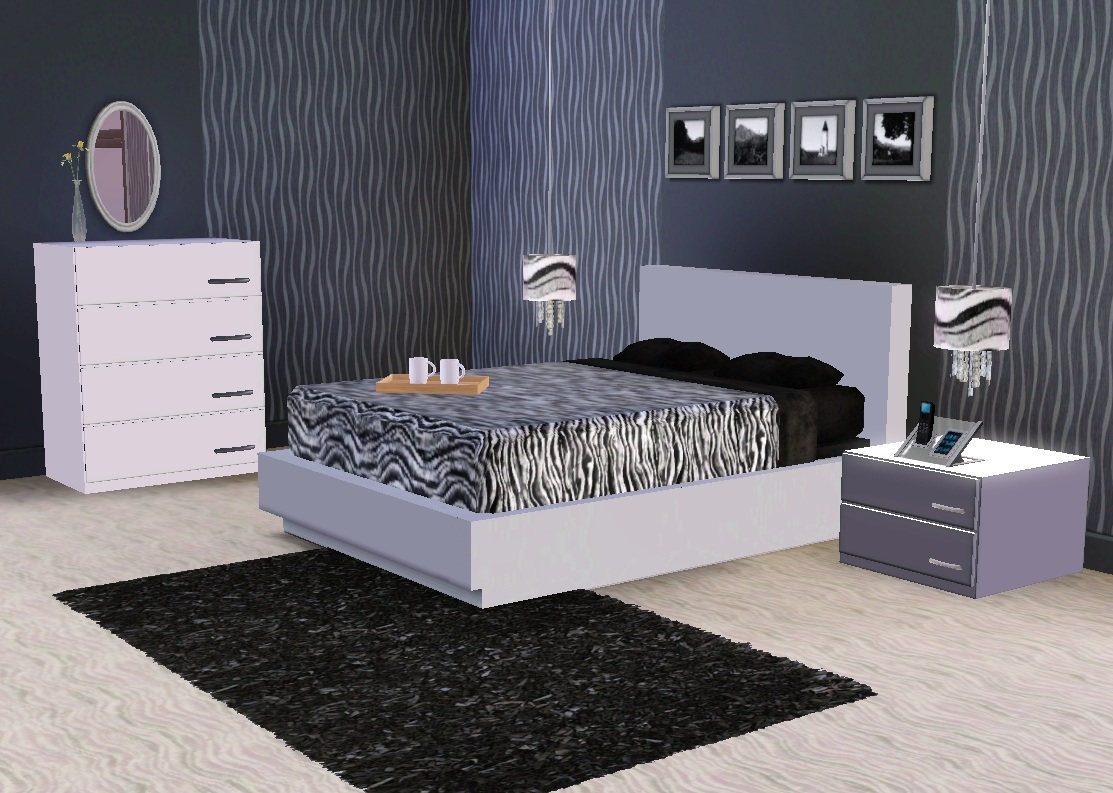
(bed, end table, dresser, lamp, tray and OMSP for beds)
Rug belongs to Cappuccino Livingroom Set.
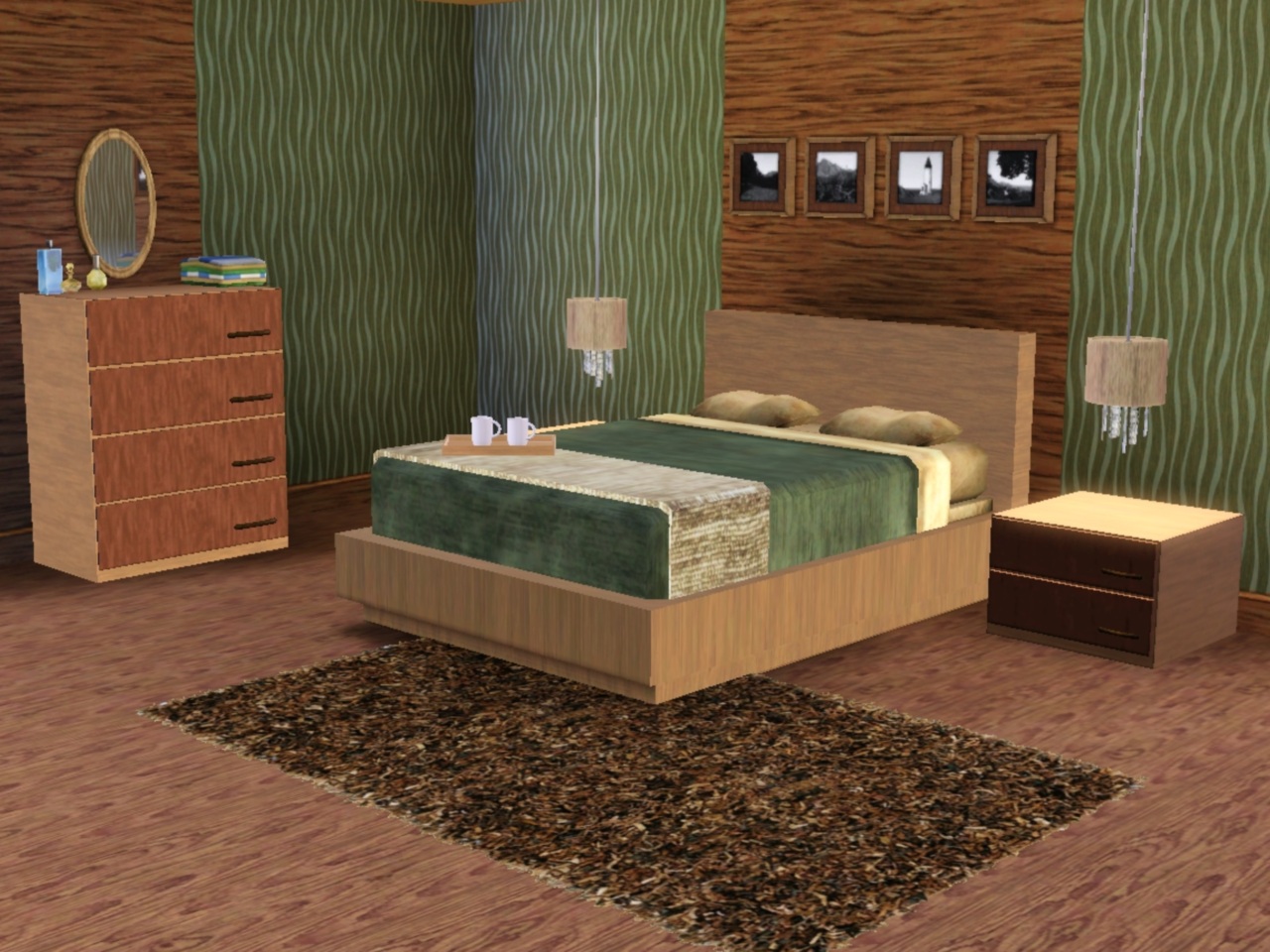
(bed, end table, dresser, lamp, blanket, tray and OMSP for beds)
Rug belongs to Cappuccino Livingroom Set












 Limited Time Offer
 For a limited time only, we’re giving away a free


