

 Sign In


's Blog
MasterXMaid Comeback Announcement
so, i'm planning to re-post my old story (from like 2 years ago)
"He's My Master, She's My Maid"
even up to now, i still don't know why i put it down. lol
it'll be soooooon.. 2 or 3 weeks from now?
anyway, i think that's just it.
have a nice day reader! :)
Moved over to Sims 4
So I have actually uninstalled Sims 3 as I never actually played the game for itself anyway and only created for my own enjoyment! So out with the old and in with the new I suppose - I uploaded my first Sims 4 lot today and hopefully I didn't screw that up somehow and it makes it through the mods.
I am thinking of making some more actual CC objects as well when TSR workshop is released for Sims 4, the crazy boot-up and loading times for sims 3 killed my desire to make objects because you could spend hours sat in loading screens just to test them multiple times :<
The Wonderland Collection
Introducing the newest collection by CrazyxChaosRaWr!
Modern chic homes with their own personal twist.
The Futterwacken; 1 bedroom, 1 bathroom

Download it here!
The Bandersnatch; 1 bedroom, 1 bathroom

Download it here!
New Beginnings!
Hi to anybody viewing my profile..(That is a crazy thing to type!),
So, I have recently published my first creation on to TSR after a few years of downloading other people's creations and I am thrilled!
I have recieved some lovely comments and over 30 downloads which is surreal! I have never shown anybody my lots before and to get so many people downloading my amateaur creation is such an awesome feeling! Thanks so much to everyone who has downloaded and commented, and good luck to anybody going back to school or college this week or next week.
I'm feeling super encouraged to build some more and see what happens so I will be making lots more time for simming in between school and studying this year! :D (This is really handy because I have just ordered my copy of The Sims 4 as well and I am ecstatic to test out the new Build/Buy mode!) I am now a proud owner of every generation of the Sims, so I'm betting on the Sims 4 being every bit as amazing!
~ Millie xoxo
My Sims 4 Diary - Part 1, CAS and Live mode
Hello everyone, and welcome to my Sims 4 blog!
I am going to share my first play-game experiences, screens and more with you guys! I will be dividing it up in parts, so you won't have to read a novel. Hopefully, I can give you some helpers and headsups along the way
First of all I want to say, that I have been a little skeptical about this new Sims 4. Not only because of the whole 'no pools and toddlers!' thing, but because the sims look so cartoonish! I mean look at the hair! What's the deal? What's up with taking away the amazing detailed hair that was in Sims 3? I might be biased, but that was pretty much what kept me at bay from getting all too crazy about it in the first place, but I decided that I wanted to keep an open mind and see if they could make it up to me IN the game.
Let's get started now!
CAS Mode:
The Create-a-Sim mode is pretty much like the one we already know from the previous Sims games. Some has had the opportunity to get a demo of the Sims 4 CAS, and to be honest, I do not see any changes between the Demo and the real game (so far!) You can choose making:
- Child
- Teenager
- Young Adult (YA)
- Adult
- Elder
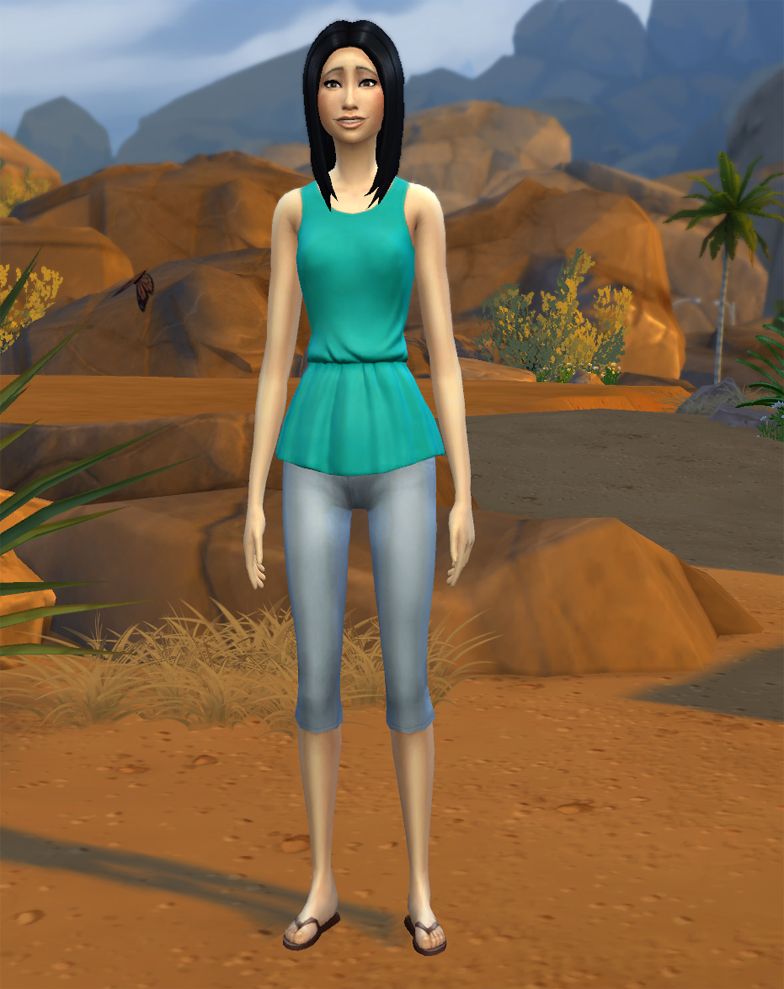
I gave her the main aspiration 'Successful Lineage'. Why? I LOVE BABIES and KIDS! Her other traits are: Perfectionist, artistic, neat and 'home-sim' (I think that is what you would call it in English)
As you can see, I moved her in Oasis Springs. I don't know, something about this desert landscape talked to me somehow. Yup! So I moved her in, and by the look of the house, it was just like every other starter home EA has given us so far. Small, cheap, bad furniture and so on. Yup, nothing new on that account.
Job and career(s)
Next I wanted to give this poor lady a job. Everyone knows you can't pay your bills and buy better furniture with no money/simoleons. So taking a quick look at the computer, I found the new jobs. Some of them has been with ther series since the very start.
- Entertainer: Musician / Comedian (seems new to me!)
- Writer: Author / Journalist (we know the author from Sims 3, but it wasn't a job-job)
- Painter: Master of Real / Patron of the Arts (This seems brand new to me, and I love it!)
- Secret Agent: Diamond Agent / Villian (awesome!)
- Criminal: Boss / Oracle
- Astronomer: Space Ranger / Smuggler (we know the space ranger from the previous games - as the last job in the military career)
- Culinary: Chef / Mixologist (mixologist = bartender if someone should be in doubt. This is also a seemingly new option. The Sims 3 had the skills, but you couldn't make a living out of it. Awesome newness!)
- Tech Guru: eSport Gamer / Start-up Entrepeneur (eSport has become quite world-wide, so cool they included this!)
Short cuts in-game
Something that I noticed right way was, there were no panel showing my sim's needs and such. Usually we have this big bar in the bottom of the screen, but this time, EA made sure to put in shortcuts. So this time we can choose what we want to see.
- Aspiration - G
- Career - J
- Skills - L
- Relationships - R
- Inventory - I
- Simology - Y
- Needs - O
MY ups and downs so far:
Ups:
It is really cool that everything around your sim affects the sim's mood.
The many different intereactions your sims can have with other sims depending on the mood.
Downs:
The only down thing I have so far, is that when your sim goes to work, you won't be able to see the sims' needs, and you have aboslutely nothing to do before they return.
Every time your sim goes to town or to a new place, there is loading time. It goes relatively fast though.
I think this'll be it for now. I will return with more later!
Happy simming!
please make the anime girl on my profile
Please make a anime girl on my profile
That's all folks!
With the release of Sims 4 I have decided it’s finally time to hang up my building hat and step aside for the new talent that this new game will bring. I know I haven’t been around so much over the last few months and it doesn’t seem right to hang on just for the sake of it now that the passion has gone.
I have thoroughly enjoyed my time here as a sims artist and I would like thank the team here at TSR for putting up with me for so long! I also wish to thank you the downloaders whose comments and encouragement have meant so much to me and kept me going all this time. I have some fantastic memories and have made some dear friends over the years and now it is time to move on. I won’t be giving up simming completely (I’ll finally get to spend some serious time actually playing the games that I’ve spent so long creating for) and you may still find me lurking around the place from time to time.
I’m sure many of your are excited to get started on sims 4 but for me the look and feel of the game just doesn’t inspire me and I won’t be parting with my hard earned cash for a copy, at least for the time being. So, that being the case I bid you fare thee well but not goodbye.
See you around,
Hats <3
The Sims 4, My First Impressions
Hi guys! Many of you know me as Degera, a lot builder and member of the staff, in charge of Social Media as well as lot submissions. I've been playing the Sims since 2001, and submitting my creations to TSR since 2002. So when a new Sims game comes out, I'm usually the first one in line. But I was reluctant this time. I wanted to keep an open mind, but I was hearing so many negatives about the game that it was affecting my ability to remain unbiased. That whole 'No Toddlers/No Pools' debate was only part of it. There was also to be no CASt, which as a lot builder is something I felt was integral. Plus they were bringing back loading screens between lots, which was something I did not miss from the first two Sims games.
But I put all of that aside, I pre-ordered and held my breath, with a hopeful 'wait and see' attitude. I wanted to make my own opinion. I downloaded the files last week on Origin so when midnight on September 2 hit, I was ready. I fired up the game and dove in. And... I don't hate it. I know that's not a ringing endorsement, but it's honestly better than what I expected.
The first time you start the game, you will be taken to Create-A-Sim where you will go through a tutorial section on making your very first Sims 4 sim. And if you're not careful, you can get stuck in CAS - it's like a spider's web. You find yourself pushing and pulling to get that nose exactly the way you want it and when that doesn't work, you sort through the available pre-made noses to find something, anything... The next time you look up, two hours have passed, and you still haven't picked out your Sim's hair!
There is a fair amount of clothing options, and of course any gaps will be taken care of by our CC creators. What I like most about this new CAS, however, is the Styled Looks option. For each clothing section (everyday, formal, sleepwear, etc) there is a set of pre-made outfits that include shoes, accessories and makeup. That's right, you can change your entire outfit, plus shoes, all accessories and your makeup with the push of one button! Making your sim look good has never been easier.

Got your Sim sorted? Then let's move him/her in and get started. The tutorial you followed in CAS will stay with you, walking you through all aspects of the game as you go along. This is handy if you have never played The Sims before, but for me, I was completely annoyed by it within minutes. And you can't shut it off. You have to let it run the full course at least once for it not to appear again. If I could get in touch with any of the developers, this would be one of the first things I bring up - please give us an option to turn off the tutorial and never have to see it again!
Now your Sim is moved in and ready to explore the world. Press the M button at any time to see the map view. Wait... is that the map? Yes. It really is that small. The map of each world is divided into neighborhoods. Each neighborhood has approximately five lots inside it (some less), and either they will all be venues, or they will all be residential, with one section in the middle set aside for a huge park. But don't be too discouraged, because you can swap between the two base game worlds at any time, for any reason, which effectively doubles the number of venues and homes. It's still only a fraction of what we had in The Sims 3, but I'm reminding myself that this is just the base game and there will be more to come.

But Degera, you're asking, how's the gameplay? Overall it's incredibly smooth. I have not experienced any severe bugs or glitches. Yes, there are loading screens everywhere. You can walk around in your neighborhood without loading, but if you go into another world, neighborhood, or even into another venue, you will have load time. The time varies depending on whether or not you've been to that location before - first time loads are longer.
A couple of minor bugs that I have noticed include:
1. After playing the same family for a few days, I could no longer see the names of other Sims when I hovered my mouse over them.
2. Sims will walk through the front door of my lots and stand on the inside to knock to be invited inside - which, when invited, they end up going outside.
3. Curtains and paintings will not always drop when the walls go down, but putting the walls back up and removing them again takes care of it.
4. Some of the cheats that were listed as shipping with the base game don't seem to work - for example, the hide headline effects toggle won't get rid of the plumbob as it should.
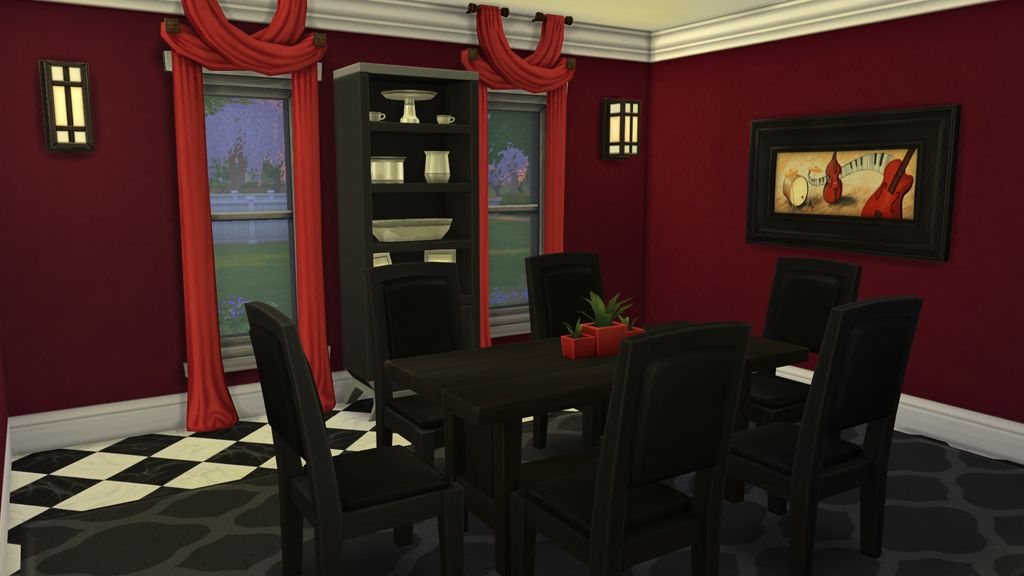
Other issues, not bugs:
1. Not having CASt makes it nearly impossible to match any furnishings. I complained about this earlier on our Twitter feed. Everything that is supposed to be black, for instance, is a different shade. In this image of my new dining room, I thought the table was black until I got the lights in place and I realized it's just a very dark brown.
2. Having the Tutorial (or Tips) always appear and not being able to get rid of it is massively annoying.
3. Having to be on the lot itself, or in the process of moving in a new family, in order to bulldoze the lot is frustrating.
4. If you want to move a lot, or turn it, after you've built it, be prepared to re-do all of your landscaping.
5. Those of you that use Edge Scrolling will be frustrated because it won't scroll if your mouse pointer is over a menu or a part of the UI (especially on the bottom of the screen). It does work, you just have to make sure your pointer is directly above the white bar at the bottom.
6. Notifications can't be recalled once they close, so if you miss what it's saying for some reason then you've missed it completely.
7. Maid service is spotty. This might be a bug, or the maid might be lazy, it's too soon to tell.
8. If you're playing a single sim and they leave the lot to go to work, you have absolutely nothing to do until they get home again.
9. You can't send a sim to a venue for a night out while you stay at home with another sim. You will go to the venue and the sim left at home will be unplayable/in limbo until you return.
If you've already discovered a workaround for some of these issues, if you found some that I missed or if you haven't experienced these problems at all, feel free to let me know in the comments.
When it's all said and done, those of you looking for a quirky, fun game to play will find it here. Our artists will bring the CC that we need soon enough, so go ahead and play to form your own opinion!
Sims4
I don't think I'm ready for Sims 4, I adore Sims3 and I have too many mods and CC, I can't move on yet!
Sleepy Hollow is Coming to TSR!
I'm a huge fan of the hit American television series on Fox, Sleepy Hollow. The series is a fun mixture of creepy and campy and I can't wait for the premiere of the sophomore season on September 22nd. This set was created so my obsession with the show (watching all 13 episodes of season one multiple times) would serve a useful purpose, creating for the Sims 3 game.
My Sleepy Hollow artifacts include the headless horseman's skull in a pickle jar, Katrina's necklace, George Washington's bible, a golem, vintage baby carriage, Ouija board, and Katrina's headstone. If you are not familiar with the show no worries, the set items can be used as part of a Halloween theme. The collection folder for the set can be downloaded at MediaFire.












 Limited Time Offer
 For a limited time only, we’re giving away a free


