

 Sign In


's Blog
Want to Design a Mansion?
LOT DESIGN TIP FOR BIG-HOME BUILDERS
If you want a beautiful but real-looking mansion, consider using a house plan of an actual luxury home. You can get several for free right off this site (see link). It's one of my regular go-to sites when I need big house help.
What You Need
- A house plan (on screen is best)
- Graph paper (also called quadrille paper)
- A few sharp pencils
- A plastic ruler (see-through is best)
- A pencil sharpener
- A good-old-fashioned eraser
- Clear tape (optional)
What To Do
- Choose a home from the site.
- Click on the home and scroll down to the house plans.
Note:
- There will be one house plan for each floor of the home.
- There may be other house plans there if the home has any outbuildings such as a stable or unattached garage.
- Some homes also have the elevation drawing (front of house) so you can see what kind of exterior items to use. - Using pencil and ruler, copy each house plan to the graph paper.
Note:
- Here is the scale, which seems to be standard with house plans:
2 x 2 foot square = 1 square on the paper
- Which for building in the game, won't mean anything. So look at the house plan and find a toilet, a sink, a washer or dryer. The space that each of these occupy in-game is 1 tile. Copy your house plans using the same scale.
1 square on the paper = 1 tile in the game
- You may have to measure to find out how many squares each room is. Just remember that house plans are to scale which means that every bit of space is in correct proportion to real-life measurements.
How This Helps You
If you can successfully copy the house plan to scale onto graph paper:
- You can build a home in the game square by square.
- You can use FullScreen mode in the game since your layout is on paper in front of you.
- This will really cut down on your building time and make you a more confident lot planner.
- You will minimize building mistakes.
- Your home will be symmetrical (balance is required for beauty).
- All the rooms will fit (no having to stick parts on afterward).
- Best of All: You'll know the exact tiles where any stairs or elevators will be on your lot, before you even start building! Very handy for multiple-story homes or stairs to a basement underneath a foundation.
Some Tips
- Get the House Plan Right on Paper
Huge houses weren't built in a day. Take the time to get the house plan right and make sure you understand it. It's easier to erase than to rebuild. Believe me. Don't be afraid to erase! If you are not confident about copying a house plan, use lighter pencil strokes that are easy to erase, then darken them when you are sure of the layout.
Number off your graph paper across the very top and down the left side. I usually number every other line. Start with 0 as the first number. Do one page for each floor of your layout. You'll see that:
One piece of 8.5x11 graph paper = about a 30x40 size lot with some spare room
For larger homes you will have to run one house plan onto more than one piece of graph paper. Because I number off my graph paper, I do not need to tape papers together, but you can if you need to.
- Pay Special Attention to Staircases in Multiple-story Homes
The Most Important Thing: Get the spiral stairs (or elevator) in the same place on every floor. The exception is straight (6-tile) staircases. In the Sims 3 they cannot be stacked. So for straight staircases, plan for one more row of tiles than what the home plan shows. The staircases will have to go side-by-side instead of one-atop-another. Or modify your floor plan to use spiral staircases if you want stacked stairs.
- Start Small
Practise on smaller homes first. That's what I did. Since I learned about house plans, I don't build anything without one - and now I can create my own house plans, straight from imagination to graph paper!
- Save Your Graphed Home Plans
If a downloader has a question about the size of items on one of your published lots, it's much easier to whip out a binder and locate the house plan, than it is to start up the whole game, make sure that version of your lot is still installed... well, you know.
Or (knock on wood) you can easily rebuild a complicated house if you (ulp!) lose your work in the game. This has saved me a few times!
Resources
House Plan Sites
Create Your Own House Plan Online for FREE
House Plan Symbols and their Meanings
Google and Wiki Search
LATE LATE LATE! D:
Hi guys, I'm sooooo sorry because I'm late for my next chapter of the story and I'm so mad at myself.
It's just that I've been busy all this time, and couldn't find the free time for me to shot some pictures. And the text isn't ready so, I'll try my best to post it this weekend.
Also, I haven't read the new chapters that were submitted, so that's my new task for now. :D
That's it. I don't know if anyone reads this but I just felt like I needed to apologize. :)
XOXO, Maria ♥
You raaaisee mee uppp ~
That song has been stuck in my head for the past few days :c Anyways, Chapter 8 is done and The Finale of Sudden End is also right around the corner.
There's nothing more that I've to say... BYEEE :3
Story~ Story~ Story~
Woot, my brain's drain for now but it felt so good. ^^
I'm still brainstorming about my characters as well as make them. I feel so satisfied the way they looked like~ >u</
I'm thinking about sharing them here at TSR, but well... I need to finish their stories first.
By the way, can you tell me some of your own stories or favorites for me to read? :)
These past few days, I had a lot of things I needed to get done like cleaning the house and such because I'm living alone O___O
It's been raining for days and it was the perfect time to write a book right? :)
Oh, with music to play along with the rain. I often listens to sweet melodies such as piano pieces when writing. Plus, a hot chocolate would add some spice. yeah!
I'm doing screenshot for my next chapter, but I need to clean some unnecessary files for the sake of my PC's memory, but I dunno what to delete O____O
Oh, well... I need to work hard to upgrade my PC xD
Happy Simming!
-Juzu
Back at thesimsressource.com
Hello folks!
I stopped making Custom Content because i had many problems and my meshing and texturing skills were..limited, like my freetime. School, Removals and many little things were ABSORDING my time, so there wasn't time to expand my meshing skills. And I'm a lazy Person. And now that Sims 4 is comming out soon, i will concentrate on learning how to create CC for TS4 (when it's time) .But I discovered a new funny activity! Taking and editing Screenshots for Sims 3.
In the Moment i have problems with uploading anything.
So i will upload some Screenshots as soon as possible. I think i was very successful and the photos came out great.
See you soon. In love, your Sheila!
Here's a sample. :)

Mushy Stuff..about retiring and having fun.
Hi!
After a long time of only thinking about it, I decided to actually retire.
It's been so much fun and a big part of my life for a surprisingly long
time. Thank you all for the support and the enormous number of comments
I received since I started.
It's funny, I can't even remember when I started creating here!
I think I was like 16 or 17 years old at the time.
But now I have two jobs in RL and I'm a university student.
I don't have the time anymore, and quite honestly, when I do,
I don't want to spend it in front of my computer.
Plus my creating skills aren't getting any better (maybe even the opposite).
So, you know, that's it. Creating imagenery castles (in my case
mostly pretty clothes for "dolls") just doesn't add anything to my life
anymore.
Thank you again for all the love and support. It really has been FUN.
And that's what creating is supposed to be about right?
Cause when it's not, it is high time to stop.
Ok and now I stop writing cause nobody will read it anyway :D :D
Have a good life and stay awesome..!
Katerina
This mouth:mix download
Last time I took to blogspot Sims York City.Na this blog administrator makes a very nice downloads by celebrities as well as by their fantasy. Some of its downloads and give here.
Also here to add a download from the dead pages (it means that there is) like for example: Glamstuff, Glamsim, SimChic, Melissa Sims, Freaky kiss, Blue sims and much more ...
I add also my creation
Oops, forgot to update!
Maggie and I have been working so hard over the weekend to build more lots for our fellow Simmers, I almost forgot to post an update -- I was able to fix Meadowland Court! After 2 revisions, it's finally done! Well, as of September 29th, anyway. Please go see --> HERE!
Now, I can rest easy and help Maggie create some beautiful homes for your beloved Simmies!
♥Jalee
Fall Colours
Oh to be in the Maritimes now that fall is here.
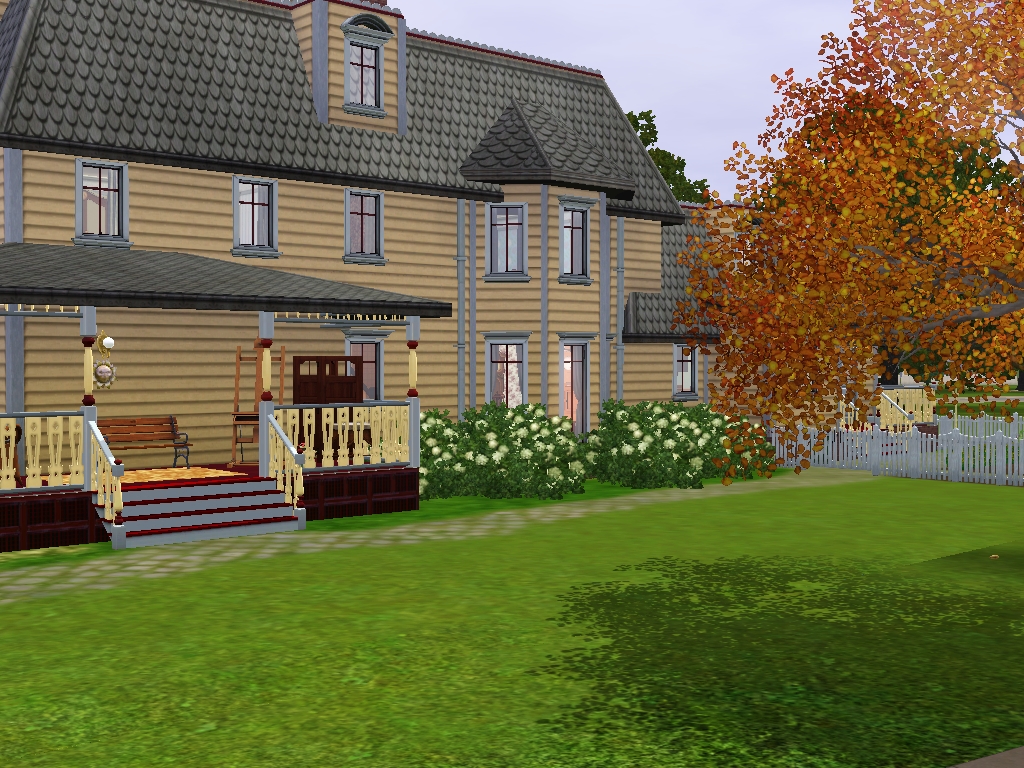
Some day I'm going to take a trip to the East Coast of Canada in the autumn. Being a teacher and being married to a professor means that September brings back to school not time for vacation. So I will continue my armchair travels for now, and let my imagination take me to Prince Edward Island.
My current project is Beaconsfield Historic House in Charlottetown. When I saw pictures of this Victorian "Second Empire" style house I knew I had to try building it, even though Sims 3 does not give us a proper mansard roof and dormers as was available in Sims 2 Apartment Life. However, I am giving it my best shot. And this house is HUGE! According to the Beaconsfield website the house was "Built in 1877 for James and Edith Peake... one of Charlottetown’s most elegant homes. Featuring the finest in materials and craftsmanship, it was also equipped with all the latest conveniences of the day." Of course, I am building it based on photos posted online by the PEI Museum and Heritage Foundation and by tourists who have enjoyed a visit there and uploaded their pics to Flickr. So as usual the floor plan may not be 100% accurate but I am trying to capture the essence of this beautiful historic home. My biggest challenge will be not exceeding the custom content limits for TSR uploads!

Check out the original Beaconsfield house here: http://www.peimuseum.com/index.php3?number=1043026&lang=E












 Limited Time Offer
 For a limited time only, we’re giving away a free


