

 Sign In


's Blog
Sims Medieval Cooking/Brewing Guide
There are three different options for preparing food: A spit, an oven, and a cauldron, which can be over an open fire or in a fireplace. There is also one type of item for preparing beverages.
Note: From what I understand, more expensive cooking items do not increase the food level like with Sims 3, but do have higher enviroment scores.
Cauldron/fireplace:
| Name | Ingredients |
|---|---|
| Gruel | None |
| Bear soup | Bear Meat -1 |
| Bear stew – large | Bear Meat - 1 | Cabbage - 1 | Mushroom - 1 | Potato - 2 |
| Boar soup | Boar Meat - 1 |
| Boar stew large | Boar Meat - 1 | Cabbage - 1 | Mushroom - 1 |
| Double boar stew large | Boar Meat - 2 | Cabbage - 1 | Onion - 1 |
| Eel soup | Eel - 1 |
| Eel stew large | Cabbage - 1 | Eel -1 | Egg - 1 | Onion - 1 |
| Fish Stew - Large | Herring - 1 | Trout - 1 |
| Fowl soup | Fowl Meat - 1 |
| Frog soup | Frog - 1 |
| Frog stew large | Frog - 2 | Potato - 1 |
| Herring Soup | Herring - 1 |
| Hunters stew large | Bear Meat - 1 | Boar Meat - 1 | Fowl Meat - 1 | Rabbit Meat - 1 | Venison - 1 |
| Meat soup | Haunch of Meat - 1 |
| Mushroom soup | Mushroom -1 |
| Onion soup | Onion - 1 |
| Pigeon soup | Pigeon - 1 |
| Potato soup | Potato - 1 |
| Rabbit soup | Rabbit Meat - 1 |
| Rabbit stew – large | Rabbit Meat - 1 | Turnip - 1 |
| Salmon soup | Salmon - 1 |
| Seafood stew – large | Potato - 1 | Salmon - 1 | Trout - 1 |
| Seed porridge | Seeds - 4 |
| Stewed fowl – large | Fowl Meat - 1 | Potato - 1 | Turnip - 1 |
| Sweet porridge large | Apple - 1 | Barley - 1 | Honey - 1 |
| Swordfish soup | Swordfish - 1 |
| Tench soup | Tench - 1 |
| Trout soup | Trout - 1 |
| Turbot soup | Turbot - 1 |
| Turnip soup | Turnip - 1 |
| Vegetable stew - Large | Cabbage - 1 | Mushroom - 1 | Onion - 1 | Turnip - 1 |
| Venison soup | Venison - 1 |
| Venison stew – large | Cabbage - 1 | Cheese - 1 | Onion - 1 | Venison - 1 |
| Whale soup | Whale Meat - 1 |
| Whale stew – large | Whale Meat - 2 |
Oven:
| Name | Ingredients |
|---|---|
| Apple Pie - Large | Apple - 2 | Barley - 3 | Egg - 1 | Honey - 1 |
| Barley Bread - Large | Barley - 3 |
| Boar Pie | Boar Meat - 1 |
| Broiled Bear | Bear Meat - 1 |
| Broiled Eel | Eel - 1 |
| Broiled Fowl | Fowl Meat - 1 |
| Broiled Frog | Frog -1 |
| Broiled Herring | Herring - 1 |
| Broiled Meat | Haunch of Meat - 1 |
| Broiled Pigeon | Pigeon - 1 |
| Broiled Rabbit | Rabbit Meat - 1 |
| Broiled Salmon | Salmon - 1 |
| Broiled Swordfish | Swordfish - 1 |
| Broiled Tench | Tench - 1 |
| Broiled Trout | Trout - 1 |
| Broiled Turbot | Turbot -1 |
| Broiled Venison | Venison - 1 |
| Broiled Whale | Whale Meat - 1 |
| Cheese Pie - Large | Cheese - 3 | Egg - 3 | Wheat - 3 |
| Eel Pie - Large | Eel - 1 | Egg - 1 | Spices - 1 | Wheat - 1 |
| Feast Bread - Large | Egg - 3 | Grapes - 3 | Wheat - 3 |
| Fine Loaf - Large | Wheat - 3 |
| Flat Bread | None |
| Fowl Pie | Egg - 1 | Fowl Meat - 1 | Spices - 1 | Wheat - 1 |
Spit:
| Name | Ingredients |
|---|---|
| Bear Steak - Large | Bear Meat - 1 | Cabbage - 1 | Mushroom - 1 |
| Braised Boar - Large | Boar Meat - 1 | Cheese - 1 | Egg - 1 |
| Braised Whale - Large | Mushroom - 1 | Whale Meat - 1 | Whale Meat - Choice Cut - 1 |
| Delicious Venison - Large | Cheese - 1 | Potato - 1 | Venison - 1 |
| Fried Fowl - Large | Fowl Meat - 1 | Mushroom - 1 | Turnip -1 |
| Grilled Trout - Large | Potato - 1 | Spices - 1 | Trout - 1 |
| Roast Bear | Bear Meat - 1 |
| Roast Rat | None |
| Roasted Boar | Boar Meat - 1 |
| Roasted Eel | Eel - 1 |
| Roasted Fowl | Fowl Meat - 1 |
| Roasted Frog | Frog - 1 |
| Roasted Herring | Herring - 1 |
| Roasted Meat | Haunch of Meat - 1 |
| Roasted Pigeon | Pigeon - 1 |
| Roasted Rabbit | Rabbit Meat - 1 |
| Roasted Salmon | Salmon - 1 |
| Roasted Swordfish | Swordfish - 1 |
| Roasted Tench | Tench - 1 |
| Roasted Trout | Trout - 1 |
| Roated Turbot | Turbot - 1 |
| Roasted Venison | Venison - 1 |
| Roasted Whale | Whale Meat - 1 |
| Royal Rabbit - Large | Cheese -1 | Potato - 1 | Rabbit Meat - 1 |
| Seasoned Boar Meat - Large | Boar Meat - 1 | Onion - 1 | Spices - 1 |
| Spiced Pheasant - Large | Fowl Meat - 1 | Potato - 1 | Spices - 1 |
| Spiced Venison - Large | Spices - 1 | Turnip - 1 | Venison - 1 |
| Sweet Bear - Large | Apple - 1 | Bear Meat - 1 |
| Sweet Swordfish - Large | Honey - 1 | Spices - 1 | Swordfish - 1 |
Beverages:
| Name | Ingredients |
|---|---|
| Ale | None |
| Barley Ale | Barley - 3 |
| Blood Moss Mary | Bloodmoss - 4 |
| Cider | Apple - 3 |
| Feast Ale | Barley - 1 | Honey - 1 | Wheat - 1 |
| Honey Mead | Honey - 3 |
| Hypocores | Grapes - 3 | Spices - 2 |
| Mulled Wine | Grapes - 5 |
| Sparkling wine | Apple - 1 | Grapes - 2 |
| Sweet wine | Grapes - 2 | Honey - 1 |
| Wheat beer. | Wheat - 3 |
| Wine | None |
Sims Medieval - Responsiblity
Life in the realm is busy for your Sims. In addition to embarking on quests and finding true romance, each Hero Sim has different responsibilities they need to fulfill. Some of these are basic responsibilities that any citizen in the kingdom has, such as paying taxes. Some responsibilities, however, are dependent on a Sim’s profession. For instance, a bard may have a certain amount of time within which to write a play, while the physician may be called upon to administer first aid.
Rewards and Punishment
Responsibilities must be performed within the time allocated or your Sim suffers consequences, such as a negative moodlet, a penalty, or, after prolonged shirking of responsibilities, even the ultimate punishment: execution. However, if your Sim does fulfill their responsibility, they gain a positive moodlet, greater Focus, and, in some cases, even achieve progress on their quest.
Career Responsibilities
As mentioned above, some of the responsibilities that befall your Hero Sim are dependent on their chosen career. Read on to get a gander at what sorts of things your Sim might be called upon to perform in each role.
Please note, a specific career can be filled with either a male or a female, depending on what you choose when you assign a Sim to these roles. The gender-specific pronouns below are therefore random. Additionally, the list below is not an all-inclusive list of each role’s responsibilities, merely a sample of some of what you can expect.
Check this gallery for responsibility related images: http://www.thesimsresource.com/staff/sww/galleries/details/id/1568/
Bard
The Bard’s responsibility first and foremost is to provide his fellow Sims with some respite from their daily toils and troubles – you might even say a distraction from their own responsibilities! Whether he’s gathering inspiration on his own, being inspired by other Sims, practicing the lute, or writing poems, the Bard spends most of his life in service to his art.
Blacksmith
If she’s not crafting armor or fixing swords, the Blacksmith can often be found wandering the surrounds of the realm in search of minerals. Her responsibilities all help ensure that the kingdom is well protected. Every time she sweats over the forge creating another sword or stave, she can rest assured that her hard work lets the Monarch sleep easy.
Jacoban Priest
This strict priest offers his fellow Sims another type of support, that of the spiritual leader. Whether converting Sims to his faith, absolving them of their sins, giving sermons, or healing with The Watcher’s Touch, the Jacoban Priest is tasked with keeping his flock spiritually well.
Knight
The strong arm of the realm, the Knight enforces the laws of the kingdom. The Knight may be called upon to engage in a duel, to maintain her weapons by sharpening her sword, to guard the forest entrance, or to discuss foreign affairs.
Merchant
The responsibilities of the Merchant mostly revolve around providing the realm with the goods that Sims both need and want. He must at turns hustle customers, butter up potential buyers, sail to other territories to engage in trade, and much more.
Monarch
The responsibilities of the Monarch are to oversee the entire welfare of her realm. She must ask about the Sims living in her kingdom to gain knowledge, pass edicts, write treaties, hear petitions, sail to new territories, and more. Any of her actions might greatly impact her kingdom, so she must be mindful in all that she does.
Peteran Priest
This peace-loving priest is often found evangelizing for his faith as he seeks to convert Sims and bestow The Watcher’s blessing. Whether giving sermons or studying The Watcher, the Peteran Priest always concentrates his focus on a higher power.
Physician
In contrast to the Peteran Priest, the Physician’s sole focus is on the corporal welfare of her fellow Sims. Her many responsibilities include collecting herbs, diagnosing Sims, giving first aid, crafting cures, and more. Once her skills are sufficiently advanced, she might even find herself operating on Sims as she pursues her quintessential responsibility: healing Sims.
Spy
The Spy’s responsibilities sometimes find themselves outside the law, sometimes for the good of the realm and sometimes, well not so good for the realm. Crafting poisons, serving “tampered” drinks, eavesdropping, and stealing funds are some of the tasks that fall to a dedicated Spy.
Wizard
With her mind focused on magic, the Wizard spends her days – and sometimes nights – collecting herbs, crafting potions, conducting research, and, yes, casting spells.
More Complex Houses for Sims 3!
Okay! So I recently became a subscriber to the Sims Resource, and I have been downloading some cool furniture and housing accessories etc for my game. This may mean that I use some of the •CC• in my game which is subscriber only :S I hope you don't mind this as it will help improve my houses by a great deal, and it will help me provide you all with better quality houses to download for your game! :)
If you have any house requests, please let me know here! I would love to hear your ideas!
Thanks! :)
Helda12345♥
I have an idea!
been so busy with school I havent been able to create a new outfit! I have a new line in mind; i just have to find the time to do it... D;
Need the assistance on creating a new mesh using TSR workshop
I still cant find a guide on how to fix up meshes using the workshop and I would like it if someone can point me to a guide or comment on here or send me a message as to how.. I have some good ideas, but messing is important in order for me to really create them!
thanks a bunch ;D
'Ello All....
If you haven't seen my recent posts in the forums, to bad becasue I'm not re-posting here again. Since sohpiexxx, I think that's how you spell it, has agreed that I can create a story with our two playboy mansions in them. Their will be no R rated content, just clean old PG-13. Please be patient until I can find out how to submit sims and houses.
James is three
Time just seems to vanish by in a whirl of activity these days. James turned three last Wednesday so I thought I'd pop an updated picture of him blowing out the candles on the first of his two birthday cakes.
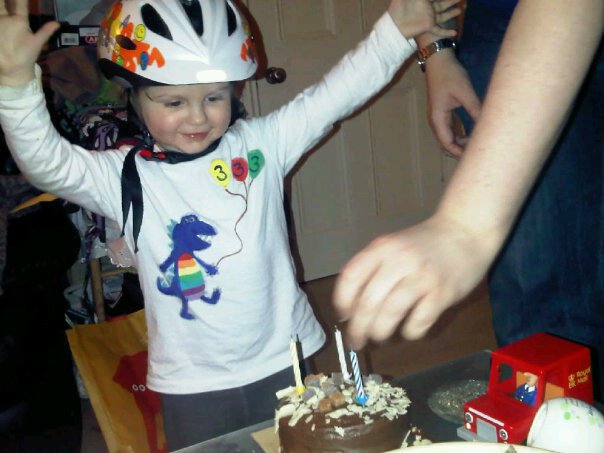
Simdate. March 20th, Two Thousand Eleven.
Welcome to my second blog entry. This time I would like to talk about creating towns, and using the Create a World (CAW). So after days of setting up my new town of Chateau Valley, I think I have everything needed for the town to be fully funtcional as a normal EA town. That means it has all the EA necessary items like the Doo corporate tower, the criminal building, restaurant, school, city hall, etc. Creating the town in CAW is relatively easy. First, simply choose a map to work on, small, medium, or large, and the height, 100, 200, or 300. I chose 300, but I used the large flat map. For this time around, I chose not to do anything in the way of sculpting the land, leaving it flat so that the lots are easier to create on. I always try to make sure that the "Snap To Grid" option is chosen so that everything lines up nicer, and the roads meet the lots. It looks cleaner, and it makes it a snap for adding lots.
My preference for worlds is grid style. This comes from Sim City, where you can build cities from the ground up as well. Anyway, the roads are boring yes, but it's effecient for adding lots placed close together. But, do yourself a favor, and DON'T put too many lots close together in a small area, because it makes water go underneath the roads, and between the lots. It makes the lots themselves look like little islands, it looks awful. Leave some green space between them, and everything will be fine. You can have hundreds of lots in a city, but just not in one small area. Make sure to include some different sized lots, small, medium, and large. I bet everyone would love to have nothing but 64x64 sized lots right? Well, sure, but, there are a lot of EA created lots that don't fit in that size category. And they also have some odd sized lots, like 64x29, or 25x50, so make sure you look through the catalog of lots you want in your town, and make sure that you include the special sizes for these odd sized lots. And they have to be a minimum of that size or larger, or they won't fit.
And of course, you have to have both Community, and Residential Lots. There are many different types of lots as well, so make sure to include a variety so that you can have a "complete" town. One thing that I have read that some people want to learn how to do, is to have the Beatuiful Vista mood factor in the game. Well, you can add those in CAW, when placing the lot is the easiest, but it can be done after the lot is made. Oh, and before I forget, add at least one layer beyond the world layer. I believe that the program says to do that, but if not, make sure that you do. This way you can keep things straight in the game, as far as lots, versus objects like trees, waterfalls, rocks, and things like that. You won't notice any difference in the game while playing it, but it's needed none the less.
When placing lots, it's helpful to name them, this will help identify them easier. Instead of having Lot 1, Lot 2, etc. I would either name each lot like EA Manor, EA Restaurant, or what ever you desire. And every now and then use the "Edit In Game" option to switch over into the game mode, and edit the lot. Here, the world you are building will be in an editing mode where you can add objects to each lot, like the Grocery Store, hospital, salon, and other houses. I recommend however, to keep the editing to a minimum, as the game sometimes can crash while editing, and it can take a while, especially on slower computers to save your progress. And save often, so that if you do experience a crash, you don't loose hours of work. One thing I have noticed that some poeple do, is just put down a ton of completely blank lots, and everything is the same color, no variation from lot to lot, and it makes it hard to tell how big the lot is. So then you have to click on each lot to find one that is the size that you are looking for. When in Edit In Game mode, I found it easy to edit each lot, and put a border around the edge of each lot, using terrain paint, and outline the lot. This give a very good idea of how large a lot is, so that you don't have to search endlessly for a specific size lot. You could probably spray the lot size into the lot too. It can always be sprayed back to the original lot color, and the nice part is, that the terrain paint option is free.
Once you have the lots placed, make sure that you go into the objects, and effects option and place some seed, rock, and various spawners, so that you can go and find different things to grow and make the various items you will need in the game. Don't forget details, like rocks, billboards, birds, trees, and insects. And there are a TON of those options, no doubt! Once you have everything you are going to need, it's then time to export it, but you aren't done just yet. You still need to add a description for your world, which is a little history, or a little bit about your town. Plus the name, and a picture of what your town looks like. That is the tricky part, because the picture needs to be a .png file, and it has to be EXACTLY 256x256, and not any larger. A photoshop program can be used, and also Paint, which is included with every version of Windows can be used as well, cause I used paint to edit mine. And when resizing it, make sure you use the save as option, and rename it, otherwise you some weird sharing violation message. Once you have that done, then you can export it.
When I exported, it didn't want to go into the game right away. I ended up having to go to dig through the CAW files, and find the world, I then Copy and Pasted the file to my desktop. Then I had to go back and go to the Downloads section under The Sims 3, where you install new content into the game, and drop it there. It then gets dropped into the game launcher- downloads, where you install it. And then it worked. It's a bit of work to get it in there, but once you get the world created, if you have spent weeks getting it done right, like I did, it can then be very rewarding, knowing that THIS world, is one that YOU created. And YOU CAN create it. It doesn't take much tech experience, just a WHOLE lot of patience. I'm happy I have done this, and I plan to do it again, only this time, I think I will try a smaller world, since I have like 120 or so lots, and I have only used about half of a large flat tiled map. There's just too much empty space left over, and it looks not so pretty. Especially when I download a premade lot from one of ya' all here, and add it. Those are the best parts about the world. Thank you for those. Till next time, Happy Simming!
mtnmouse
first time
idk all aboutlogging bcuz its my first time you kno
Realistic and Celebrity Sims
Okay, so, I am sure that you have all seen that I have been posting some realistic sims. Well, I've decided to start expanding my capability and I thought that maybe I should start providing you all with a range of Sims 3 things, other than houses and paintings. So, I have started to upload some Sims for you all! I am also having a go at celebrity sims- the first one that I have done is Kristen Stewart as Bella Swan, as she is one of the sims most people want to see. However, if you have a celebrity that you would like to see me make, let me know here, as I am open to any kind of request!
I am still going to be making houses and paintings, but unfortunately I won't be posting as much stuff for the Sims 2 anymore, as the Sims 3 is a little less complicated than uploading for the Sims 2, and the Sims 3 is the game that most people have nowadays, not the Sims 2. However, I will be posting the odd little thing for the Sims 2, so not to worry! :)
There should be some paintings for the Sims 3 up very soon, so I hope you will like those! ^^
Helda12345












 Limited Time Offer
 For a limited time only, we’re giving away a free


