

 Sign In


's Blog
Still Alive
Hey everyone here on TSR.
It is a long time ago, that I was online. In my life has changed a lot, my new school is very stressful and I have less time for me to deal with sims. But soon there are the Christmas holidays, where I will finally deal more. In future I will continue to create sims and lots.
There also will be a new story, which is kind of a sequel to my last story. I will try to write the stories more complex and larger.The story is again about the life of the family Grimmer. Mara and her sister Alicia will act the leading roles.
Lastly, I want say thank you all who like to use my downloads, and read my stories!
Have a nice day, Guslucky
Useful stuff 2-Clothing tut 1 pt 1
Here's a first tutorial in series of tutorials that should help you create clothing.I'm planning to do 2 more-"more information about alpha" and "taking better preview:the tips".If you'll find any pic small,open it,all of them are huge actually :D
Before we begin I'll introduce you to the three pictures that you'll see all the time while creating clothing:texture,alpha and bump map.
Texture is how clothing looks in game,thats obvious =).Alpha is a black-and-white version of texture but sometimes its easier to start with alpha if you're messy at creating texture..Anyway,alpha shows game what to show and what to not show but it cant change shape of clothing for example:if you had top with skirt mesh and would like to create top with jeans instead by editing alpha you would get top with skirt and leggings and some parts of skirt would turn grey.Why?Because mesh has a skirt that you cant remove by editing alpha.(but there are alpha editable meshes-you can change lenght of skirt,remove it,make it more/less transperent).And the last pic is bump map-it allows you to change "depth" of texture from smooth and usual to us to a plastic ,annoying,unrealistic fabric.
Hope it wasnt annoying :D
Now,time for picture examples:

Now,since we've learned the basics of textures of clothing,lets create something for christmas!
There are 4 main ways of creating texture:
- hand draw
- add realism to fabrics
- photo skinning (fast but everyone are using the same clothing sites to get textures so i dont reccomend it anymore)
- maxis-match (either mix up textures from game or hand draw them in style of game,well you got the idea-in style of existing in game outfits)
Its totally YOUR choice what way to use more and which ones less.I totally agree that handdrawing is the slowest way-simple outfit may take only 40 minutes to create and "polish",while on more complicated you may work for like 15 hours :( .BUT its the best way to create clothing that noone will create 100 % identically like yours and it will make your creations original!
Lets start with handdrawing because while it will take 30 small steps to create something for christmas it covers all skills you need for other ways.
First,open up The Sims 2 Bodyshop.You dont need to download it or install,its already included with game.You can either click Start/All Programs/EA Games/*your latest installed game thought it doesnt actually matter*/The Sims 2 Bodyshop.
Or,you can go to C:\Program Files\The Sims 2\*your latest installed game thought it doesnt actually matter*\CSBin and click on TS2BodyShop file.Now,be patient.Depending on how fast your pc is,how many custom content you've downloaded it may take a various time for it to appear and load,from like 5 minutes-1 hour but just be patient ;)
When its loaded,clcik on buttom create parts that is at the right of the top.Then,pick create clothing (I have a russian version of bodyshop and game so I may be mistaken,but you got for what you need to look for,right?;) ).Since each of us has a base game,search for summer dress that came with base game.
 '
'
By default,you're creating for female adults,and thats what we need,dont worry.When you found it,click on it.Something like that should appear

Its always important to name it properly not like abxmnbxeiuyiqunb,its much easier that way.Lets name it "clothingtut"
Now,click on check buttom.You should get this screen now

See that bodyshop says that "textures were saved to My Documents/....."?Now go to that adress.

As you can see,we've got texture,alpha and bump map.


Now,lets finallly open texture and work on it :D
Open any graphic editor you fancy,I suggest to download Gimp or buy Photoshop-those 2 have better tools for handdrawing and generally more useful then Paint ;)
*I'll be using Photoshop CS 2 if you're interested*
Select most of the outfit,leaving top part of dress unselected and use bucket fill tool.You should get something like this.Save file (File/Save)

lets go back to bodyshop."Refresh" your outfit,so game will how you how outfit looks right now.

Eww,right?Texture now looks veeeery solid and unrealistic and stuff...Maybe thats how your clothing creations could look and thats why they were rejected by sites you were trying to submit them to.But hey,we only started so stop panicking if you did :D
Lets go back to graphic editor you're using.*Yes,creating of clothing is going back and forth between 2 programs*
Pick smooth brush,its easier to work with smooth and quite small brushes while drawing.
If you're new to program you're using *I'm terribly sorry,but I never-ever used Gimp! =(* :
for photoshop users you'll need to simply pick a brush tool.See on the top of program words "Brush *thumbnail of it* 10 *for example"?Click on that.Scrool down till you'll see smooth brushes,not simply circles.Select any,those are the same brushes just in different size.If you already used ohotoshop,search in basic brushes for smooth brushes.

If you'll create by handdrawing in future-the smaller brush is,the smoother everything looks.But in this tutorial it doesnt matter veery much.Anyway,draw lines on the area that is filled in that solid colour.They should be a bit darker then colour of which area is filled with.But it should be darker enought to see difference between solid colour and lines without changing anything.

Outfit becoming even more ugly?Dont worry,now we're going to make it beautiful.Select Blur tool

And smooth those lines by smothing each one,not all of them.

Now,right-click on blur tool and you'll see those 3 variants that you saw in the pre-last screenie.We're going to need smudge tool now.Select one of the solid areas and smudge it to make it realistic,or simply move your mouse.If you mess up-go to previous action by clicking on previous action in history (if it isnt open window/history or somehting like that)
I admit that it will take some time to get used to that tool.Anyway,smudge it until something like this,which isnt much a solid area with stripes:

Do the same for another area

or you may skip it and simply select area you've just smudjed
Click on Edit/Copy (or Ctr+C)

Nw click on file/new
Click ok,we need exactly the same size as is selected and copied area.

Now,paste into this file by edit/paste:

Now I'm going to teach you how to make texture seamless (one of ways).We're simply going to rotate horizontally our image!Thats all =)

Then select the whole image

and copy it

Go to outfit's texture.Paste this rotated pic we've made

Texture seems to be like mirrowed?Thast one of ways to make texture seamless-you wont see where texture of "front" and "back" while looking at sides of outfit.
You may save texture now and refresh in bodyshop to see difference.
But now we're going to draw the top part of our dress.Click on lasso tool and make sure its magnetic lasso.If not,right-click on icon of tool and select magnetic lasso.

Now select the unchanged texture of top part of dress by moving your mouse and sometimes clicking by left mouse buttom if you want to make a break or simply make your selection more stable

Now pick the colour in which you would like to draw top part.

To draw with comfort zoom in [ (view/ zoom in) or ctrl and + ] till you'll see top part more closely.Now draw the top part.You may use the same way that you've used for bottom part but i'll personally draw stripes without any smooth because i picked white colour.If you've picked it too,first draw the "center" part of stripe in light grey and then add dark grey to make stripe more visible

Lets check if we're satisfided with result.Go back to bodyshop and click on refresh buttom.(save texture at first of course)

If you are,lets go back to texture and create the back of top part =) I've drawed the same boring stripes
Refresh buttom again ;)

As you can see,we no longer see pink top part in the back.
Our dress is quite good but boring.Lets add some details..I'll add a classic black belt,just like one Santa has
While we're handdrawing its allowed to photoskin details like that while you can of course hand draw them aswell.
I personally not that good at belts so i used a pic of belt to create one

To make your detail seemless (skip step if you didnt add something meant to be shown at both sides of outfit) use the same mirrowing techique we've used with bottom part of dress.
Now refresh outfit in bodyshop

Way better,isnt it?
Since i'll show you how to edit the rest 2 pics aswell,lets make those straps more "heavy" because those that we have are too "light" for winter party dress ;)
Open alpha file
(if you closed it,open My Documents/EA Games/The Sims 2/Projects/*your project name,i've picked clothingtut* )
It should look exactly like this

Few things you need to know:
white in pic tells the game "show me up"
black in pic tells the game "hide me"
If you'll edit something like alpha editable meshes or siply would like to add gloves,stockings,transperent sleeves-use grey.The lighter grey-less transperent,the darker grey-more transperent
now,simply use that shape tool that is upper colour picker.Pick white colour and make straps heavier.Go to background layer (
if you dont have layers window mak it appear via windows/layers) and by brush tool paint out crossed straps at the back.Save the file.You should get this:

Now lets go back to bodyshop.Especially its important to not see difference between straps (can be checked by lifting camera up,use F3 for free camera mode).If there isnt one-great!

See that we can still see old straps?Its bump map file still tells them to show up.But more important is to see if there are any glitches with texture like this:

Its because we've painted our texture based on old alpha,not new.Open texture file again and simply paint more over straps area (thats why its good to simply use a solid colour for straps)
Now open bump map file,close alpha file if its still open and reopen (because shapes are layers and blah,blah,blah xd)
See its still has grey version of old texture without that annoying print?Simply paste aplha file over it and paint in black shoes area-we'll change shoes soon.Save file
Refresh outfit at bodyshop

*i edited bump map only when taking this pic*.See?No old straps anymore,YAY!
So after editing texture and bump map we should get this:

Look at those shoes...Arent they ruining our dress?! =(
Download alpha and textures of pretty ballet shoes (taken from nightlife outfit)
open both of files and just paste that fab alpha onto alpha we have,same must be done with texture.Select only bottom of it or via magic wand delete the black (you need to double click on background first).

You should get this:

Isnt this dress unique and gorgeous?If you think you've finished creating it click on " import to game" buttom
If you would want to upload it somewhere go to My Documents/EA Games/The Sims 2/SavedSims/*randomlettersandnumbers*_*projectname*.package.For example,I've got 5fba1ca3_clothingtut.package

As a reward for completing this tutorial you may download it here,i've included alpha and texture of shoes again just in case.
Hope to write part 2 soon,where i'll show you other ways of creating clothing =)
Hope tutorial was easy to read and follow,it took 4 hours of my gorgeous sleep to make it which leaded to insomnia:D
If you have questions-ask in comments,i'm not biting and will be glad to help!
~Happy simming and great new clothing creations,Ksenia
Oh and if you think you totally failed..Maybe you're simply good at other ways of creating textures?;)
Troubles!
Hi! Sorry if I suddenly disappeared! Experiencing problems in real life as of the moment, so I am not sure if I will be able to be back here for some time. Too bad though, since I have a lot of unfinished stuff waiting to be finished. But real life calls, and I can't ignore it! So, til next time, I guess! :D
Tutorial about creating clothing coming out tomorrow =)
Hi!Juist want to tell you that I'll post DETAILED tutorial about creating clothing tomorrow =)
I'll try to coverr all 3 main ways of creating textures xD
And here's sneak-peak of one of the goodies you'll get as a reward for completing it(contast is low on purpose)

Time To Flush
Something is starting to stink , and its time to clean house.... I've
been downloading CC for so long and have acquired quite a collection of
great items. But lets face it, some of it is just to old and we have all
seem them and used them, colored and recolored over and over and over..
Not to mention those nasty little floaters that just cause problems
within the game such as making children wear boots and have them all out
of whack.. and so on and so on.. blah blah blah.. So its time to FLUSH out the old and bring in the new. I've seen some absolutely gorgeous new
clothes, shoes, makeup, and so much more created here on TSR and so
that seems to be a great starting place for filling up the Sim Closets.
Let them strut in style "as every Sim Star" should. How could I let my
little stars be so out dated, they were a laughing stock of gossip.. But
NO MORE... they will now be stepping out in style and be the trend
setters they were born to be. So look out my simmies the Stars are about
to shine with a new wardrobe stuffed with all the FABULOUS new
creations from the Fashion Gurus featured on TSR.. Sims everywhere will
see the model sims running the cat walk in the finest quality items and
be the envy of every sim dreaming of becoming famous and having such a
collection of their own.
Now with all this being said, I will be clearing out ALL cc from my
system and starting new.. There are a few favorites that will be left (
some items are just timeless) Not to mention it will improve the speed
of the game and open up memory and so on. OH and one other thing, I'm
seriously thinking of not using ANYTHING that is not in a simspackage
rather then standard package files so that when someone downloads from
any of my postings they will get what they see and not just portions of
it. Have tried really hard to avoid this already but with the cleaning
it should make it much easier to do so.
Enough of my ramblings, Happy simming everyone
I will soon be testing my hand at creating clothes and such so I hope soon to be part of the fashion group.. not sure that I'd fit into the
guru section though.
HUGS


It's My Birthday!!! :D
So today is my birthday, and even more excitingly, my first day of a MONTH-long Winter Break. :D
I hope to get a lot done during this vacation, and today I've started learning how to mesh hair. Well, I've tried during Thanksgiving break, but it obviously didn't go too well. Hopefully this time around I can get some nice things done.
Other than that, you might notice that I've started making more celebrity sims, and less model/fashion sims. I think this happened because in the process of making some of my sims (Sasha Pivovarova, Chanel Iman, etc) I notice that they start to resemble celebs(Madonna, Beyonce, etc), and so I've created even more projects from that. But, I really want to focus on learning how to make clothes and hair, maybe makeup too, so that the sims I make will look even better, and truly my own. I do, however, want to thank all the creators for all the wonderful things they make, and hopefully I'll be one soon! ;)
Lastly, here's a list of things I've started, and things I hope to do soon!
Started
Britney Spears
Kim and Khloe Kardashian
Anna Wintour
Hope to do:
Shakira
Michael Jackson
1980s Madonna
Kourtney Kardashian
Kanye West
Rihanna done
Katy Perry
Miley Cyrus
Lady Gaga
and maybe some famous athletes and actors
Really want someone made, let me know in the comments :)
Quick Update~
Hey everyone, This is just a quick update. Okay, so I have been working on some paintings, (and houses). The paintings are mainly animals. For example, bears, dogs and cats ^_^ Cartoon ones. You could say tha paintings are sort of based around kids, as they are that sort of style. :) Oh, and also, I HAVE FORGOTTEN HOW TO PUBLISH THINGS. Remind me! :( I will probably remember later on though ^^ I'm just very tired at the moment. :P I'm sleep deprived! =P
100.000 Downloads!
Another milestone: you have 100.000 times downloaded my creations! Thank you all for your support! Hope you and your sims are enjoying these things!
Sneak-peak on next dedication set =)
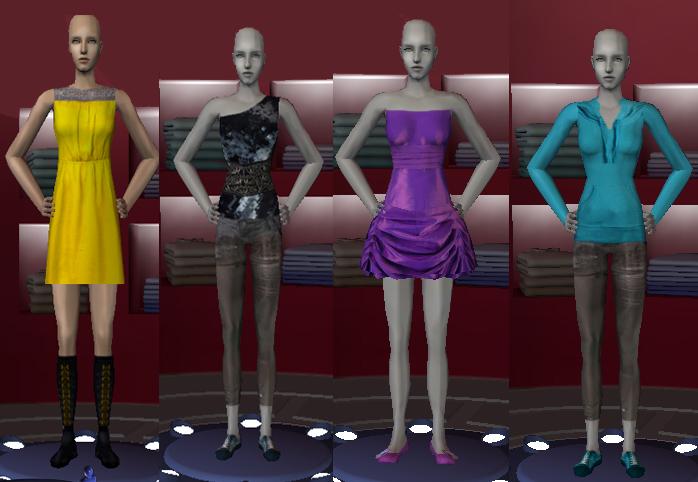
It will be submitted tomorrow if I'll take all preview pics today












 Limited Time Offer
 For a limited time only, we’re giving away a free


