

 Sign In


's Blog
1,000 DOWNLOADS!!!!!
WHOOOOAAA!!!! 1,000 Downloads!!! That isn't a lot compared to many, but I am SOOO proud! Thanks you guys! Thank you for all of the wonderful comments and downloads ... !!! I am speechless ... It seems just like yesterday I uploaded Quinn Fabray and Salem Donovan ... !!! Again, Thank you SOOO much and I hope to be uploading soon!
-TLK Creations-
New set to be published next week
It has been a while since my last post but that doesn't mean that I haven't done anything. It has been like a duck pond. Quiet above the surface and frenetic paddling under the surface. Design choices and technical issues has delayed this set by weeks but now it's finally ready for publishing.
This is the Monterey Modular Shelving System, a contemporary storage system that has 24 decorative shelves at various heights to make it easy to customize it to your liking.

I hope you like it.
Build Blues
Alas, I have the build blues. This latest lot is testing me. I've had to start playing Dragon Age again to get my creative juices flowing. That whole "thing" still baffles me. Killing stuff and stumbling around in clunky medieval armor = need to build? It's so weird, but it works.
I don't think it's so much me as what's going on in real life bothering me. My mom is in the hospital so that has me distracted. And I tend to pick up speed the longer I create/decorate/etc and after work I just don't have enough time to reach maximum creativity on this huge lot. I have to be responsible and get to bed for work so I can't pull an all-nighter on a lot, no matter how much I want it for my game. It might just have to wait for the weekend when I have a bigger chunk of time to focus on it. I'm not sure why I'm being so picky on this one. I'm always picky but I seem to be picky picky on this one.
I did get a chuckle from an email this morning. Blizzard sent me an offer for 7 free days of play when World of Warcraft: Cataclysm comes out. Woo. Just about wet my pants over that one. Not. Now if they gave me a free copy of Cataclysm, waived the ridiculous monthly fee, gave me free name/race/faction/server changes THEN we'd be talking. They still won't do anything about the daycare-esque atmosphere and brat packs so, no Blizzard, you can take your 7 days and choke on them. I will not be returning to babysit snot-nosed, immature, eternally horny teen boys. I'd like to slap their parents around for not giving a rip what their kids do online nor teaching them any manners nor passing along any common sense with their genetics. I guess $15 a month is a cheap babysitter. Don't even ask me how I got into WoW in the first place. It's not open for discussion.
Anyway, you probably wonder what that has to do with sims. Nothing. I just wanted to vent. But anything that distracts me from sims means less good stuff for you guys so you might want to care in the future. I'm just sayin'.
I still want to do an updated version of my Ayesleigh lot for you folks and finish this monstrosity for Bridgeport. This week can get over any time now. Where's Doc and Marty when you need them?
Introduction
Hi my name is Terry Miller. I live in a small town in Texas named Silverton. I am married with 2 kids. I have worked on agricultural irrigation equipment since 1991. I am new to The Sims Resource. I have been a fan of The Sims since the original game. I have a complete collection of The Sims and all the expansions. I am only missing a couple of Stuff Expansions for The Sims 2. Now I am playing and learning The Sims 3 and have all the current Stuff and Expansions. I have never used in Mods in the past for any of my Sims, but I am looking forward to creating different thing using TSR Workshop.
Terry Miller
Video Tutorial: Making a secret basement in Sims 3
Here's another video, this time a short tutorial explaining how you can create your own secret basement in a few simple steps. Enjoy!
TS2 Story Writing Tutorial: The Basics and More
I've had this tutorial waiting for approval for a LONG time, I don't know why it hasn't been published yet. But I think there's somethig wrong with my tutorial thingymajig, anyhow I thought I'd post it in a blog so you can all read it if you like.
So... here it is:
I've decided to write another 'Story Telling' tutorial, so to speak. Well this was after I read my 'Story Telling Secrets' tutorial that I made when I was just starting out, and I sounded like I knew everything, when in actual fact I knew probably next to nothing. Not to say I know everything there is to know about writing sims 2 stories now, there's always so much to learn. But I thought I'd share some of my knowledge for all you sims 2 writers, whether you're just beginning to write stories or have been for some time. I hope I can tell you something that you didn't know before, then spending my lazy Sunday afternoon writing this would all be worth it.
So I'm going to start off with the assumption that you know what your story is going to be about and that you've already made your characters and go from there.
Okay so, when you move your family of characters onto a lot, make sure you put them onto the largest lot possible. It just makes things easier because you can create all your scenes on the one lot instead of making them drive to a community lot everytime the scene changes.
This is what most of my lots end up looking like, pictured below is the current lot for my 'Good Vs. Evil' story.

But once you've gotten your large lot, you need to change some settings so your snapshots come out nice and clear. So in the game click 'options' which is the bottom button on the left hand side with the three dots.

In the options, click on the camera icon to change the Camera Options. You'll see Snapshot Size option in the menu that pops up and make sure the size selected is Large. Next to Snapshot Size, should be Snapshot Quality, and make sure that it's set to high quality.
So you are now ready to start taking your snapshots.
I usually start off with a cheat when I enter a neighbourhood. By pressing Ctrl + Shift + C you open up the cheat window. The mega cheat I use is 'boolProp testingCheatsEnabled true' spelt exactly like that. It's a really big help with stories for reasons I'll explain in a minute. You can type this cheat in when you're on your normal lot actually in the game, but then you can't drag up relationship bars and motives so it's better to type the cheat in when you're in the neighbourhood.
So with this cheat, if used before entering a lot, can be of great help. After you've entered it and then gone into your lot you'll probably notice a bunch of numbers in the top right hand corner of your screen (v.1.16.0.179) this just means that the cheat is working and that you can now use it. If you don't see the numbers it means that you either haven't typed in the cheat properly or that you didn't type it in the neighbourhood before entering a lot. But no worries, you just have to go back to the neighbourhood and re-enter you're lot. Don't ask me why the neighbourhood fixes it, because I really have no idea, I just accept the fact that it does.
Now to use this cheat. The first thing that is awesome about this cheat is the fact that you can click and drag up motives and relationships (as I said before) which helps a great deal when your making your story because you don't have to spend all the time trying to get their relationship up and you don't have to wait for your sims to go to the toilet and eat and all those other things that, when taking pictures, you really forget about and then you realise one of them has died, and now you're devasted. There's also another cheat for the motives, if you open up the cheat window (Ctrl + Shift + C) and type in 'maxmotives' then it maxes all the motives of all the sims currently on your lot. Which is easier than dragging up each sim's motives individually.
So that's just the tip of the ice-berg for this cheat. Now to get into the fun stuff. If you hold down Shift and left click a sim a bunch of options shall reveal themselves to you.
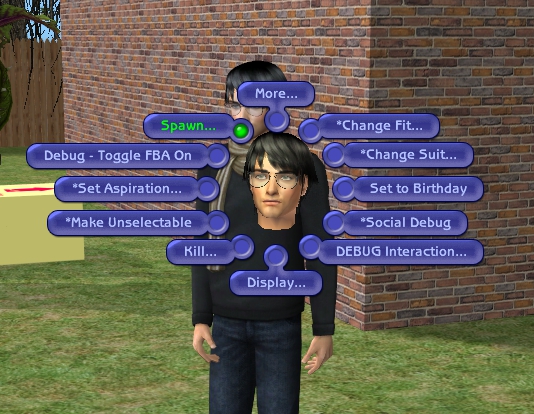
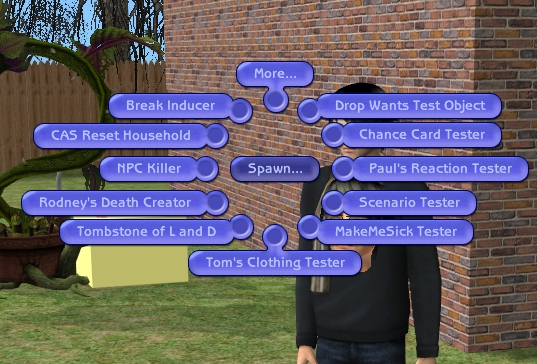
So you'll see all these options, and most of them are pretty self explanatory e.g. Change Fit, Change Suit, Set to Birthday. You can have a play around with them but be careful, because some things may not be reversable so you might want to save beforehand.
If you click spawn however, you'll come across a new menu with loads of new options. Most of them look strange but if you read them and think about it they start to make sense, most of the time. But for writing stories the main ones that you'll use will be Paul's Reaction Tester, Tombstone of L and D, and probably Tom's Clothing Tester if you want to change the clothing for your pregnant sims.
Okay so start off with Tombstone of L and D. When you click on it a tombstone will appear somewhere near your sim. The main thing with the Tombstone of L and D is it's easier to make your sims pregnant. If you look through the options you'll find 'Simulate Genetic Merger with...' and you can choose the father of the baby. It works for guys too surprisingly, you can make a guy pregnant with a girl instead of an alien. Speaking of alien, you can also make them have an alien baby as one of the options in the tombstone. Also on the subject of aliens you can MAKE your sims get abducted when they're looking through the telescope, by holding down Shift and clicking on the telescope while a sim is using. You'll see a 'get Abducted' option, then you'll get the whole filmclip and they really get abducted and return pregnant. Anyway leaving the subject of aliens and back to the Tombstone of L and D, when your sim is pregnant you can speed up her pregnancy by clicking on the 'Speed up my Pregnancy' option that replaces the 'Simulate Genetic Merger with...'. It just speeds up the whole process, instead of it taking 3 days, it takes a couple of hours in sim land. The pregnant sim still gets a tummy too, with the first stage then the second stage. It all just happens a lot faster. There's other options that you'll find in the Tombstone of L and D, but those are just the main ones, and I can't spend the entire time telling you all about the Tombstone of L and D, we must move on, to Paul's Reaction Tester.


Paul's Reaction Tester is probably the best thing for Sims 2 stories. It is indeed a reaction tester, in the manner of you being able to test your sim's reactions. It's good for when you're trying to take a sad picture and making your sim look sad instead of him being unusually chipper. I remember talking to a friend of mine ages ago, she'd been making Sims 2 stories for a while and I was telling her about the reaction tester and she'd never heard of it. I asked her how she made her sims cry and stuff in the game, and she told me that she'd make them attached to a random sim and then kill him, so her character was sad. I found it funny and sad at the same time. But a lot of random sims' lives were saved by this tester from that time on.
It's also a lot better to use this tester to make them cry. Because you can have them 'Do Consolable Cry' which looks like a normal cry. But if you select another sim and using that new sim, click on the one that's crying, amongst all the 'kiss..', 'hug..', 'flirt..' options there will also be a 'Console' option. You can see above, my two sims, one crying and one consoling. It looks really sweet, and kind of makes you feel sorry for making them cry. But it makes for a good story.

Okay moving on from making our sims miserable and onto the options! If you look through the colomns you'll find different, I was going to say emotions but it doesn't seem to be the word. You'll find different actions/emotions e.g. Laugh at, disgust, pine, startle, surprise and a lot more. So once you've clicked on a action/emotion that you'd like to try, an option screen will appear asking you how you want to reaction to run. So to see what the action/emotion looks like select Anim and then you're sim will run the reaction you selected.

For fun I'm going to make Henry 'Pine'. (Pictured Right). So that's how you use Paul's Reaction tester.
And now, onto the last part of telling you about the 'testingCheats' cheat: Tom's Clothing Tester.
This tester is good for when you have pregnant sims and you want to change their outfits, rather than them having the normal maxis maternity outfit. Although to change their outfit you'll have to have downloaded some maternity custom content. If you have other custom content for your female sims, they may also work, but it all depends on whether the person who made the cc, made it with a pregnancy mesh. Now there's two ways to make your pregnant sim wear custom maternity wear, the first one which is generally the easiest if it works for you, and that is to download the 'Pregnancywearanyoutfit' hack, which can be found here: http://www.insimenator.org/index.php/topic,91730.0.html
It is easier to use that hack, but if you don't want to use hacks in your game there is another way.
When you click on the 'Tom's Clothig Tester' option under Spawn, a clothing rack will appear. Now before you do anything with that, you first have to change your pregnant sim's outfit. So with the pregnant sim selected, hold down Shift and click on them. With the options menu that shows up, click 'More..' and search around until you find '*Plan Outfit'. Then make sure your game is NOT paused and wait for a buy clothing box to appear.


Find some cc that you think your sim can wear, that's either specific maternity wear that you downloaded or other clothing that you hope a pregnant sim can wear. Add those clothes to the cart and click the tick. Then another screen will appear asking you to choose her outfit. If you highlight one you can see her wearing it on the left hand side. If she doesn't have a baby bump when she's wearing it, she can't wear it. Hopefully you'll come across an outfit that she looks pregnant in, if you don't you'll have to do some more cc hunting and download some more. So you've got an outfit she looks pregnant in and you can click the tick. Then you'll leave that menu and come back to your game.
It will appear as if nothing has happened. Your pregnant sim will still be wearing her maxis maternity clothes and not the ones you picked out for her. That is where 'Tom's Clothing Tester' comes in.


Click on the clothing rack that is 'Tom's Clothing Tester'. You'll find an option that says Force Redress. Click on that and it will reset her clothes and she'll refresh into the clothes you chose for her. That's all there is to it. There is one problem with it however, everytime your pregnant sim has a shower or goes to sleep she resets her clothes back to the normal maxis maternity wear. So every time that happens you'll have to Force Redress again. That's not the problem though, that's just a minor annoyance. The problem when using Tom's Clothing Tester for this purpose, is that I've found that after a while my sim's career goes to the top of the career track, when it was at the bottom. I know it may not seem like a big deal, but it's annoying that it happens by itself.
Now off again we must move and onto a new subject. This one being the setting up of scenes.


There's some basic stuff that can improve your screenshots. When you're taking pictures in the game make sure your walls are up. It helps to make it seem more real and less like the sims game if that makes sense. Also make sure that when you start taking your pictures that you take them in 'Live' mode instead of 'build' or 'buy' mode, because if you don't you'll get that grid over everything.
Another thing is the plumbobs and the speech bubbles. The plumbbobs being the green diamond that hovers over the selected sim.
Now you can get rid of them with two simple cheats. To get rid of the plumbbob, you open up the cheat window (Ctrl + Shift + C) and type in 'plumbbobtoggle on' and the green diamond disappears. To get the plumbbob back you simply type in 'plumbbobtoggle off' and the diamond reappears.
To get rid of the speech bubbles and thought bubbles everytime a sim says something or thinks something you simply type in 'showHeadlines off' in the cheat window. To turn the thought/speech bubbles back on you type in 'showHeadlines on'.
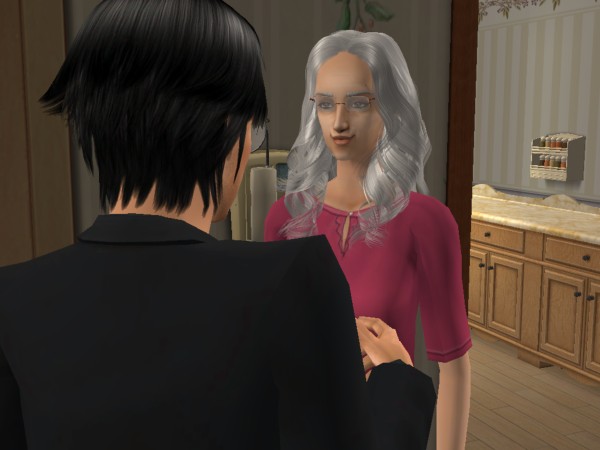
Last but not least, the zoom. It looks better when you're zoomed in and you can see the reactions on your sims faces. Although you might have to wait to get the reaction you want. There is an awesome feature that I found by accident. I accidently pressed Tab, and freaked out when I found all my buttons like buy mode and build mode disappeared. I thought it was some kind of error and I restarted my computer. Until I found I had just entered 'Camera-man Mode'
You can enter the 'Camera Mode' simply by pressing the Tab key on your keyboard. Then in this mode, you can move your screen around using your mouse. You can't move your place higher or lower, but you can look up and down. You can also move by using your direction keys. You really have to play with it for a while until you get the hang of everything and start to take some good pictures. Just have fun with it and play around with some strange angles. There is another cool feature of being in 'Camera Mode' you can zoom and unzoom. By pressing 'Z' you start to zoom, the more you press it the more you zoom. But there is a limit to how much you zoom. To unzoom you press 'X' on your keyboard, and you can keep unzooming until you get this weird bubble like effect.


Also with the 'Camera Mode' you don't get the invisible stairs and trees. You know when you get too close to either of them and they start to disappear, it doesn't happen when you have the Tab 'Camera Mode' on.
So that's the 4 things, walls, speech/thought bubbles, plumbbob and zoom.
Now last but not least, pose boxes! You can download 'pose boxes' from a lot of different websites and they're all basically the same thing: boxes full of poses.
Pictured below you'll see a heap of boxes behind the sims. They're all pose boxes, and when you click one a menu will appear. You choose your options and then click start, and your sim will pose. There's heaps and heaps of poses!! that people make.


Pose boxes really enhance your stories, and also come in handy when taking pictures of clothing that you've created and plan to upload.
I really hope that this tutorial was of some help to you. I'll definately be writing more tutorials as I think of more things to write them on. So if you have anything you would like a tutorial on, I'd be more than happy to help, just let me know.
I'll leave you with a bunch of cheats that I hope will be helpful to you. Remember to get the cheat window up is Ctrl + Shift + C. (I know I've repeated that a lot but it's so you don't have to scroll up and look everywhere for it if you forget it)
boolProp testingCheatsEnabled true/false - The mega cheat that I was talking about at the start of the tutorial.
Plumbbobtoggle on/off - Removes the diamond green plumbbob.
showHeadlines on/off - Removes the speech/thought bubbles that appear when a sim is thinking/talking.
kaching - Instantly gives you $1000, helpful when buying things for your stories.
motherlode - Another money cheat, instantly gives you $50,000.
boolProp SnapObjectsToGrid true/false - Get's rid of the restricting grid that prevents you from placing objects where ever you want them.
moveObjects on/off - To be used with the cheat above. Also a good cheat on it's own, allowing you to pick up sims and other things.
aging on/off - Turns off aging so your sims don't get old in the process of story writing.
As well as all these cheats there's also hacks that I use. You can find a list of hacks and hacked objects with the link below:
http://www.sims2wiki.info/wiki.php?title=Content_List:Hacks_and_Hacked_Objects
Also there's a lot more on mod the sims. But just be careful when using them, as their object is to alter gameplay and it could end badly. I've had a couple of hacks wreak havoc with my game and each of those times I've had to not only try to delete the hack, but also uninstall and re-install ALL of my games and custom content. But you just have to decide if it's worth it. Not all hacks are bad though and it's just a matter of weighing up both sides and deciding. Even after the problems I've had with some of the hacks, I still use them and not all hacks that have problems end in you having to uninstall your game.
Anyway hope you all enjoy writing your Sims 2 Stories!!
Adios Amigos!!
Changed the Poll Again...
So I changed the Poll again..it was only meant to be a quickie and as Bonfire Night is now over until next year, I decided to put it away for another Poll. I was going to admit a chocolate related one..but, hey..I don't want it to sound like I'm a chocoholic or anything!! ;-) So here are the results of lst Poll....
Poll Result:
Question: Is your Sim having a Bonfire Night?
| Yes..Bonfire, Hotdogs, Fireworks..the lot! | 50% (5) |
| No..A Normal Sim Day (!) | 50% (5) |
The next one is 'which is your favourite expansion pack so far'..have to admit I like World Adventures best..I still haven't got bored of tomb raiding, and I STILL haven't found all the relics to make up the sets, I'm still looking for one last Dropa Stone..Now what I would like to see in a future game would be some use of the Gems..maybe some way of making them into Jewelery..each stone into earings or a necklace and maybe as a skill to be a jewelery maker..so you could sell them or just have your Sim wear them..I think that would be a very nifty idea :-) one can but hope...
Countdown to my Gallary!
Okay update time.
I will be uploading pictures to the My Screen-shot area on here, for the purpose of you to comment on, all of the pictures I will upload will be of celebrities, so it won't be to hard. The more you comment the more often I put up pics! This is all in the hopes that I will gain enough kudos to purchase a gallery so that the official Beauty Central event can begin, and I will be able to showcase singular Sims in their own gallery.
Thank you for the support.
RQ.
Heather's Sims 3 Generations Challange
“Heather’s Sims 3 Generations Challenge”
To add a bit of my own twist to some of the current Sims 3 challenges that are out while still honoring the challenges like it I decided to add my own twist and set of rules.
Your Founding Sim!
1) First of all you need to start a new game on whatever town you wish, just make sure that this game is for challenges only.
2) Then you need to create your Founder Sim, they are to be either a young adult or an adult. Their looks, likes, lifetime wishes and such all can be customized as you see fit.
3) For your sims trait you need to hit the random button to start off with. You can keep all of the five traits that it randomly picked for you for an extra challenge if you wish but for his challenge it is only required that you pick one of them. Remember the first trait HAS to be one of the five that the computer generated for you. The other four you are free to pick on your own as you see fit.
4) Custom content, clothings, meshes, create-a-pattern tools are all allowed in your creation.
5) You can only create one sim to start off with. Spouses, kids, roommates and the like all need to be added from playing the game.
Finding a Place to Live!
1) Next you need to figure out where you Sim are going to start out. Here is where I am a bit easier going then most of the other challenges.
2) As I said you can start in any town. You also get to pick your place to live – you can choose an empty lot and work your way up to a place to sleep or you can buy something cheap. You also can get it already furnished as long as you have the funds for it. The loop hole here is NO CHEATS of any kind. No mods, no switching things around nothing. So whatever you choose to start with you are stuck with till you can afford better. So pick wisely!
Rules to Play By….
1) Rules are simple no cheat codes, no mods, no boost no help. Nothing that will help make your sims life easier!
2) Yes, you can use custom content so long as it does not have any type of mod/cheat in it to help with stats, energy aging ect.
3) You have to keep aging on at all times. No stopping time to move up in your career or have time to create that family you want.
4) The goal is to try to make it through 10 generations.
5) The child you choose for your next generation can be adopted or home grown but it has to be the same sex as the one you started off with. Meaning that whatever gender your founder was, this must be the gender of every heir. Meaning if you started with a female founder, only female children may become the heir to bring in the next generation. Children of the other gender are still counted as part of the family but they cannot be the one to start the next generation.
6) Lastly your future generations are just like their parents so one trait of each new generation has to be the same trait one of their parents had. This can be picked from either the mother or the father but at least one trait has to match one of their parents.
7) You can move to a different house as long as you have earned the funds to do so.
8) Family portraits – if possible have family portraits made and displayed through the house so future generations can see where they came from.
9) Stories – I love stories so adding in stories and such with each generation. This can be of their whole life or just one small story from a time in their life.
10) Just try to have fun!
So that is my Sims 3 generations challenge! Now let’s see how well it comes out!!!












 Limited Time Offer
 For a limited time only, we’re giving away a free


