

 Sign In


's Blog
New nursery
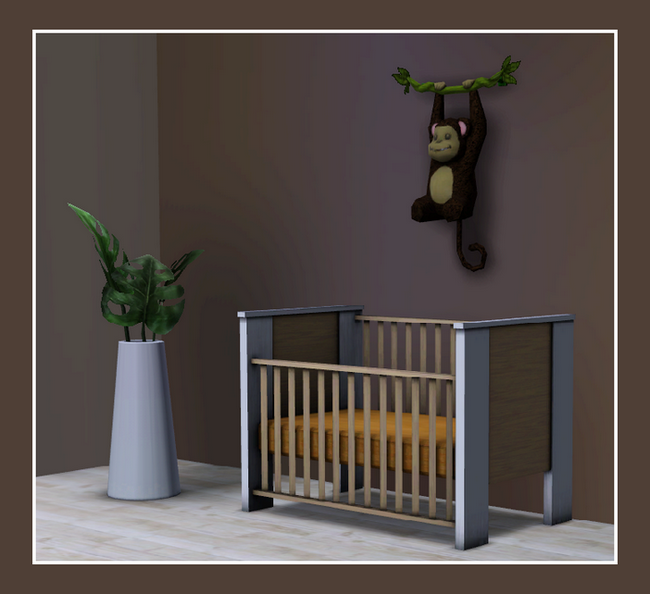
It has been awhile since my last blogpost. But today i wanted to show you the new nursery i am working on.. i hope to be ready for release this weekend.. but here you can see the crib i made for it..
The monkey and plant are both Store content.
Thank you!
Thanks to all who have read The Face in the Mirror. Thanks even more to all who've commented and rated it. I'm so happy to see the final chapter featured on the frontpage of TSR! Even though I'm sick with the flu, I'm delighted! Thank you, it was just the medicine I needed!
... a Merry, Merry Christmas and a Happy New Year...


Having Bench Issues
I was going to post a new The bench, but i tried and it got an error, so i gave up, but I may or may not make new ones.
Also, just a random note, i'm now a sub! YAY! But, I will keep all my submissions free download! :D
Also, Dreaming of life is on hiatus for now I guess, because my screenie folder is crowded, and i can't seem to find the screenshots! XoX
Now, I have also developed an interest in playable mummies, which are way easier to get then ghosts, so you'll see a lot of those. You may have seen my A day in the Life of a Mummy story! Or my, Kung Fu! (Egyptian Style!) screenie.
Also, my ghost tutorial is taking forever to get accepted, so i may or may not have one.
You also seem to like my new story, Children of the Sea! I'm glad you enjoy it, and I'll post a new chp today! :D
Also may post a Waydei.
Alright, thats it for today, but boy do i have a lot of updates!
Signed, Elzi

SIMposium - Create A World Tool
When creating a new world, you can now select from 4 different size worlds (Sim City 4 only allowed you to use one size). The smallest world is 256x256 & the largest is 2048x2048. You can choose from Lush or Desert & you can also set the maximum height of the world (100,200 or 300), to allow for huge mountains or a more modest height elevation.
You can also select from a range of Pre-made Terrains as your base or you can import an image to use as a texture map. The tech team showed us an image of a flower which they then turned into a terrain. You could use this option to build on a face or a favourite painting – you’re only limited by your imagination!
TERRAIN EDITING TOOLS
*PAINT*
Select a paint colour to automatically shade hills & mountains
Beaches can be painted along any shoreline, so you no longer have to worry about getting the exact height right for the beaches to show up. BUT... at this stage you can't build along the beach, so lots can’t be built on the water’s edge.
You can now Import paints & textures, so you could have dirt or cobblestone roads if you want a themed neighbourood.
*SCULPT*
Allows you to change the shape of the terrain (similar to"God Mode" in Sim City 4). Unlike SC4, you can vary the strength & intensity of the "Brush" while using the following Modifiers:
- Flatten - Gentle
- Flatten Terrain
- Hill – Steep
- Hill – Gentle
- Mountain
- Smooth
- Smooth – Gentle
- Sheer Cliff
- Valley – Steep
- Valley – Gentle
*ROUTING*
- Where the camera can see – so you can hide the edges of the map if you want to
- Determines where your Sims can go/walk
- Although you can place lots anywhere, the tech team recommended making the lots near roads, as sims will have to walk to a road in order to get into their car. They also recommended making the lots flat so that if they are shared, they won’t distorting the surrounding terrain.
*EFFECTS*
-birdsflock
-geeseflying
-hotairballoon
-jettrailfx
-meteorshower
-oceansurf
-oceansurfreduced
-oceansurfsimple
-oceansurfsplash
-oceansurfsplashsmall
-rainbow
-rapidsnorock
-rapidsrock
-rapidswaternarrow
-rapidswaterwide
-sailboat
-seagullsfx
-waterbuoy
-waterfall_1_med
-waterfall_1_medsplash
-waterfall_1_short
-waterfall_1_shortsplash
-waterfall_1_tall
-waterfall_1_tallsplash
-waterfall_1_med
-waterfall_2_med
-waterfall_2_medsplash
-waterfall_2_short
-waterfall_2_shortsplash
-waterfall_2_tall
-waterfall_2_tallsplash
-waterfall_2_med
-waterfall_3_med
-waterfall_3_medsplash
-waterfall_3_short
-waterfall_3_shortsplash
-waterfall_3_tall
-waterfall_3_tallsplash
-waterfall_3_med
*TREES*
When placing Trees & other objects like rocks, it’s important to create individual layers, so all the trees are placed on one layer. This enables the game to run much faster as you can "cache the trees" together.
I placed trees on "Layer 1" & the rocks on "Layer 2"
*OBJECTS*
You can move objects once placed along their axis, which means you can turn them in their current position. This is very useful for placing intersections on curved roads! This feature also enables you to move objects up in the air, so you could have a group of floating rocks, if you wanted to build an alien world. You can also bury rocks or other objects in the landscape so they blend in with the environment for a realistic feel.
You will need to place the objects – like trees & rocks – on the one layer
Spawn collectibles – fish in ocean/river, seeds etc.
*LOTS*
Lot size – max 64x64
Lots can be placed anywhere – but it's best to place them near the road, as sims will have to walk to a road in order to get into their car.
You can increase an area's property value – so they show up with a "beautiful vista" moodlet
*ROADS & SIDEWALKS*
Unlike The Sims 2, sidewalks are not automatically placed along the roads, however this tool allows you to place them wherever you like. You can link communities with intersecting sidewalks & that should make for some great visuals, as sims hike across the landscape.
Roads can now be curved & can be moved after placing them, as can sidewalks & if placed over a hill, the hill can be flattened to stop their being unrealistic road angles.
Can add "Sidewalks" now as a separate way of linking lots. Like the roads, they can be curved & can moved after placing them.
"Intersections" can be placed on connecting roads
As you can Import terrain paints & textures – you could have dirt or cobblestone roads – perfect for themed worlds, such as a Medieval Village
*OTHER*
Available to download for FREE in December from TheSims.com
Can upload/share via the exchange
Has an "Undo" option which was not available when creating neighbourhoods in Sims City 4
Downside – Bridges must be place in the Sims 3 – can’t automatically stretch a road over a body of water to create a bridge.
Able to move between Sims 3 & Create a World to make changes (no more having to make .png or .sc4 files to import into game)
*CONCLUSION*
Tutorials will definitely be needed, as the Beta Version we tested was tricky to use. Although the actual sculpting of the terrain was pretty straight forward, I wouldn’t recommend this tool for beginners – at least not until tutorials become available. I admit I found moving roads after placing them & getting intersections lined up correctly a finicky task. For those who love to spend time making sure every detail is just right, there is lots to love...
Up for a Challenge?
If you're looking for a gaming challenge, the SimShack started it's first ever 'Monthly Challenge' yesterday. Head over to thesimshack.com to take a look.
The objective is just to see how many parties you can throw! You can play TS3 or TS2. Check it out to see the rules and point-system. If you participate and keep a tally of your points, you'll win a certain amount of simoleans (part of a reward system on the site) that you can spend in the simolean shop! Sign up now to take part!!!! And don't forget to stick around for the January challenge!
My first object set ever! + preview
Never made an object set before so this was extremely exciting for me. I had some serious problems with my patience, but I finished it in the end. I made part od the creations like a week and something ago, but I wasn't motivated enough to make the whole set, so it took me many days to finish this. Today, after days and days of searching for an sort of inspiration it's finally done! Can't belive that it would be soon out and ready for you to download it! Hurray! :)
However ... I must thank my today illness(high temperature) for three new plants and all the previews (19!), because I was all day home and I had plenty of time to play out with all the creations. Thanks god ...
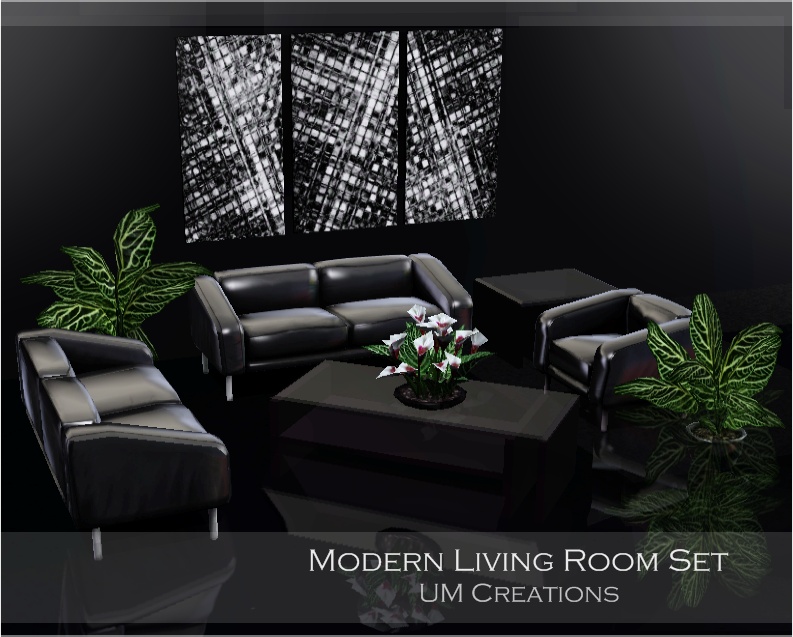
The set contains 8 creations: three plants, painting, sofa, living chair, end table and a coffee table. All the creations are recolorable and have their variations ( three ) except the two tables.
Hope you'll enjoy this set as I did! I still need to decide the date of the realese, but it would be uploaded up tomorrow anyway. Have a great time!
UM
Preview:
Nasty Update!
Well, unfortunate news...the Eco house I had intended to upload is gone, along with all my houses. They are empty and now the town is littered with blue holes where the lots used to be. >:(
I'll get back to work whenever EA fixes this fix for a fix. Really, how did they manage this?
World Adventures and New Lots

It's been a while since I've posted anything. So I'm going to talk to you about World Adventures and new lots from me.
Lots created with World Adventures can be used with the base game only. Any World Adventures items (objects, build features, roof patterns etc) will be replaced with base game items, just like when you download a lot with store items. However, you will need to have the latest patch installed with your base game, otherwise you will not be able to install the lot at all.
If I don't use a specific World Adventures theme in my lot, or if the items arn't necessery for the lot to function and look good, I'll try to keep at least some of my new lots Base Game Only.
At the moment, I'm working on a bit of preperation for the release of the World Builder (released in december). This'll let us create entire new neigbourhoods, and I've already got detailed plans for what I'm going to create. I am also working on a working tomb and Nectary for your residential neigbourhoods (not vacation destinations) so your sims can have all the exploring fun even when at home.












 Limited Time Offer
 For a limited time only, we’re giving away a free


