

 Sign In


's Blog
Garden Flowers
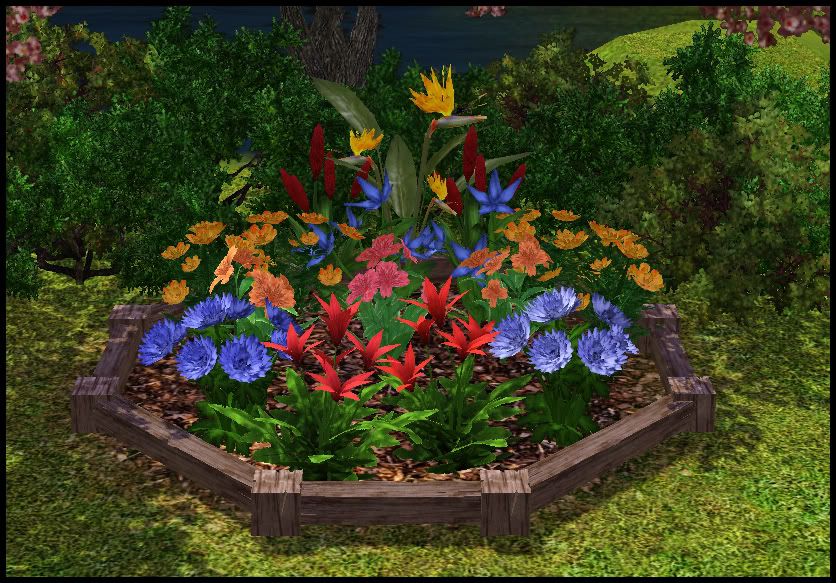
In response to a few requests I've gotten, I've converted a number of flowers from TS2 over to TS3. This set wasn't in response to my poll (as it's still going to be open for a while), but I figured I'd go ahead and knock this set out of the way while I wait.
Includes Bromeliad, Bird of Paradise, Marigold, Peruvian Lillies, Zinnia, Racaria Flower, and Windflower. All the flowers are recolorable.
- The marigolds have two palletes that can be changed, but because of the way I had to blend the mask together to get that effect, the colors you select with the design tool are NOT going to be the color that appears on the flower. For the default of yellow and orange, in design tool, it's red and an odd shade of brown. Most color combinations can be achevied, you'll just have to mess with the colors in game and see what looks right.
- The yellow part on top of the Bird of Paradise is recolorable
- Some plants have recolorable foliage as well, if you want to make them brown or some such to make them look dead. (Random idea, but I figured someone might make use of that ability)
Texas Flood
Much as other portions of the US, I am currently recovering from flood damage...(not too bad, we only got about 2" in the house.) I will be offline temporarily. Sorry!
Yaay - The picture's approved!
Now where the heck do I find it so I can show it off to people? There's loads to discover still about this site but slowly, slowly we'll get there. Tomorrow some more pattern work I think - or maybe I'll frame one of the Halloween pics we made this evening with the neighbours :D Even when we don't celebrate Halloween really here, the kids wanted to have some scary make-up and watch The Omen before having a sleepover. The parents (being my neighbour and I) were also made over and of course loads of pictures had to be made. Oh dear :D A few should be good enough to be made into scary family pics ;)
D'oh! Of course, if you haven't ticked the Sims3 tab, you won't see it in upcoming events - so that's what that one's for, that's one thing solved :) And it looks like it will be published tomorrow - I wonder how many people would like a black cat in their house :)
New Sims 3 Set!
I have a new set for Sims 3 coming out on Monday. Hope you like it!
Hope everyone has a great Halloween!
Some strange problems with shoulders and arms in new stuff
In newest stuff (created with latest version of TSR Workshop) you can see the arms are ticked in the body.
Inside the game is the same situation. They only move arms for actions, but the rest of the time is like this.
This does seem to be an issue with the new version of Workshop. It has been reported in the Beta Bugs thread.
For reference, I added this link back to this thread in Forums
http://forums.thesimsresource.com/showthread.php?t=376283
Sallys downloads
Sally was so proud when she reached the 700,000 down load point.. it breaks my heart that she is unable to see that she has smashed through the 1 million marker, on her behalf thank you all for keeping Sallys TSR site running, without your downloads her site would have to close because she has not renewed her subscription.. Sallys dad
Newport Revival on Sims3
Hi!
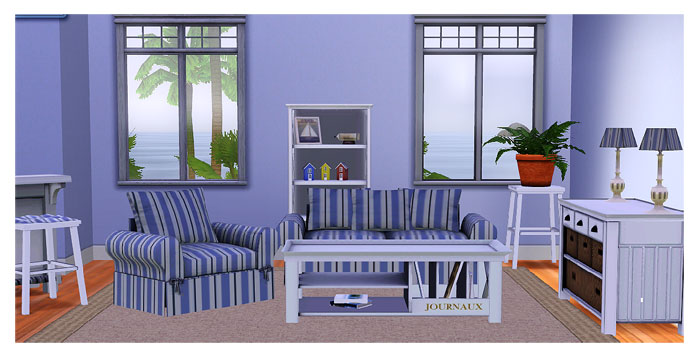
Because of many many request I remake my Sims2-Newport-Theme. At the moment I'm on creating the Livingroom and the Kitchen - here is a first impression of the Livingroom:
Create A World Tool
Let's have a look at the Create A World Tool which will be available for download in December at the official site. This tool is used by the Sims 3 team themselves for creating all the neighborhoods. You can choose from a premade terrain to start from but you can also create your own heightmap which you can import. From there you can do further changes to the terrain. There are a couple of tools available with which you can sculpt the landscape in an interesting way.

Click for high resolution image (598.9 KB)
Further you have the possibility to import your own textures to paint on the terrain. There's a limit of 8 textures used per neighborhood section (2x2 sections). However, if you're not satisfied of a texture, you can easily replace it. You can even assign a sound effect to a texture. It's possible to place all kind of trees and other objects as well as effects into the neighborhood. This stuff can be moved and rotated at any wish. So you're basically able to place rocks in the air. :P

My created, but not yet finished, neighborhood with the Create A World Tool.
You can place streets and walkways everywhere and connect them. Their path can be set with bezier curves (like in Illustrator). Lots don't have to be attached to streets but it's recommended to do so to not confuse the game's track system. Lots can be freely created with a rectangle, although there's a maximum size. Whenever you need to make changes ingame, you can do that. There's a button with which you can switch back and forth between the editor and the game.
You can also define areas where the camera and/or sims can't go to. Such areas are automatically created when hills or mountains are too steep.
Well that's it for now. Going again to the editor to place the streets and lots. :)
Edit: Back with having the neighborhood basically finished. But there's actually so much more you can do!














 Limited Time Offer
 For a limited time only, we’re giving away a free


