

 Sign In


's Blog
News! Two Craftroom Sets for Sims 3
With the holidays just around the corner, it will soon be time for gift buying and wrapping. A dedicated Craftroom is the perfect solution! Part One includes the furniture, modular units that can be mixed-and-matched for different looks and styles. While Part Two, which includes the decorative clutter items, will arrive later in the week.
Craftroom Part One is scheduled for publication on September 21st and Part Two will be published on September 23rd. A collection folder is available for download at MediaFire, here.
I finally have my dream craft room (too bad it's only virtual, lol), I hope your enjoy the set.
Hugs,
Carolyn
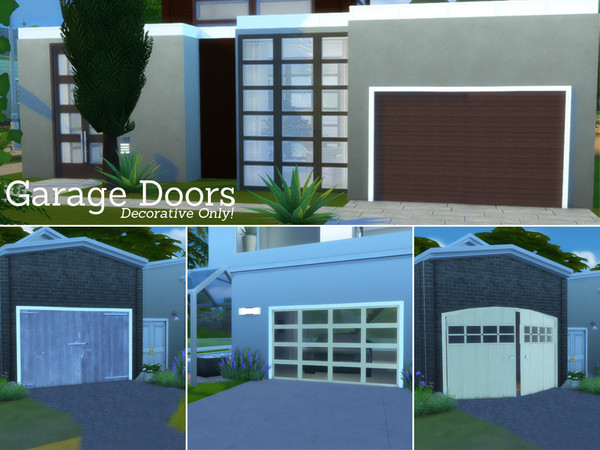
Garage Doors Set
Today i finished my Fake GarageDoors set for Sims 4.
Now you can also build houses with what looks like a Garage untill we finaly have some...
Ready to download October 1st...
harry potter
i am the worlds bigest harry potter fan
I am back
Dear TSR community,
I have got a brand new laptop and I can finally start working on brand new creations for your Sims and you to enjoy!
Spacesims
First Post!
I'm super nervous about this whole Sims CC thing, to be honest. I'm still trying to work out all the meshing tools, so for the first week or so I'lljust be doing recolours, maybe a couple Sims, who knows?
Wish me luck on my creations!
We Want Your Screenshots!
Every day when we announce the winners of the previous Lottery, we use a screenshot that has been submitted by you guys. The images can be anything you would find in your game, but they must be PG-13, and they should not have any text (this includes your name) on them. (Also avoid images that are overly photoshopped, meaning no lens flare, borders, etc).
While we love every image that gets published, we are in need of landscapes and pictures that show off the great outdoors. We accept images from any Sims game, as well.
As a bonus, from now on, if we use your picture on our Facebook page for announcing the lottery, we'll link back to your profile so everyone will know it was yours _and_ you'll get 3 days of free VIP access.
Side Note: If you need some tips on how to take better screenshots, you can't go wrong reading this 'Scene Creation' tutorial by FredBrenny - http://wiki.thesimsresource.com/index.php?title=Scene_Creation_a_Brief_Summary While it is aimed more towards making a set look good, the information on lights and arrangements can make a difference.
But Degera, how do I upload a screenshot? Make sure you are logged in, and click Account at the top of the page. Then click Edit Screenshots.
Now you'll see a page with two tabs. The first tab displays any images you have already uploaded. The second tab is Submit Screenshot. Click the Submit Screenshot tab.
Enter a title. Change the category if you want to using the dropdown menu, but there is no Sims 4 category (boo!) so you can skip this step if you're submitting for Sims 4. You don't have to add a description, but it's always nice to have more information.
Now the important part! If you do not change the Public option to Yes, then no one will be able to see the screenshot. So, using the Public dropdown menu, change it from No to Yes. I can't stress this enough - if it is not public, I can't see it and therefore won't be able to use it.
Now upload the image to the site by browsing to the image on your computer and click Submit Screenshot.
You can do this as much as you want to, in fact, the more the merrier, and the more chances that we'll use one of your pictures!
** After some testing, we've discovered that the screenshot uploader does not like images that are over 1 MB in size, and it seems to eat .png files, so using a .jpg format is your best option. Thanks to Howdy Simmer for bringing this to our attention.
it's been a while
It HAS been a while, but i finaly found some time to start something new..
The Kayo Bathroom, all inspired from the Latis one, but all new meshes for Sims 4..
Here's a preview picture for the set in progress for you all!!













 Limited Time Offer
 For a limited time only, we’re giving away a free


