

 Sign In


's Blog
Free Download - The Gemima
My house The Gemima will be free to download from August 30, 2009 to September 27, 2009. :)
New Laptop on its Way!
My desktop is a great machine, one that I have upgraded my self for the last eight years, but I've used up all my memory slots and while it plays Games like the Sims 3 and WoW just fine, the poor thing churns away on others.
So incoming laptop for gaming, graphics and report development, the latter being the excuse I used to convince myself the purchase wouldn't be fluff. Now I can carry my work to my clients, instead of <shudder> webex and other shadowing thingies.
I want to thank everyone for downloading my Sims and lots.
WOO HOO!!!!!! 1,139 have downloaded the things I made. That is so cool to me. One girl asked where can you find the houses after downloading it. You can find them in the CC in lots. The Sims you can find them in saved Sims. If you can't find them, make sure you have downloaded them to the right place.Thank so much for all the awesome comments and for downloading my stuff. Have a great week!(((HUGS))) **Wanda**
Future Projects
OK, I see a lot of people downloaded Cara's Body and I guess many of you download them for the Body and not for the cloth.
Maybe some of you downloaded her because you like this type of body, or if you just wanted more diversity in you neigborhood.
Actually I get bored to see all the sims having the same body type. EA gave us the option to make them thin or fat but the body construction was always the same and the diversity was quite limited.
As we want more objects, more clothes, more hairstyles, etc... I think also we should have more body types, so this is what I'm planning to do in the future.
First of all I want make an intermediate size between Game Mesh and Cara, so there will be 3 tipes of busts.

Maybe some curvy hips like Beyonce it will be a good idea, I'm not sure at the moment.

And also for more diversity, I think Pot-Bellied man should be interesting to have him in our town, as an old gardener, a very specific couch potato or whatever we want.
If you have any other suggestion it will be very interesting to hear what others need in their game and maybe in the future all of these will be there.
Part 8 of you only live once...
Is on it's way, I have been away and not had much chance to carry on story.
Watch this space:D
THANKS TO ROSALEENA
Yes, I am back with my stuff.
After a difficult week in which I had some problems with my Photoshop, finally due to Rosaleena´s help, now I can go on working in my clothing projects.
I can´t leave the opportunity of thanking to Rosaleena. THANKS!!!
Sandra
Sims 3 Meshes
Hi my dear friends!
Today, I have joined the beta-tester group, and we discussed a lot.Then I learnt that cemre was there.We are both from Turkey, our main language is same.So she helped me all the day!
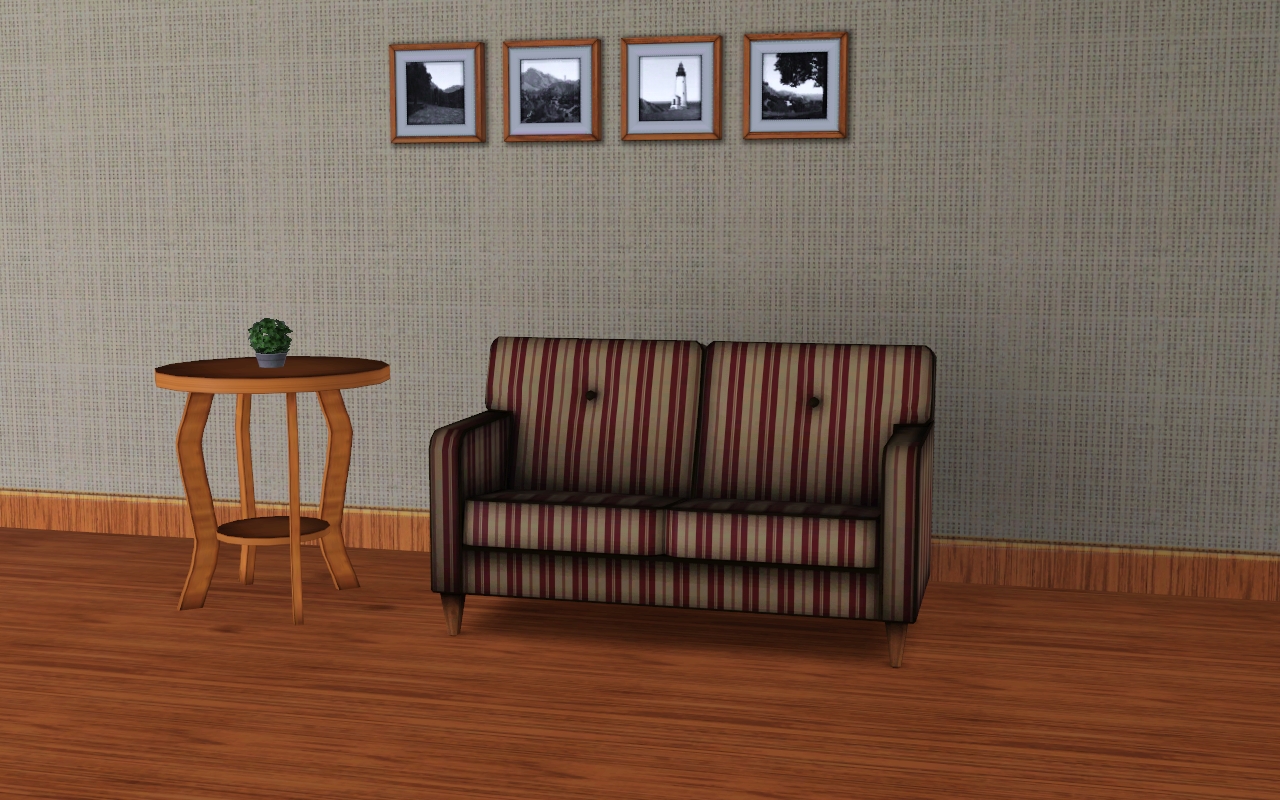
I made an endtable for cosy livingrooms Yay!
Screenshots!
Hi all!
Today when I logged in here at TSR and would do my usual stuff, I was very surprised that I had received 9 new comments on my screenshots! : O * shocked * I thought that would never get so many comments, although I do not have so many comments .. I just want to thank everyone and say that it means a lot to me!
Have a nice day!
Daniel :wub:
Color Palettes
Color! What would we do without it?
I'm not going to bore you with a long list of what would happen without color. But first, I'm going to show you how to blend colour.
My forte is probably make-up.. I love creating eyeshadows and eyeliners, then uploading them to TSR. However, I've only uploaded one Eyeshadow at the moment.. it takes me ages to fiddle around photoshop with .dds files and what-not! Then when I finally get Sims 3 up and running (my computers quite slow), I nearly tear my hair out, because something has to go wrong!
Anyway, enough about my rant! Onto the concept of this post. :)
Many people get fustrated with matching colors. I certainly do - but I personally find it quite fun...experimenting with color! So here are some of my favourite colour palettes.
This is pallet #1

I like this set of colors - the first blue is slightly grey, and blends in well with the middle blue. The last blue is quite pale, and evens out the other colors. These colors aren't in any order (like darkest-lightest.etc) just a rough sketch of what I mean.
Pallet #2
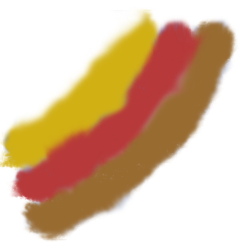
Ooh nice sunset colors! Possibly my favourite palette. Again, this isn't in any order.
Pallet #3
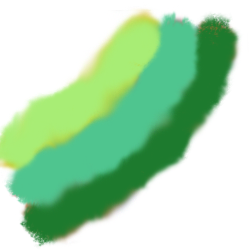
Reminds me of toothpaste. I have no idea why? At first, with this palette, I thought that I'd do a combination of grass-green and bottle-green.. but no. I changed mhy mind and decided to go with a minty green and a sage(ish) green. Green, green, green!
Pallet #4
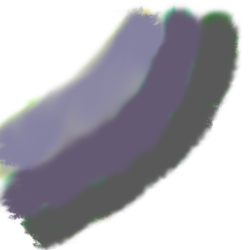
Quite like the blue one, except darker. This palette reminds me of coal.
Hex codes (remember that color A.etc is the color from the top. For example, on pallet #2, colour A would be gold, and color C would be brown)
Pallet #1:
A = #98A3CB
B = #5D6EAD
C = #D0D5E6
Pallet #2:
A = #D1B014
B = #B73939
C = #986B31
Pallet #3:
A = #A9EC74
B = #51BD84
C = #1E7A2E
Pallet #4:
A = #8B88A3
B = #645A73
C = #595959
More coming soon! :)
And this is only a rough sketch haha!
Sims 3 Objects in the new TSR Workshop
Hi folks! I've been testing a closed beta of the new TSR Workshop, and all you object creators are going to love it!
First off, it is possible to clone video game consoles! They work differently to in TS2, and I won't be able to change the controllers (not yet anyway)... but on the other hand, the controllers don't sit on the floor next to the console so this will be less of a big deal than it would have been in TS2.

So what I plan to do is to make new console meshes, inspired by all your favourite real life video game systems, and some decorative controllers which you can place wherever you like. The Sims will still pull the default controller out of nowhere, but let's just pretend that's an incredible "one for all" video game controller for now :D
Pictures of my very first Sims 3 console will be posted on my blog soon... but now for something completely different! I thought I'd test the new object capabilities of the Workshop with the simplest thing I could think of - a dining chair. The latest in game picture is shown to the right, though there's still a bit of tweaking to do to the shading I'm now quite happy with the proportions of the chair. The cushion recolours separately from the wooden part, so you can choose your own cushion fabric and wood grain (or any other materials of course) for the chair.
Plus great news for those of you who were concerned about file sizes (I'm referring to this thread in the forum) - the whole dining chair .Sims3Pack file is 2.10MB, including the new mesh, new multiplier, and new mask file. Hopefully even more complicated files won't be too large :)












 Limited Time Offer
 For a limited time only, we’re giving away a free


