

 Sign In


How to Manage Downloading Too Much CC

Do you download way too much CC? I will be the first to admit I totally do! I have multiple game saves with LOADS of CC (easily over 100GB) and of course, I want more! So how do I manage downloading too much CC? Well, take it from a pro CC hoarder… You have to keep things organized or your CC collection will get overwhelming!
Yes, I speak for experience when I say I have been there! Overwhelmed by the large amounts of CC I am looking at… asking myself where do I start? Is my game going to load? To the point where on my ALL CC game save I start it up and WALK away. It is so big that I will go make dinner or clean, while it is loading up! YIKES! The good news is once it loads up, it is totally fine!
Why is CC so Addictive
So I would like to say there is a cure to your CC addiction, however, we all know the only cure is to not play Sims lol. How many of us have stopped for a short bit, just to redownload this timeless game at another point? So why is CC downloading addictive? Well, SIM-ply put it is because it is like collecting and… you have to TO DOWNLOAD IT ALL…

Links can be found in the Barbiecore Sims blog HERE
All jokes aside many of us are proud of our CC hoarding as it allows us to say things like… “I have ##GB of CC!” or “I totally have CC downloaded that would work for that!” Having a large mods folder is like a badge of honor and a goal in The Sims Community and the bigger the folder size the more CC and mods!

Links can be found in the One Color Retro Kitchen Blog HERE
Of course, having a large ‘collection’ of CC in your mods folder can create some issues… well some are loading time and the ability to be able to find the CC you specifically downloaded for a certain thing… If you have a lot of CC this can be a bit of a challenge! So how do you keep it all together? No worries! This pro CC hoarder has you covered!
Guide to CC Hoarding Success
1- Game Folders
One of the first things shown to me when I started here was multiple game folders. I literally have six different game saves, each with a different ‘job.’ I keep one with ALL of the content I download, another with just trending items and recent blogs, one dedicated to just building and decorating lots, one for collections and collabs, one for looking at specific CC and mods, and one for reviews that have no CC. This allows me to stay organized and load my game much quicker as I split everything based on what I am doing.

So how do you do this, well it is really quite simple, before you load the game you rename your The Sims 4 folder that has the Mods folder in it. I simply put a – and then what it is in the name so I know exactly what I am looking at. So for example when I am not building, that folder gets changed to ‘The Sims 4 – build.’ Of course, when I want to build and use that group of downloads I change the folder back to The Sims 4 and then load up the game. *note you cannot change the name if your game is active.
2 – Folder Organization
It can get crazy when you download a lot of CC, and if you do not use the download manager, you need to keep track of things another way. I suggest folder organization and structuring. That way if you know you have a specific item broken it will be much easier to find.
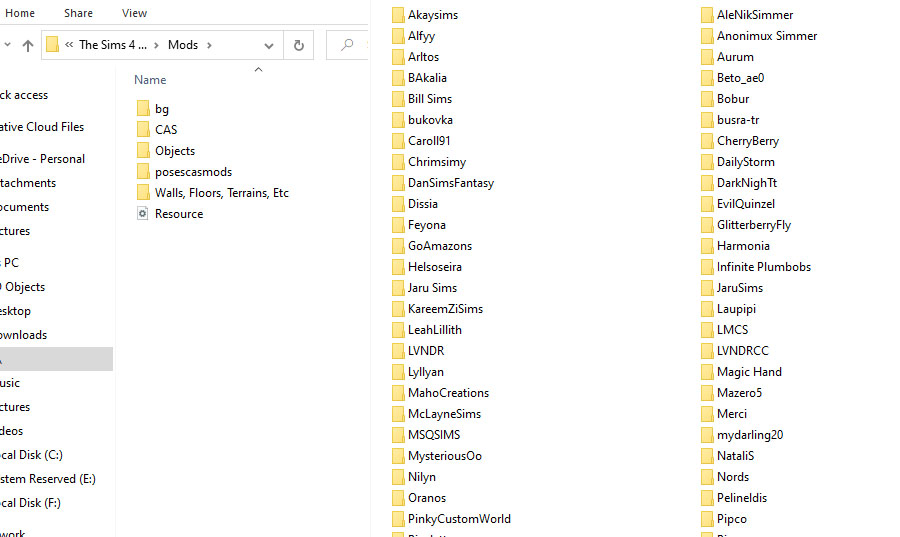
One thing to consider is you do not want too many folders inside of folders. I generally just do two inside the mods folder. For example, if it is a CAS item, I put it in Mods>CAS>the artist’s name. Instead of doing accessories, hair, clothing, etc as my folders for CAS and Objects, I do them by the artist to keep track better.
3 – Using the in-Game Search Bar & Filters in Game
Once you are in-game it can be a challenge to find one piece of CC in a massive 100GBs of custom content! Don’t panic and use filters and searches! Build mode is easier as if you know the name of the item you can just start to type that into your search bar. Create a Sim… not so much, but there is hope! You can filter out the EA content by going to the filters and checking Custom Content, and this will make it slightly easier.

You can always use other filters, but the one thing to know is that the CC has to be set to that filter. So it could be a bit of hunting. However, with the EA basic clothing out of your way it should go faster, especially if have more columns mod installed!

4 – CC Manager
Another way to avoid having to do a lot of these steps yourself is to use the CC Manager. The CC Manager will organize, install, update, and remove CC for you. It’s a great tool and option for those who do not find joy in manually doing all the organization and set up for their custom content collection. I won’t go into crazy detail about the CC Manager as we have an entire page for it… but just know it’s good stuff!

Summary
Hopefully, you have learned a few new tricks in managing your massive collection of CC. Or maybe you came here first and are getting ready to download a massive collection. Regardless of your CC situation, I hope you found some valuable info to help you manage your downloads. Custom content is like collecting for me and I always think when I see another cute Sifix dress “My Sims might wear that… oh I need that one too… oh and that one!” And before you know it I have downloaded the artist’s entire page. Whoops. #noregrets

Links can be found in the One Color Lookbook: Daffodil Yellow Blog – HERE
And don’t worry one of my next Tips & Tricks videos is going to be all about CAS filters! So we will keep helping you out to make your CC hoarding adventure easier!

Links can be found in The Resource Issue 5, on page 4.
Looking for more useful Sim tips? Check out our Tips and Tricks on our Youtube Channel!
Keep up with more Sims stuff and what I’m up to at @TSR Jezi












 Limited Time Offer
 For a limited time only, we’re giving away a free


