

 Sign In


Building Adventures – Learning to Build in The Sims 4

Alright, Building Adventures with Jezi take 2 – Learning to Build in the Sims 4! Remember that terrible build I did in January… in Adventures of a New Builder? I would like to report that I have made progress… How in a little over a month you might ask? Well… building lessons of course! It never hurts to ask questions to improve and there was A LOT of improvement needed. Hopefully, through laughing at my previous terrible building skills other Simmers can get a laugh or learn something new.
Starting Skills

Do we really have to look at this again… So starting off from the blog, Adventures of a New Builder, I was determined to try, even as terrible as it was to build a lot. I successfully built a square with a terrible roof and some very involved landscaping. I am pleased to report that my skillset has branched out from there. (haha) Learning to build in the Sims 4 from what I have heard is much more difficult than in previous Sim games. I didn’t ask for specifics nor did I seriously build ever… so I guess take it for what it is…
Building Lessons

So I won’t lie when I say that I had A LOT of help learning to build in the Sims 4 … and I am still learning. The turning point for me was watching someone else build and being able to ask questions. Sure there is always youtube and other videos… but to be able to ask made a huge difference for me. In a matter of about eight hours, I went from being TERRIBAD to functional. Sure I am still not the greatest, but I can put a proper roof on a house now!
Progress

Jezi’s first build during building lessons
I am now working on multilevel roofs and lots just trying to make myself less basic in my builds. Trying to jazz things up can be a bit challenging but I am forcing myself to not work so symmetrically and to try to incorporate platforms and other elements. I have gotten far away from the standard one-level square, so we will keep rolling with that. Of course, in true Jezi fashion, the 2nd home I tried to build was a luxury four-story beach house (that is still not finished). I hope to one day finish this lot as I feel like it is actually pretty good. Lots of landscaping, as usual, but also definitely not your standard square lot.
Roofs

Roofs were scary for me. This was absolutely the hardest part of building anything and the main reason I avoided learning to build in Sims 4 at all costs. However, now that I have a bit more knowledge and have been practicing roofs are not so scary. Sure things still go sideways from time to time, but if I get frustrated I phone a friend and ask questions or come back to it later.
 The tricky thing in my opinion about the roofs is all of the arrows, like which one does what! There are so many! Just take it slow and remember don’t panic there is a button to undo your mistakes!
The Toolbar

I was always told that if I didn’t know what something did… not to touch it… Well in a toolbar sense if you don’t use it this means that you’re not figuring out what it does. This is not good for using the Build/Buy Toolbar as there are buttons here that can help you. As silly as this will sound here are five of the tools on the toolbar that I did not use that I have found super useful!

- The Eyedropper will clone build and buy elements.
- Use the Design Tool to switch color swatches without having to go back to the catalog.
- A handy dandy sledgehammer for destroying… I mean deleting things on your lot.
- If you went too far with the sledgehammer you can always go back with this button!
- And the most important on this toolbar… the save button!
Final Product
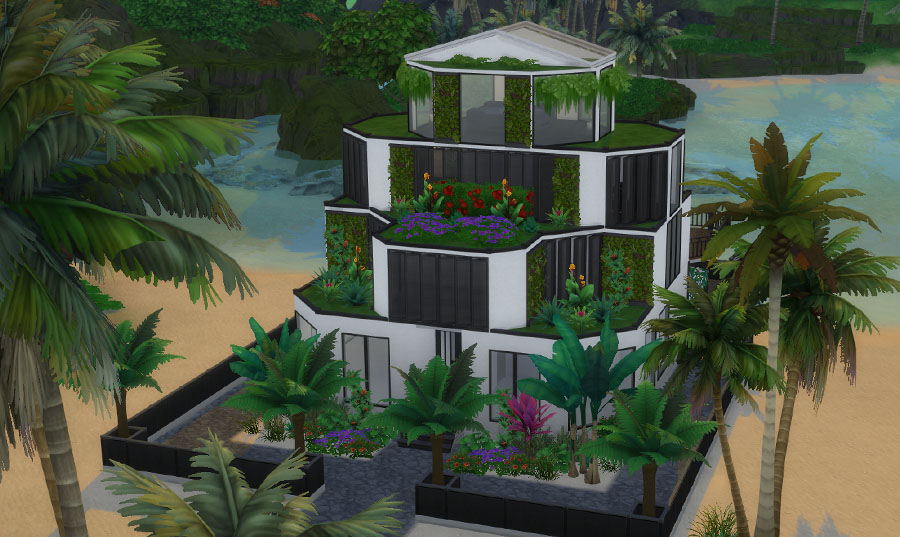 Well… kinda… mostly finished… I still have more landscaping, the goal is to fill up those grass patches on the outsides with tropical plants! I also have quite a bit more decorating to do; however, all the basics are complete.
 And of course, any and all CC I use is from TSR. I am working on my clutter game. It is a struggle bus as I am a minimalist and a neat freak so clutter is hard. LOL
Summary

My goals from here are to keep chugging along and get to the point where I can actually post something publicly here. You know something decent that others would enjoy. So where do I go from here? Keep practicing and keep learning, definitely going to try to challenge myself to create things not so standard and basic so that I can learn more. I feel like I definitely have a long way to go with learning to build in the Sims 4, but I have gotten MUCH better.
Keep up with more Sims stuff and what I’m up to at @TSR Jezi
A special thank you to Nate and Fredbrenny for all their assistance! I have loads of great building and decorating tips now! 🙂












 Limited Time Offer
 For a limited time only, we’re giving away a free


