

 Sign In


Room Reno #94: Life’s a Beach
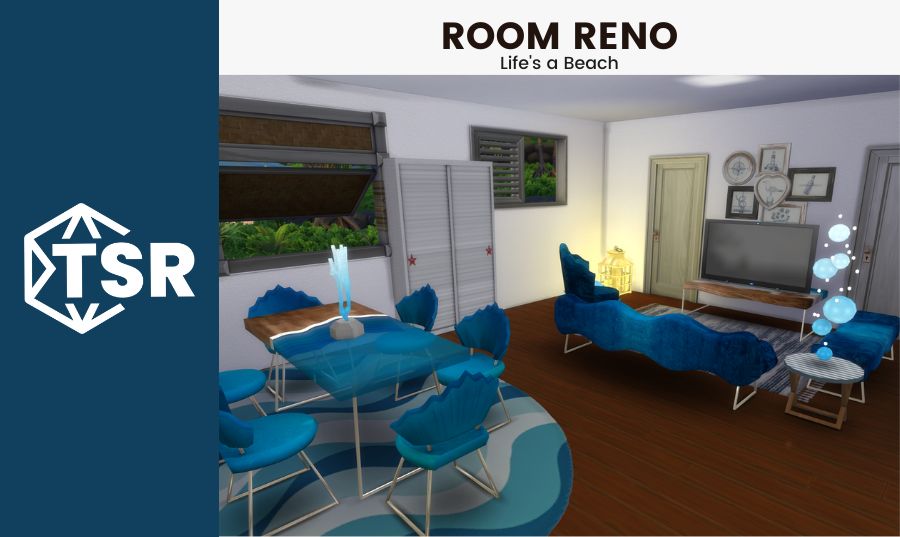
Welcome back to Room Reno #94 here at The Sims Resource! Today we’re helping a Sim who wants to turn her bland living room into a beachy oasis using the brand new Life’s a Beach collab! Let’s meet the Sim we’re helping.
Meet Shayla!

Shayla is a beach loving Sim who recently moved to Sulani to try and maximize her time on the beach when she’s not busy working at the vet clinic. She loves all things beach, surf, and sand, and she wants her space to reflect that since she lives a few blocks away from the water itself and can’t use the view as part of her decor to remind her of her favorite place. Her new home is on the smaller side and is mostly open concept, and while the former owner left some furniture for her to use, she found it a little too empty to really feel at home and comfortable when she first got there. She wants to make the room feel beachy and homey – no amount of beach is too much for her! (Much like Ken, her job could be beach). Let’s see what we’re working with!
The Before

This before is… not bad, objectively, but very empty. Shayla was not kidding when she pointed out how sparse the furniture that was left in the space for her made it look. Just a single dining table, with only two chairs (slotted into the center instead of on the side slots!) instead of the four that would usually go with a table, and the barebones kitchen with the trash can that Shayla brought along with her. The room has pretty good bones and is mostly square other than the kitchen, though Shayla said she’s not opposed to closing that area off and making the room completely square to help the living and dining room become a more defined space and to help the flow of the room in general.
Decorating around the door and window placements may also be a bit of a challenge. The front door is just fine, but the fact that there are two doors in the middle of the living room wall and one in the middle of the wall near the kitchen creates a few obstacles when it comes to furniture placement for Sim routing (you know how easily they can get stuck walking around furniture, even if they should be able to route without issues) as well as wall decorations, so it looks like there are going to be mostly small wall pieces to decorate around all the doors (and the windows on the several exterior walls). With all that in mind, let’s get planning!
The Planning

This layout takes aspects of the previous room (literally just putting the dining area in the same spot) and otherwise adds more to the space. Not that that would be too hard, since there was basically nothing there to begin with other than the dining table! That table has been removed, and will be replaced with something a little more on theme to suit what Shayla is thinking of. I will be adding a wall on the right, extending the side wall and creating more space for decorations as well as creating a more defined separation of the spaces. Open concept can be great in some cases, but in this home it made more sense to divide the rooms up a bit more so that each space feels more complete individually rather than having so much extra floating space in the in between areas.
A TV will fit perfectly between both doors on the wall across from the front door, making as much use of that space as possible (though when building your own homes, I highly recommend figuring out door placement that doesn’t cut off the middle of a room or any important spaces). A couch and more seating will complete the TV area, likely without a coffee table as that would break up the flow of how the Sims would be able to walk to enter the rooms through the doors on both sides. Finally, lots of nautical and beach themed decorations will complete the room’s aesthetic. Let’s get beachy building!
The After


This room turned out amazing! All the new objects created for the Life’s A Beach collab really brought the room together in a perfectly beachy way without feeling too stereotypical or cookie cutter. I absolutely love the way that all of the furniture fades into the blue ombre in different ways – the way the dining table goes from see-through blue to dark to white to solid wood is really incredible and looks great in the game! The seashell shaped chairs feel very The Little Mermaid inspired, as does the amazing bubble lamp over on the side table by the TV (which would be amazing to find in real life!).
A matching light can be seen on the dining table, this time shaped like coral – if you ever want to switch up what you would normally place on a dining room table, go for a small decorative lamp (bonus: in The Sims, you don’t have to worry about plugging it in). The walls are painted completely white, as are the doors, helping the furniture to pop out against the background. I added a white armoire for general storage in between the two windows on the left walls so that Shayla has a spot to put her household clutter (that isn’t aesthetic enough to be used as decorations ;)). The couch, matching chair, and matching bench are a great set even when used without the coordinating dining set, as that blue ombre is just beautiful to look at in any type of furniture.
Thanks for checking out Room Reno #94! If you liked this blog, check out Room Reno #92: Indoor/Outdoor or our Barbie movie inspired lookbook. Looking for something else? Read about summer CC looks for the whole family or check out our Gilmore Girls inspired lookbook! Have a great day 😎












 Limited Time Offer
 For a limited time only, we’re giving away a free


