

 Sign In


terriecason - Sim Pack Install Instructions
Published Jul 6, 2011
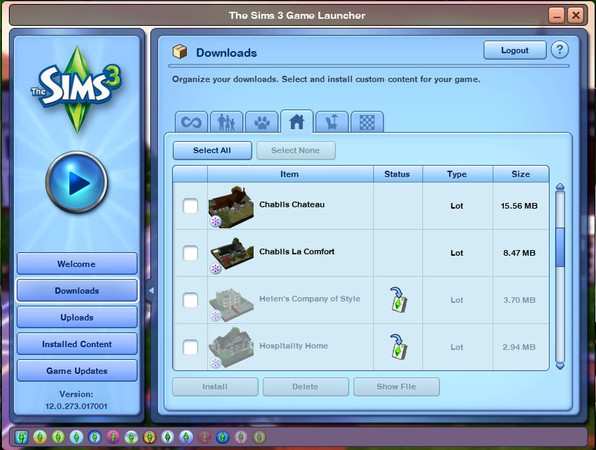


Screenshot of EA's Download Manager (The Launcher) that indicates when a package is installed and when it's not installed. The items that have been installed are those that appear transpartent like the two lots, Helen's Company of Style and Hospitality Home, shown on this screenshot. Items that have not been installed will NOT be transparent such as the two lots, Chablis Chateau and Chablis La Comfort, in the image shown. Sometimes clicking the items repeatedly will ultimately install the item correctly but then there are always custom content that no matter how many times you click on the item it will not install through the launcher. An alternate way to install creations onto your game is by creating a Mods folder in the following area: My Documents/Electronic Arts/The Sims 3 Inside the Mods folder you will need to create a second folder and title it Packages. Also, you have to place a file called Resource.cfg inside your Mods folder so that the game recognizes custom content. You can get the resource.cfg file from here: http://simpedia.sims2cri.com/Resource.cfg_eng If you've done this correctly you should have one folder (Packages) and one file (Resource.cfg) inside your Mods folder. Once this is completed, obtain a program from Mod The Sims called Delphy's Sims 3 Pack Multi-Extracter which is found here: http://www.modthesims.info/d/364038 This program will extract the .package file (will be a white paper looking file) from your .simpack file (the blue file). When the .package file (the white paper looking file)* is extracted, place the file inside the Package folder you created. After doing this start your game and the creation should be available for use. Please note: When using the Sims 3 Pack Multi-Extracter it is highly advised that you check the box below that will remame the file you'll need to place in your Packgages folder with the same name that it had under the original file (the blue .simpack file). Doing this makes it easier for you to identify which file you'll need to place in your Packages folder as on occassion multiple files (the white paper looking file) could be extracted from one .simpack file (the blue file). I have included an image that shows where the box is located on the 'terriecason - Sims 3 Pack Multi-Extracter Box' screenshot.
Other Screenshots














 Limited Time Offer
 For a limited time only, we’re giving away a free


