

 Sign In


Room Reno #82: Infant Play Area
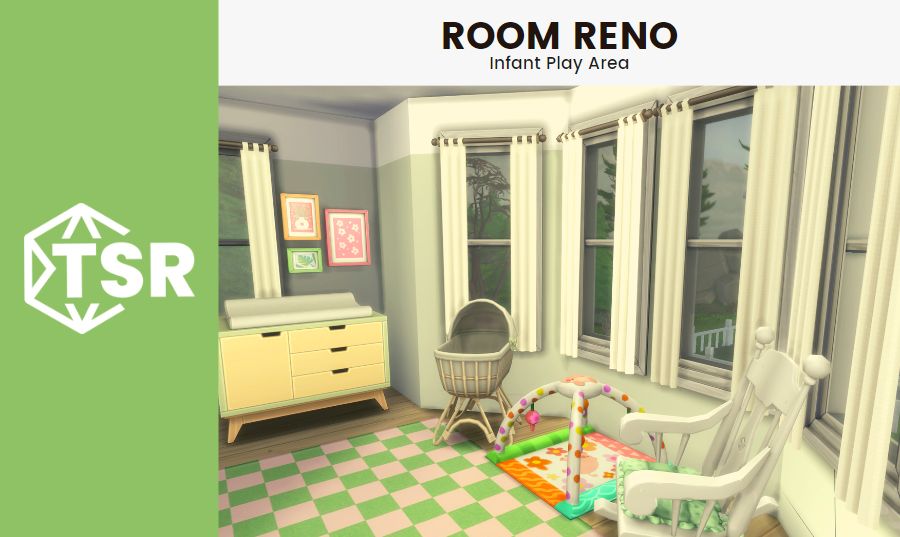
Welcome back to Room Reno #82 here at The Sims Resource! Today we’re helping a Sim who wants to redo her upstairs landing to be a play area for her infant daughter. Let’s meet the Sims we’re helping!
Meet the Ellisons!

The Ellison family live in San Sequoia and absolutely love it! They think their Pacific Northwest inspired city is the best city in the world (as soon as I saw the map I thought of Portland, OR–glad my thoughts were right on the money with the inspiration!). Marie Ellison and her husband Dan Ellison are raising their two daughters, Melody and Maya.
Melody is a rambunctious child Sim who loves to run around and get into trouble, and her little sister Maya is an infant who’s very sweet and social. Let’s get excited for the new infant life stage! I haven’t had time to play with it a lot, but even just playing with CAS I can tell it’s absolutely adorable. I can’t wait to download some infant CC to customize their little onesies and other outfits! In the meantime, Marie needs some customization for her office area so that Maya has somewhere to play where her mother can also keep an eye on her. Let’s see what we’re working with!
The Before

This is a really cute office space! Other than obviously needing a baby gate (if we got usable baby gates in the new pack that I haven’t found yet I will totally freak out from excitement), it’s a very simple and functional area for Marie to work in, but she wants to make it into a space for Maya since they recently expanded the house and she now has her own office. There’s space for pretty much everything Maya needs out here, from a changing table to a crib, along with lots and lots of toys! The one issue is that because the room is a ‘bonus’ or hallway room, it has a very strange shape that can make it hard to furnish very easily.
I highly recommend leaving in hallway rooms when you build your Sims houses, especially if they have multiple floors. Landing spaces are usually big enough for some extra furniture and can be totally useful, which is something I picked up on when I was building a lot of tiny homes that had multiple floors. Obviously in real life you would need a baby gate or another way to block the stairs to keep babies (and some pets) safe, but in-game they are perfectly safe and usable for all Sims! This landing area has the benefit of lots of windows, too, which means plenty of natural light to work with. Let’s get planning!
The Planning

Planning my rooms from above is the most helpful way that I have found to work on these rooms made up of weird shapes, like hallways. You can see all the bumpouts and cut ins so you better understand where to place your biggest pieces. I highly recommend placing the largest pieces first and then working from there in builds and rooms of any size. It’s significantly easier and means that you won’t spend your entire time building placing and replacing smaller items when you realize that the largest object you want to put in the room won’t actually fit in the current configuration. It saves a ton of time and headache, and I am all for making my Sims building easier and less stressful! It should be fun and relaxing most of the time (though sometimes it’s going to be hard, especially if micro homes are involved).
With this in mind, I placed the changing table first in the nook across from the stairs. I scoped it out as a good spot earlier because the desk had been placed there originally. Another great renovation tip: look where things are originally! Sometimes the placement turns out to be really useful for whatever renovation you’re working on. After the changing table, I placed the crib, which will sit at a slight angle up against the window, and the rocking chair, which will be flush against the other angled window. Finally, a bookshelf for Maya’s story books and toy storage will go on the wall near the bedroom doors. Let’s get building!
The After


This play area turned out so cute! Which is the point of a kids’ play area, to be fair. I’m really happy I went with a lot of bright colors and pastels to make the space feel welcoming for little ones like Maya and her sister while not being too bright or overwhelming for their parents Marie and Dan. I really like the new changing table options that came with the expansion pack, and I know a lot of people will be very excited to have them in their games (finally) after missing them from Sims 3 so I knew I had to add one into this build. I love all the swatches that they come in, too! They match the preexisting toddler furniture and I really love that my rooms for little ones can be color-coordinated like they were bought in a set just like the furniture for adults.
I used a few pieces from the Pastel Pop kit in this renovation, proving to me that that kit is one of my all time favorites. You can check out my review of it here if you’re interested in hearing more! I didn’t want to go too grown up or chic with this space since it’s really a space for little Maya, but I think I did a pretty good job of balancing the infant’s needs while not making the hallway totally baby themed (If you take out the baby furniture, it would be a great office space again! Multi-functional!).
Thanks for checking out Room Reno #82! If you liked this blog, check out Room Reno #81: Vintage Kitchen or our Gilmore Girls inspired lookbook. Looking for something else? Read about all the best Vanilla Girl CC or check out our Gossip Girl inspired lookbook! Have a great day 😎












 Limited Time Offer
 For a limited time only, we’re giving away a free


